#carpentry #cad #3dprinting

Wondering if anyone uses CAD to design furniture they want to build.

Hubby is a really good carpenter, and we need more specific furniture after a move to a house where the old furniture didn't fit.

Is there a CAD program out there that can print to paper with measurements. eg. for each unique part of the build?

And - probably dreaming here - also prints out an overview of parts showing how many of each is needed for the build?

Subscriptions are out.

@MaryPot have a look at "sketch up". I used it for just that. It has changed allot so I'm not sure about the features but it might be what you want :)

@OldZean

I did. Dave suggested it. Minimum USD 55 subscription. We are trying to avoid having to lock into subscriptions.

@MaryPot oof. That's new :( they used to have a very good free version. I'm sorry

@OldZean

They do have a free version, but you have to prove that you are working in primary or secondary education.

@MaryPot
#FreeCAD is a popular open source CAD system that you'll find a lot of info on the web/youtube.

@ianp5a

Open source ftw. Looks very promising when I see this among the illustrations on their page!

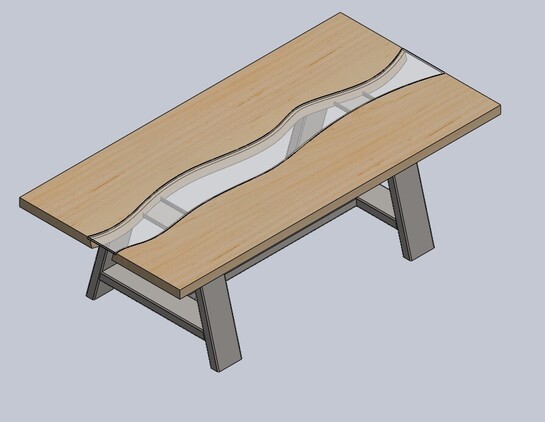
@MaryPot Sounds like the automatic cut list function in SolidWorks. That’s designed around metal weldments, but I suspect it could be converted for woodworking.

@aardvarksagus

They don't even have a quick link to prices of anything. Call us and ask for an offer?

We have a budget that does not like us having subscriptions or buying way expensive software that we may or may not find useful. I bet they have a cloud save only too. To proprietary for me. But thanks for the tip! Table looks great .

@MaryPot Definitely not cloud save only, though I suspect the price is beyond your budget (if you’re even talking budget, I bet it’s too much). I’m only using it because I have it through school. I’m trying to get some education and certification in CAD/CAM.

@aardvarksagus

Smart choice! I bet there will be some really cool (and some really boring) jobs going in that field for years to come!

Yeah - definitely trying to be careful with money. Splurging on the printer. Trying to be restrictive on everything else.

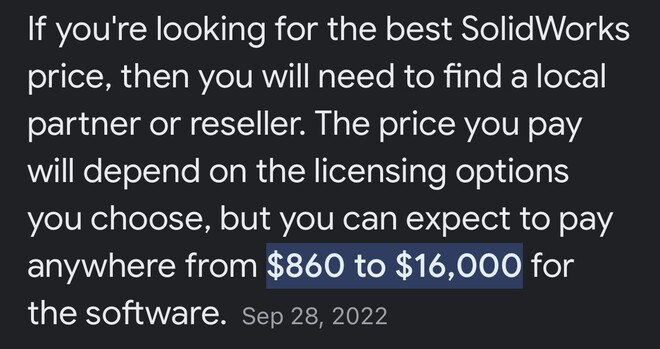
@MaryPot Best answer I could find online.

@aardvarksagus

As I suspected. Not even cheap for businesses if that is a monthly fee!

@MaryPot I haven't used it but I think #freecad has a workbench that will do it. Hopefully someone who knows more will chime in.

@in3dca @MaryPot yes #freecad with the #a2plus workbench is pretty intuitive to design furniture.

I'm a newbie at both CAD and #woodworking, here's some info on what I used to get started: https://shom.dev/posts/20221019_foss-woodworking/

Happy to answer any questions and point to other resources.

FOSS Woodworking

I built a small table this weekend and realized that the thing I desperately need if I’m going to build more stuff is a workbench. There are a TON of workbench options to pick from, which is great. But, I didn’t want to get into picking and choosing dimensions and features on the fly, that was asking for a disaster. So I decided to take the plunge and learn FreeCAD. There are excellent YouTube videos targeted at “FreeCAD for Woodworkers” which was a delightful surprise.

@shom @in3dca

Thanks very much!

For me, a potter and creative more than systematic, it seems really too much work, but, for an engineer, this might be just the thing!

Have sent hubby the video and the website, and he will be taking a look at it.

@MaryPot @shom All CAD software has a pretty steep learning curve. Even more fun there's always multiple ways to get to the same result, so everyone has their own style. There is a ton of good content on YouTube to help him through it.

For the sorts of forms you work with, check out Blender (https://blender.org). It too has an intimidating initial impression, but when I want something that is more organic, it's the tool of choice.

#FreeCAD #Blender

Blender - The Free and Open Source 3D Creation Software — blender.org

The Freedom to Create

Blender

@in3dca @shom

We have both used drawing/photo software in the past, so the jump isn't as high - just need to learn the symbols and terminology. I'm a potter and he's a carpenter - so thinking 3D isn't a stretch either. Just need to figure out how to input it into the computer. 🙂

@in3dca @shom

Love me some open source!

This is the first program I have seen that I actually want to download and really try out. Thank you!

@MaryPot nice, go high quality #foss! For furniture using #freeCAD as a parametric modeling is great for changing dimensions easily to visualize how things would fit. The tutorials from @MangojellySolutions and @chrishuck are fantastic!

@in3dca