⚠️ WARNING! ⚠️

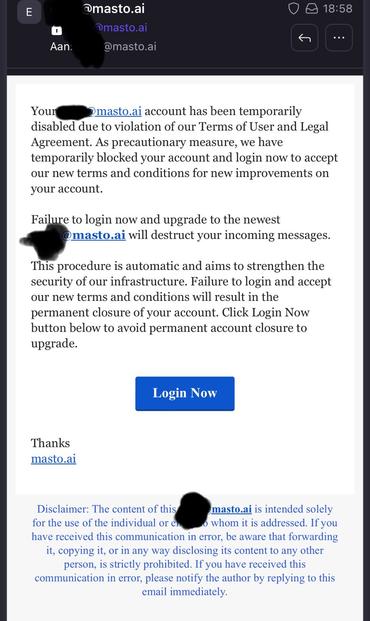
I just received this email in a catch-all that was addressed to a user. Mastodon does NOT send such mails and this leads to a malicious login page!

Please make sure you are on the correct instance URL before logging in!

Also make sure the emails are send from the instance you are on! Often this email can be found on the /about page

#Mastodon

@stux What’s the “real” email address behind the spoof? It can be reported so it sends this stuff directly to junk for people.
@Fez @stux wdym reported? email has no reporting…
@pjals Most established email providers have a reputation to uphold and their emails getting classified as spam hurts them greatly. If you find the provider then you can report that this user is using their service for illicit activities.


@stux
@pjals @Fez @stux Check the from, and forward to abuse@ -- this is still a thing. and gets spammers suspended. It's not a YOU WILL NEVER HAVE AN ACCOUNT AGAIN like it was back when, but it slows them down.
@equinox_deschanel @Fez @stux what if the email hosting has no abuse@? or the spammer self-hosts a .com?
@pjals @Fez @stux Then you’re out of luck, but forwarding to abuse@ is better than nothing.
@pjals If you self host your email, it’s going to be sent to spam on 99% of email providers. That’s why you set up an email with a reputable provider then use your custom domain through them.


@stux @equinox_deschanel
@Fez @stux I've gotten this phish before claiming to be related to both MS365 and Google's offering.
@stux that scam is a new, but yeah I've been getting emails to users @ my mastodon instance since years, they looks like emails so scrappers eat them :/
@stux Some people are very lousy.
@stux
Not surprised, just hope folks doesn't fall for it.
@stux Thanks for the warning!
@stux definitely see this as success for #Mastodon in general, and your instance specifically @stux . Now to make sure people aren't filled by these phishing expeditions.
@stux Incoming message will be destruct! All your base are belong to us.💣
@stux Mental note: Never click links in emails. No, never click anything.
@spitecho @stux Friends don't let friends click. Interactive interfaces are bad! Sensible, serious, security-aware users submit batch jobs on punched card decks and wait for the results of the overnight run to arrive in the post the next day.
@spitecho @stux a good password manager (such as 1Password) will flag this before you’re owned
@stux A good case for using a password manager with autofill. It won't autofill if the URL is wrong.
@stux thank you! Not on your instance but I boosted 'cause it could be an issue across the board! appreciate the warning.
@stux thanks for posting this. Scammers are everywhere.
@stux Moderation decisions are usually written on your page (either here, or on your main instance), so if I read this one, I would know that this is, indeed, a phishing attempt. But thanks for spotlighting these attempts anyway.

@stux
In this context, I cannot recommend Google's phishing quiz highly enough: https://phishingquiz.withgoogle.com/

Identifying phishing emails is comparatively simple (unless it's well done spear phishing) using the methods taught in the tutorial.
@fulelo

Take Jigsaw's Phishing Quiz

Can you spot when you're being phished?

@stux jokes on them, I never read my emails.
@stux I always run emails like this through SPAMCOP and the headers almost always point to somewhere OTHER than the site the email says it is. Those emails get reported as Phishing SPAM to the ISP and the site being phished.
@stux Thanks for publicizing this.
@stux Tip: Disable incoming email on your server (incl. blocking port 25) and use a 3rd party email provider for admin tasks. Notifications@ emails are sent with transactional mail anyway.
@joenepraat I do!  Proton for incoming and MG for outgoing

@stux thanks for the heads up. I for one would be so concerned with the "destruct" of my incoming messages I would have rushed to type all my credentials 🤣🤣
@stux "distruct your incoming messages"😅
@stux can I blast this to an entire server like @infosec.exchange?
@stux they didn’t waste time moving to the new neighbourhood did they.
@stux Thanks for the ‘heads up’ on this.
@stux Hmmm
That reeks of #SpaceKaren the #ChiefTwat attacking his competition.
@stux Any #webauthn or #passkey options available or in development for #mastodon that would prevent this?
@brianpierce @stux Good news! Mastodon already supports #WebAuthn and #passkeys even. Check it out: https://infosec.exchange/@iamkale/109564985971645455
Matthew Miller :donor: (@[email protected])

Attached: 1 image @[email protected] @[email protected] Mastodon already supports #WebAuthn. Go into your settings > Account > Two-Factor Auth > Security Keys, then register whatever authenticator you want. You might have to enable OTP first though; I enabled OTP before exploring WebAuthn so I can't remember if it's possible to go only with WebAuthn for MFA.

Infosec Exchange

@stux Admins of Mastodon instances should ensure their legitimate emails and being properly DKIM signed, then publish a DMARC record with a reject policy in DNS to prevent #phishing emails from spoofing their email domain in the from address.

I wrote a blog post on how DMARC works a while back. Let me know if you have questions. I'm happy to help.

https://seanthegeek.net/459/demystifying-dmarc/

#infosec #informationsecurity #cybersecurity #mastodon #adminsofmastodon #phishing #spoofing #dkim #dmarc #email #security

Demystifying DMARC: A guide to preventing email spoofing

Learn how the SPF, DKIM, DMARC email authentication standards work together to prevent unauthorized email spoofing — and how to use open source tools to deploy DMARC for free

seanthegeek.net
@seanthegeek @stux That only works if the recipient mailserver verifies SPF, DKIM, DMARC, and other alphabet soup. While mine does, it does not dispose (to spam, sinkhole or rejection) messages based on the results. This, we believe, is best left to individual user .qmail files or equivalent. Server-side, but user-controlled.
@ellenor2000
@stux these days most consumer and commercial email providers honor DMARC policies, even if they unfortunately don't don't send DMARC reports to domain owners.
@seanthegeek @stux I have considered writing a DMARC validator and reporter, but again, my server would remain forever permissive

@ellenor2000
What server software are you using? Pretty much everything should already have the option of validating these controls.

The beauty of DMARC is that the owner of the message from domain gets to set the policy, so recipient mail servers will only enforce the policy once the domain owner declares they are ready.

@stux And so the Mastospam begins…
@egon This isn't mastodon related. I've gotten this spam before and it's a bog-standard email account phisherman.
@ellenor2000 I didn’t mean that it came from Mastodon. Just that people are starting to trick people into saying it is. One of the unfortunate side effects of growth.
@stux how exciting! The fediverse is big enough to be a phishing target!
@stux Also, click on that link and log in with fake data. Make it nearly impossible to filter out the people who have been tricked from the garbage, let them stew in a morass of bad data, hopefully triggering firewalls in the process.
@alan @stux Just striking the link may alert them that your email works. I recommend not doing that.
@ellenor2000 @stux This is true. I forget that not everyone has a unique address with a nonce for everything they sign up for. If your email is in plain text in the link, then you can copy it and mess that up too...
@stux Besides who falls for this why, if I would get such a rude mail I would not do it out of spite alone
@stux The serif font is the real giveaway.
@FutureMarkus @stux fr who the hell uses these fonts nowadays, except for aesthetic sometimes
@stux 'tis the season!! My neighbor just got scammed out of $300 in iTunes cards.

@stux this is how you know #mastodon has arrived, it's important enough to try to phish credentials for now!

#phishing #scam #StaySafeOutThere

@stux
I bin warning folks this shee-at was a-comin' our way...propts to @stux for the Early Warning Radar. And TBH some black woman journalists and intellectuals been hit with this trollery long before most...

So my main point: it is also possible for the #trolls to fake that the emais are indeed sent from the instance you are on...

AFAIK. But I am not an expert, just, a popularizer. Stux is pointing out though that there is no reason to ever receive a post like this anyway.

My question is how do the trolls figure out that a given email address matches a given account? Seems like they might have penetrated the Ocean Cloud or wherever the instances are hosted...?

@theghostoftomjoad
One can easily add another layer of, well, not really protection but awareness by using Gmail extension address. Like this:

Append "+" sign and any combination of words/numbers after your email address. For example, if your name was [email protected], you could use [email protected] to sign up to masto.ai on 31 Dec 2022.

That way, phishing becomes much harder because the address won't match the website.

@stux

@theghostoftomjoad
More details here: https://gmail.googleblog.com/2008/03/2-hidden-ways-to-get-more-from-your.html

I've found this an easy and effective way to protect myself from emails using addresses obtained by breaches. It's not a 100% protection, of course, but most regular phishers will not sanitise the email addresses they illegally obtained, so a phishing attempt of my nafo.uk account on Mastodon using, say, a muenchen.social address previously used would immediately raise a giant red flag.
@stux

2 hidden ways to get more from your Gmail address

Posted by Robby Stein, Associate Product Marketing Manager I recently discovered some little-known ways to use your Gmail address that can g...

Official Gmail Blog

@IronFist @stux

Yes assuming they did not pwn the instance passwords.txt with uid matches. Or hack the user email but that would require individualize retail work only justifiable whale spearing...