 Toad King
 Zhuowei Zhang
"Mastodon is just like email."
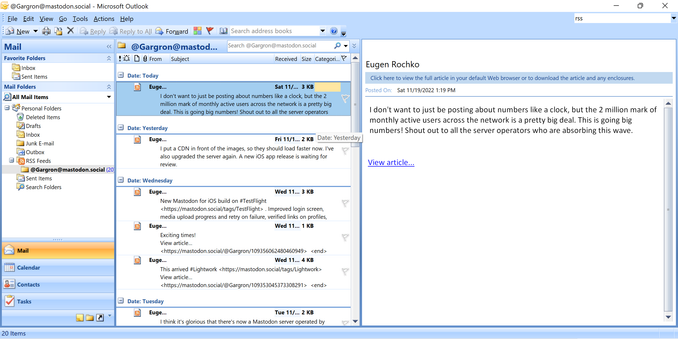
Like email? So I use Microsoft Outlook?
"Use WHAT"
(Tools -> Account Settings -> RSS Feeds -> New -> https://mastodon.social/@Gargron.rss)
Like email? So I use Microsoft Outlook?
"Use WHAT"
(Tools -> Account Settings -> RSS Feeds -> New -> https://mastodon.social/@Gargron.rss)
 n0toose
 sazanlip 🍁 #ZИНК
 GunChleoc
 Thomas Dickerson
 Lightning Bjornsson*
 the vessel of morganna
 halva
halva Fudgesicles Spinner™
 scythe
 Tyrone Slothrop
 Matija Šuklje
 Tom Bellin


 kaukamieli
 Calisti 🏳️🌈🦇 — 🪩✨ 39c3
 Severák
 Polychrome
 GuySoft
 ThaneVim
 Minnà Pandora
 Adam
Adam Oblomov
 PJ "Vote Green" Coffey
 Mihailik 🌼🌼🌼🏃🏿♀️🌼🌼🌼
 grin
grin Emil Jacobs - Collectifission
 Marcos
 leymoo (Ashley Rolfmore)
 katrina
 Ⓜ3️⃣3️⃣ 🌌
 Lunar 🛸 ♾
 Mathieu Poussin
 Andreas Steinhaus
 Comfortably Numb
 Dr. Rebecca
 Leigh Hunt
 ink and yarn
 Christopher
 JonasHeidelberg
 Myria
Myria dispatchrabbi
 Simo 🧊