"Mastodon is just like email."
Like email? So I use Microsoft Outlook?
"Use WHAT"

(Tools -> Account Settings -> RSS Feeds -> New -> https://mastodon.social/@Gargron.rss)
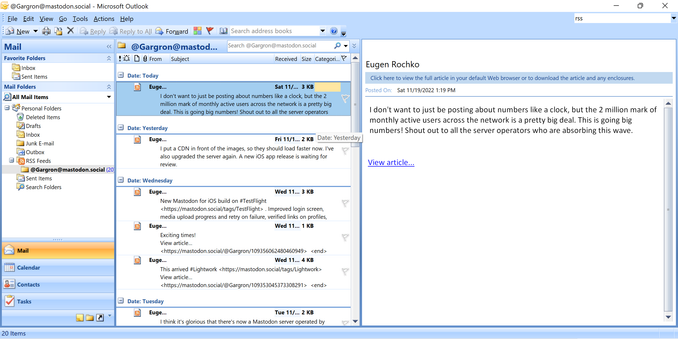
@zhuowei I've seen Mastodon in DOS, in Windows 3.11, on Commodore 64, but Outlook takes the cake.
@ygalanter @zhuowei really? I hate to ask how this works because I donโ€™t think Iโ€™d get it - anyone want to explain it like Iโ€™m 5.
@RebeccaPRN @ygalanter Mastodon exports each account's most recent posts as an RSS feed, and Outlook supports reading RSS feeds: https://mstdn.social/@feditips/108357998963885456
FediTips has moved! (@[email protected])

RSS fans! You can follow any Mastodon account via RSS by just adding ".rss" to the end of the account's public profile URL. To find a user's public profile URL, click on their profile image within Mastodon. For example, if you click on FediTips' profile image you get this page in a new tab: https://mstdn.social/@feditips So, to follow FediTips through RSS, use this address: https://mstdn.social/@feditips.rss This will only show that account's public posts. Other posts will not be visible on the RSS feed. #RSS #MastoTips #FediTips #Mastodon

Mastodon ๐Ÿ˜
@RebeccaPRN @ygalanter @zhuowei this 15 year old video explaining RSS in plain English is still surprisingly relevant! :-) https://www.youtube.com/watch?v=0klgLsSxGsU&ab_channel=CommonCraft
RSS in Plain English

YouTube
@RebeccaPRN @ygalanter @zhuowei I'll give it a shot :) RSS stands for Really Simple Syndication. It is a way of sharing information in a standardized format. RSS reader software can subscribe to an RSS feed from any site that provides it. This was the best way to keep up with blogs, when that was more of a thing. Using an RSS reader feels similar to getting emails from everything you've subscribed to. In this case, Outlook's RSS reader is subscribed to the feed of Gargron's posts on Mastodon.
@RebeccaPRN @ygalanter @zhuowei I ran out of characters - should probably also add that an RSS feed is made up of "articles," or individual pieces of content. An article might be a blog post, an image, or... a toot :)