My one-tweet Mastodon starter advice:

1. Pick a server where people are likely to post generally about stuff you're most interested in.
2. Follow interesting people on other servers, who will boost interesting stuff into your home feed. THEY are your algorithm.

@garius I ended up choosing an instance that is focused on my city because half of what I used Twitter for was proximal news, though I am strongly considering migrating to mastodon.art because honestly I just want to see cool pictures and having an uncurated stream of it under the local tab is super enticing.
@garius How does on go about finding interesting people on other servers if one cannot see what they’re tooting? 🤔
@IndrekLobus
any instance can see any federated toot (just like i saw yours from my french instance since these toots are public 😁 ), there are a few rules for messages to get federated, but you wont really notice it actually
@garius
@IndrekLobus @garius searching hashtags works pretty well

@garius Sage advice. Not knowing much about it i rolled my own, and it's definitely had something of a penalty when it comes to finding others, but I'm getting the hang of it now.

I would also add:

Follow hashtags you find interesting - new feature introduce with the 4.0 release earlier this week and it's very useful.

@garius And also look up ways to migrate to a different server, it’s pretty simple!
@garius anyone know an account that boosts good memes?
@AdmanAbou @garius Anyone how to migrate to a different server?
@adveetya @garius you just make a new account and link them in your account settings

@garius

This is true to a certain extent.

I must VERY MUCH recommend the use of Lists of people because then you can have a custom thread of people, e.g. you're on "Interesting people" because you drop good knowledge. It was only when I was wondering where you all were that I clicked on said list and was like "New Timeline!"

PJ Coffey (@[email protected])

Attached: 2 images · Content warning: Lists: Making Custom Timelines by interest, an illustrated guide.

mastodon.ie
@Homebrewandhacking @garius very well done! Thank you for your time in curating & compiling such an easy and direct 'how to'- greatly appreciated!
@Homebrewandhacking @garius how do you create lists?

@ozgrrl09 @garius

I made a thread with pictures and put it in answer to the excited list comment.

@Homebrewandhacking @garius Yep, and make one of your lists the Mods on your server, so if you suspect things are going a bit tits up you can check their posts easily to see if they've updated about any issues.
@garius ah. Failed at the first hurdle. I set up my own server & there’s only me & 2 other tooters on there 🤪😝😜
@michellelaverick tbh i may do that at some point! 😆
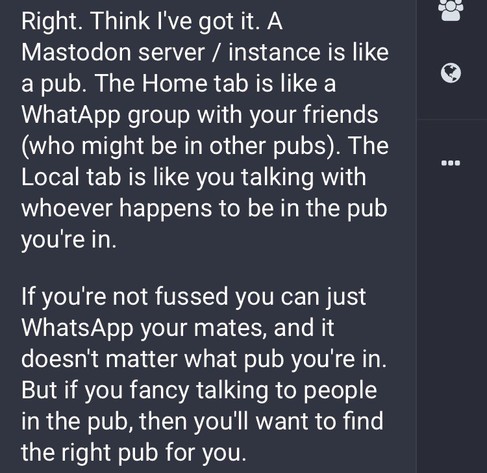
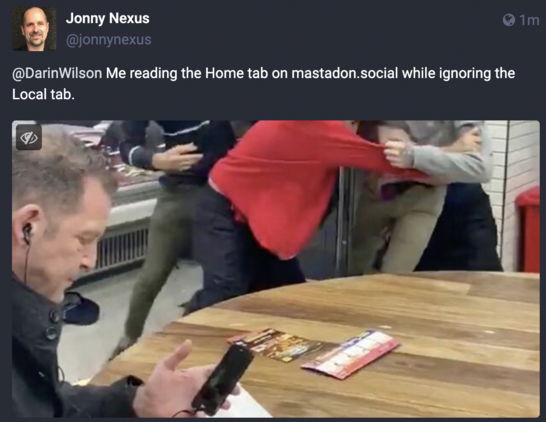
@garius My attempt at an analogy for this was choosing a pub from which you will WhatsApp your friends. https://mastodon.social/@jonnynexus/109356022858070828
@jonnynexus
I love the pub analogy "Local" 🙂
@AH_99 You know I hadn't even realised that! (That the Local tab is therefore analogous to "going down my local"). :)
@jonnynexus
It does, especially when the server admins are the landlords (cafe owners) and will bar people that step out of line 🙂
@AH_99 At the moment, I'm on the default, mastadon.social. (Which some people say isn't so great, and I confess I don't bother reading Local).
@garius I ended up creating a server for my family and friends and named it after my cat. It’s surprisingly pleasant doing this.
@garius I don't get the server thing at all. The app doesn't let me view my server specifically or even info about it, and the magnifying glass shows people from all servers so... Where's my server? What was the point of picking one? I can see stuff from all, people from all. I don't see the restriction of choosing one.
@meowlygrowly @garius if you are using the official app, go to magnifying glass and then "community." That should be your local feed. Other apps make this easier to find.
@mburtonkelly @meowlygrowly @garius and how do i find other servers! ? so confused… 
@padmapriyadvl it's OK to be confused! What do you mean by "find other servers"? Finding people to follow on other servers, or finding a list of other servers?
@mburtonkelly hey matt so i see some friends of mine on other spaces (servers?) and i don’t know how to follow them. so just wondering how this works. rest i am getting a hang off :))

@padmapriyadvl
If you know their address (@[email protected]), you can paste that full thing into the search. They should pop up.

Once you can see a person's profile, there should be a "Follow" button you can hit.

For example, if you go to my profile @mburtonkelly, you can click follow. <--This link might just show up as @mburtonkelly instead of @ mburtonkelly @ scholar.social (spaces added).

@mburtonkelly ah yes! that worker! thanks a lot :)
@padmapriyadvl @mburtonkelly @garius I don't think you have to worry about servers unless you're making a new account on one. If you want to follow people I guess you just search hashtags for people. I'm honing my own follows from all kinds of servers but have yet to see a single person on my own (on the Android app).
@mburtonkelly @garius local feed of people I follow from all servers, not my local server. Unless mine is just pretty much empty. I think your server is under the community tab in the magnifying glass.

@meowlygrowly I highly recommend using an app that isn't the official one. Tusky for Android and Metatext for iOS are good ones. They make it easier to switch between home, local, and federated timelines.

I *think* the tab to the right of "Community" in the official app is the federated timeline.

@meowlygrowly @garius
If you click on "Local" that's just the folks on your server. At least that's how it works on the desktop app and on Metatext. The Mastodon app doesn't seem to have that feature?
@shaktinah @garius from what I can tell, home 🏠 symbol is people I follow. The magnifying glass has Posts | Hashtags | Community | News | For You. My suspicion is that community is my server 🤔 I'll use the browser version when I'm at my computer next and check that out. Thanks!

@garius For me, there are 2 problems with step 1.

First, I'm interested in a very wide range of stuff, and that range is ever widening.

Second, just because I like stuff, it doesn't follow that I want to join a community of people who talk about nothing but that stuff day and night. In fact, quite the opposite.

Is there a server for people like me? If so, I imagine it's called mastodon.eclectic or something.

Also, doesn't this reinforce the creation of internet bubbles?

@eribosot @garius you’ve summed up my apprehensions perfectly 👏🏼
@eribosot @garius I'm the same way. I suspect the more "general" ones that are dot social, would be good for that... But I don't know.

@garius can I change servers?

What's the sweet spot for server size and number of servers?

@garius

The fact I saw this because @davidallengreen reblogged it says it all!

@garius Ive signed up for 3 different servers at this point, and they all seem to be either general, geography based, or specific, VERY specific niches. I hope this expands over time, or otherwise I don't see the point unless you want to box out the crowd intentionally.

@garius
Yes.

It also doesn't matter much which server you start on, because if enough of the people you followed on twitter have mastodon accounts, you can follow them and build your list of interesting people regardless of where they are.

Partly why I picked a geographically-based server, to keep it simple.

Am I on the right Mastodon instance? - Mathew Lowry - Medium

I paid almost no attention to which Mastodon instance I joined a week or two ago — after all it doesn’t matter ‘cos it’s federated, right? As far as I can work out, quite a bit: the other users on…

Medium
@garius How dies one switch servers?
@garius , newcomers don’t know where others will post stuff they’re interested in.
@garius How do you switch/follow people on other servers?
@garius
Well said. For example there's no need to follow major accounts because if you follow a couple of people with similar interests, those accounts will be boosted into your feed in no time.
@garius I'm not sure how this platform works yet.....I guess I will have to poke around.
@garius Thanks for the advice! Can you change servers once you're on?
@travisthespacedad yes. your followers will come with you (so to speak). but your posts won't.
@garius I wanted to join a server focusing on democracy. (I'm in favor. 😀 ), but democracy.town is closed to new sign ups. Any suggestions?
@garius
Good tip thanks John