I'm looking into some #automation on #ubuntu #gnome desktop. I figured I'd be able to do everything using #dbus.
It works great for media control but not so much for virtual desktop / window management. I can use #wmctrl to nativate between virtual desktops but window management doesn't work on #wayland. Then there is #ydotool which also doesn't seem to work well.

Now I can
- Control media via dbus
- Switch workspaces via wmctrl

But I feel there has to be a better way?

#csharp

Cómo evitar que xss-lock bloquee la pantalla cuando una aplicación está a pantalla completa

xss-lock es un programa que gestiona el bloqueo de pantalla cuando el equipo está inactivo. xss-lock cumple esta tarea llamando a un bloqueador de pantalla externo, y comunicándose con el login manager que define el tiempo de inactividad antes de bloquear la pantalla y conecta con la sesión para salir del bloqueo.

Yo uso xss-lock para gestionar el bloqueo de pantalla en i3wm. xss-lock funciona estupendamente sin mucha configuración excepto cuando hay una aplicación a pantalla completa. En este caso bloquea la pantalla considerando que hay inactividad. Esto es especialmente molesto cuando estoy viendo una película: cada 5 minutos tengo que mover el ratón o se activa el bloqueo.

Para evitarlo he añadido un pequeño script de bash que monitoriza con wmctrl si hay alguna aplicación corriendo a pantalla completa. Si es así, pausa xss-lock con pkill. Cuando se sale del modo pantalla completa, el script reactiva xss-lock.

https://voragine.net/linux/xss-lock-bloqueo-aplicacion-pantalla-completa

xss-lock(1) — Arch manual pages

@aral @gunstick No proper #xdotool replacement is the part that annoys me most about #wayland. I've heard that #wmctrl is somewhat usable, but even if it worked, it's not really a viabe replacement. There is something called #wlrctl that I've not looked much into yet. My first impression, just from the manpage, does not have me very eager to investigate further.

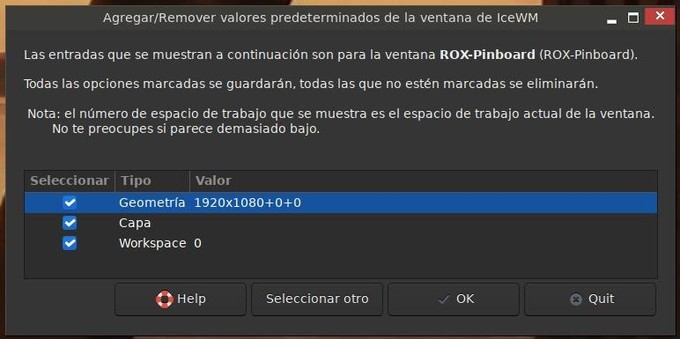
icewm-remember-settings:

GUI para gestionar y que "recuerde" el tamaño y posición de cualquier ventana en icewm (escrito en bash, aparece en la versión 23.1 de antix. es compatible con versiones anteriores de antix).

#antix #icewm #GUI #bash #yad #wmctrl #icesh

la entrada en mi blog: https://drcalambre.blogspot.com/2024/04/icewm-remember-settings.html

icewm-remember-settings

Dr Calambre: Un blog sobre GNU/Linux y cicloturismo. Patagonia Argentina

Can _anyone_ shed some light on this weird behaviour of #wmctrl on #Wayland / #XWayland / #Gnome where I usually have to execute this snippet twice?

> wmctrl -x -r code.Code -e 0,0,0,5760,1200

First time it will just move the window to the central screen (triple head setup 🖥️🖥️🖥️) _and maximize_ it.

From there I have to drag it over to the left and execute again before this eventually works and I get my editor over all 3 screens.

I'm totally lost what in this chain of wm magic causes this.

Got #gnome setup this weekend. Giving it #Forge a shot which is a new, simple tilling window manager:

https://github.com/forge-ext/forge

I've tried material-shell before but it didn't work well for me for whatever reason and Forge while more simple feels more stable.

For further customization I used #wmctrl which allows more scripting options and for drop down terminal I used #trdrop. For system control I can't get away from brilliant #rofi and it's ecosystem (#rofimoji, #greenclip).

GitHub - forge-ext/forge: Forge - Tiling and Window Manager for Gnome-Shell

Forge - Tiling and Window Manager for Gnome-Shell. Contribute to forge-ext/forge development by creating an account on GitHub.

GitHub

@bofh1337 So until then a wmctrl script OUGHT to help here.
Except - using #wmctrl to report on windows it shows me where they are, nicely. X, Y, Geometry.
Now, using wmctrl again to set the window property to that - it is wrong. 😡 🤬 X seems to be wrong by around 40 points, width around 15 to 20.

Useless. 😢

Boah, I do hate computer.

Discovering that wmctrl is a REALLY useful tool to have on X11 and works great on elementary OS/GNOME.

Examples:

See list of all current windows with their geometry:

wmctrl -l -G

Move a window with the class name org.small_tech.comet to position (100,100) and size it to its minimum size:

wmctrl -x -r org.small_tech.comet -e 0,100,100,0,0

Show the desktop (hide all apps):

wmctrl -k on

Learn more: https://www.freedesktop.org/wiki/Software/wmctrl/

#linux #wmctrl #WindowManager #cli #x11

wmctrl

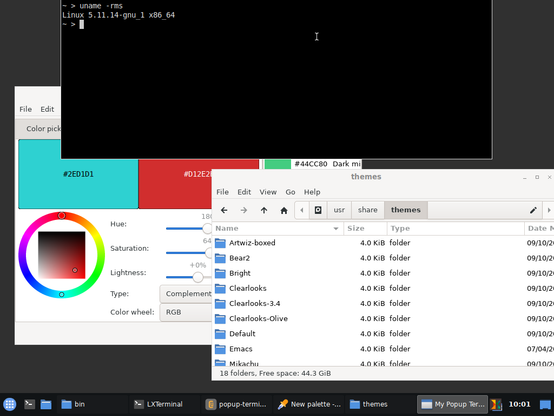
Turn any terminal emulator into a popup terminal, with the power of #bash, #xdotool and #wmctrl! 💪 🖥️

➡️ https://notabug.org/adnan360/code-backups/src/master/bash/popup-terminal.sh

Can be configured to use any terminal: st, lxterminal, sakura etc. on any desktop environment. Just config, map it to a key and have fun! 🎉

Width and height can be configured too. Who needs an extra popup terminal package?

Since "The Year of 🐧GNU/Linux on the Desktop" has surprisingly been postponed once more:

I want "xfce4-display-settings -m" to show up on *every* connected display when I press Meta+P, not just on my (closed) notebook in its dock 😡

The #pseudocode is easy:

for each display in connect_displays
$process = start "xfce4-display-settings -m"
move $process.window to $display.center

I have the 🔧 bits 'n' 🧩 pieces
#bash #xdotool #wmctrl #xrandr #gdk #xfce4 #python ready.

but still: welp 🥺