 Lowyat.NET
Xiaomi Debuts Watch 5, TV S Mini LED 2026 Series Globally; Priced From RM1,199 #smarttv #smartwatches #tvsminiled #watch5 #wearables #xiaomi
https://www.lowyat.net/2026/384652/xiaomi-watch-5-tv-s-mini-led-2026-series-global/
Xiaomi Debuts Watch 5, TV S Mini LED 2026 Series Globally; Priced From RM1,199 #smarttv #smartwatches #tvsminiled #watch5 #wearables #xiaomi
https://www.lowyat.net/2026/384652/xiaomi-watch-5-tv-s-mini-led-2026-series-global/
Xiaomi Watch 5 Czech Price Leaks; Much Higher Than China #smartwatches #watch5 #xiaomi
https://www.lowyat.net/2026/383264/xiaomi-watch-5-czech-price-leaks-higher-than-china/
Xiaomi Watch 5 Officially Debuts In China With EMG Sensor #smartwatches #watch5 #wearables #xiaomi
https://www.lowyat.net/2025/377153/xiaomi-watch-5-officially-debuts-in-china/
One UI 8 Watch for the Galaxy Watch4 released!
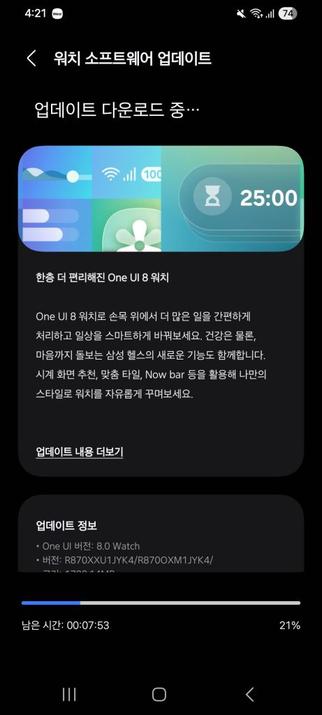
Today, Samsung has released One UI 8 Watch for the Galaxy Watch4 series, starting from Korea, which means that regular users can now download the stable version of One UI 8 Watch. This was a very long wait after the release of the stable version of One UI 8 Watch back in July for the Galaxy Watch8 and Watch Ultra.
The USA will have to wait a bit longer, as we haven’t seen any update regarding the closure of the beta program there yet. If you’re on a cellular network, you may have to wait a bit longer.
You can identify the stable release with the JYK4 version as the build version for your Galaxy Watch4.
You can now update your smartwatch, but if you still didn’t receive any update, you’ll have to wait for a few days as this rollout is a gradual rollout that starts from Korea. You can periodically check for updates to see if this update has reached your device. We recommend that you update your watch manager in your phone to ensure compatibility with the latest software.
To update your watch, follow these steps:
In an event that something went wrong with copying the update, disconnect your phone from your watch by turning Bluetooth off or by disconnecting it through Galaxy Wearable, then try again from your watch. Make sure to turn Wi-Fi on in your watch to download the update faster.
Make sure that both your phone and your watch are charged before performing the update, and that your internet connection is stable. Never interrupt the update process, or there could be problems later. The update process may take a few minutes to finish, and if it appears to be stuck, just wait for more minutes.
#Android #GalaxyWatch5 #news #oneUi #Samsung #SamsungGalaxyWatch5 #smartwatch #Smartwatches #Tech #Technology #update #Watch5
Huawei Announces Maxis eSIM For Watch 5, Watch Ultimate 2 #esim #huawei #maxis #smartwatches #watch5 #watchultimate2 #wearables
https://www.lowyat.net/2025/375162/huawei-maxis-esim-watch-5-watch-ultimate-2/
One UI 8 Watch for the Galaxy Watch5 released!
After the release of the 5th One UI 8 Watch Beta for the Watch5, Samsung was putting their final touches on the stable release for this smartwatch series. Today, Samsung has released One UI 8 Watch for the Galaxy Watch5 series, starting from Korea, which means that regular users can now download the stable version of One UI 8 Watch. This was a very long wait after the release of the stable version of One UI 8 Watch back in July for the Galaxy Watch8 and Watch Ultra.
The USA will have to wait a bit longer, as we haven’t seen any update regarding the closure of the beta program there yet. If you’re on a cellular network, you may have to wait a bit longer.
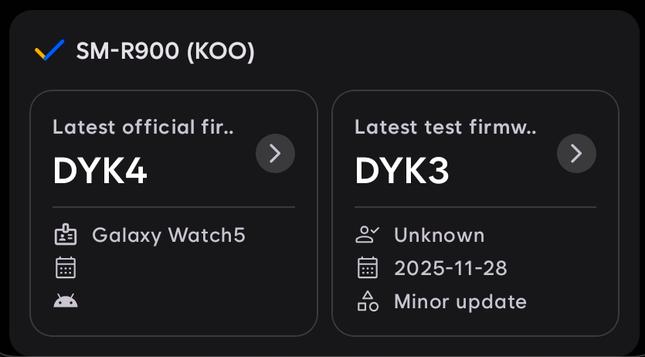
You can identify the stable release with the DYK4 version as the build version for your Galaxy Watch5.
You can now update your smartwatch, but if you still didn’t receive any update, you’ll have to wait for a few days as this rollout is a gradual rollout that starts from Korea. You can periodically check for updates to see if this update has reached your device. We recommend that you update your watch manager in your phone to ensure compatibility with the latest software.
To update your watch, follow these steps:
In an event that something went wrong with copying the update, disconnect your phone from your watch by turning Bluetooth off or by disconnecting it through Galaxy Wearable, then try again from your watch. Make sure to turn Wi-Fi on in your watch to download the update faster.
Make sure that both your phone and your watch are charged before performing the update, and that your internet connection is stable. Never interrupt the update process, or there could be problems later. The update process may take a few minutes to finish, and if it appears to be stuck, just wait for more minutes.
#android #galaxyWatch5 #news #oneUi #samsung #samsungGalaxyWatch5 #smartwatch #smartwatches #tech #technology #update #watch5

Week 47 of 2025 was big for Galaxy Watch users!
In the forty-seventh week of 2025, it was a massive storm of updates in regards to the Wear OS-based Galaxy Watch series, including the latest Galaxy Watch8 series that was released with One UI 8.0 Watch this July, in addition to the shower of security updates for the flagship phones, including the Galaxy S25 series. We have witnessed this from the start of Week 47 for this year in Korea and in other regions, though the Korean rollout was more apparent.
Included in the updates done this week were updates that were related to the entire Galaxy Watch lineup, starting from the most intriguing ones. However, we’d like to highlight the biggest event that happened in the One UI 8 Watch Beta Program as the first item in this list.
Galaxy Watch6’s One UI 8 Watch Update
First of all, the Galaxy Watch6 series in Korea has started receiving the One UI 8 update across the entire region, and the beta program ended this Wednesday, which is November 19th. Shortly after the beta program was closed, the official rollout started for users who didn’t participate in the beta program, starting from the same home country.
One day before that, the Galaxy Watch6 Manager received the November 2025 update that brought redesigns that matched the aesthetics of One UI 8, the same design that is found in your Samsung phone running Android 16. When this update happened, we felt that the One UI 8 Watch stable rollout for this watch series would start very soon, and the stable rollout in Korea confirmed it.
However, users in other regions, such as the United States of America, still didn’t get the update yet, and the global rollout is expected to start within the next Wednesday, if we can count on the rhythm of smartwatch updates, which is usually seven days after the Korean rollout. This means that our best guess is that November 26th is expected to be the big day for the global Watch6 users.
One UI 8 Watch brings the design aesthetics of the phone version of One UI 8 to your wrist, allowing you to perform tasks more efficiently than before, complete with new features that make tracking your health more efficient. Additionally, it brings several new features that make your smartwatch easier to use.
One UI 8 Watch Beta 2 for the Watch5
In addition to the Galaxy Watch6 getting its stable update of One UI 8 Watch in Korea, the Galaxy Watch5 has received the second beta of One UI 8 Watch that fixes performance-related issues, along with the DST time fixes. The Galaxy Watch5 is an older smartwatch series than the later smartwatches, but it is still eligible for the One UI 8 Watch update, with the next version of One UI Watch, scheduled for next year, being the last generational upgrade, according to the promised four-year policy.
There is no release date for the stable version of the One UI 8 Watch software for the Galaxy Watch5 series, but if you see the Watch5 Manager update that is released to the stable channels, then you’ll know that the stable rollout will start very soon. Currently, there is no such update, so those who didn’t participate in the beta program will have to wait longer.
November 2025 update for later smartwatches
In addition to the older smartwatches getting their One UI 8 Watch updates that we’ve mentioned above, recent smartwatches have also obtained their November 2025 update that allowed them to utilize the November 2025 security patch level, including the Galaxy Watch8. Here is the list of smartwatches that obtained this update:
Next week will, hopefully, be bigger than this week, because the global rollout will commence soon.
#android #galaxyWatch #galaxyWatch5 #galaxyWatch6 #galaxyWatch6Classic #galaxyWatch7 #galaxyWatch8 #news #oneUi #oneUi8 #oneUi8Watch #oneUi80 #samsung #samsungGalaxyWatch5 #samsungGalaxyWatch6 #samsungGalaxyWatch6Classic #samsungGalaxyWatch7 #samsungGalaxyWatch8 #smartwatches #tech #technology #update #watch #watch5 #watch6 #watch6Classic #watch7 #watch8


One UI 8 Watch Beta 2 released for Galaxy Watch5!
Samsung has released the second beta of the One UI 8 Watch set to be released later this year. This beta version is applicable to Galaxy Watch5 users only, since the Ultra has already received the stable version back on July in preparation for the 2025 rebooted version launch.
The evidence has been posted in the Korean Samsung Members community forums.
The following changes were made in the ZYK4 version:
The following firmware information is available:
Galaxy Watch8 comes with the One UI 8 Watch, which Samsung is constantly working on through the beta program for older smartwatches, while the newest smartwatches are getting constant updates.
#Android #GalaxyWatch5 #news #oneUi #OneUI8Watch #Samsung #SamsungGalaxyWatch5 #Tech #Technology #Watch5

Galaxy Watch5 One UI 8 Watch Beta Program is now open!
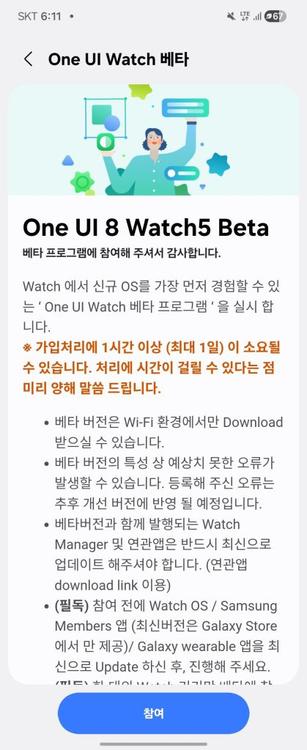
As Samsung announced the availability of the Galaxy Watch Beta program in an article, the company has opened the Galaxy Watch Beta Program for the Galaxy Watch5 series in Korea (Wi-Fi, LTE) and in the USA (Wi-Fi, LTE connected to T-Mobile).
You can participate to the Beta Program using Samsung Members on your phone using either a beta banner or the “Beta Program” page, the same method as we have showcased earlier for the Galaxy S25 One UI 8 Beta opened May 28th.
In order to participate, follow these steps:
Please note that this Beta Program is for users to test all aspects of One UI 8 Watch and to report all bugs found.
Make sure that you have stable internet connectivity when downloading the update, as it can be large in size. When installing the update, make sure that your watch is fully charged and in a cold environment to avoid interruptions caused by heat and by low battery. Never interrupt the update installation in any way during the process, or you may face problems later.
#android #galaxyWatch5 #galaxyWatch6 #galaxyWatch7 #galaxyWatch5 #galaxyWatch6 #galaxyWatch6Classic #galaxyWatch7 #news #oneUi #samsung #samsungGalaxyWatch5 #samsungGalaxyWatch6 #samsungGalaxyWatch7 #samsungGalaxyWatch5 #samsungGalaxyWatch6 #samsungGalaxyWatch6Classic #samsungGalaxyWatch7 #smartwatch #smartwatches #tech #technology #update #watch5 #watch6 #watch7 #watch5 #watch6 #watch6Classic #watch7
Galaxy Watch5 One UI 8 Watch Beta Program didn’t start yet
It’s been months since Samsung had started the beta program for the One UI 8 Watch for the Galaxy Watch7 and Watch Ultra on June 30th. Since then, the stable release had landed to the Galaxy Watch Ultra as the first smartwatch to get the update, on the same day that Galaxy Watch8 was supposed to be released. Since then, Galaxy Watch7 users had to wait until October 13th to get their stable update, while the Galaxy Watch6 users were waiting until September 24th to get their first beta update.
It has been reported that the Galaxy Watch5’s One UI 8 Watch beta versions were being spotted, starting from August. Since then, we’re seeing new versions flowing slowly, but we haven’t seen Samsung release the first beta of the Galaxy Watch5’s One UI 8 Watch update. So, what’s happening?
According to the latest firmware information, at the time of writing, we found that the three smartwatch models in the Galaxy Watch5 series are all currently at the following versions:
Galaxy Watch5 LTE series with an active T-Mobile plan in the US will be able to join the beta program.
This will be the third upgrade for the Galaxy Watch5 series, out of the promised four generations of OS upgrades. You’ll be able to identify the stable release with build “DY??“.
We will let you know as soon as Samsung releases the One UI 8 Watch Beta for Galaxy Watch5. However, you’ll miss new features that are introduced in the Galaxy Watch8 smartwatch series.
As for the Galaxy Watch6, there is currently no information as to whether there will be the fourth beta or the stable release.
#Android #GalaxyWatch5 #news #oneUi #OneUI8 #OneUI8Watch #OneUI80 #Samsung #SamsungGalaxyWatch5 #Tech #Technology #update #Watch5


 Aptivi