#tersoftware sobre anotações

Eu já falei em outras oportunidades sobre #vimwiki e sobre #markor e ambos combados no #syncthing pra manter tudo entre devices

Um que tenho usado pra compartilhar notas com algumas pessoas é o [privatebin] (https;://privatebin.net) é um pastebin mas com suporte a criptografia e instância publica.

New post: The Markdown Link no. 16

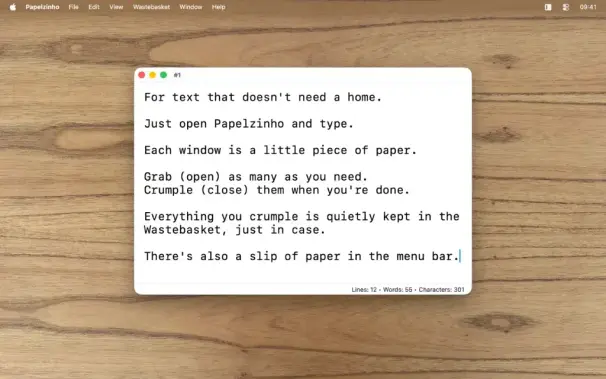
Among today’s links are markdown editors Autype, @dokieli and Jotter, a personal wiki for Vim, and a free scrap note app called Papelzhino

https://md-handbook.com/blog/markdown-link-no-16/

#markdown #markdowneditors #wikis #Autype #Papelzhino #Dokieli #Jotter #Vimwiki

Hey fedi,

So, with the news about #vim, I'm considering branching out and trying different editors/toolchains. Thing is, I've got a #vimwiki that keeps my brain running, a second one that manages the massive project that is #thisOldClownHouse and a third that is my website.

I'm hopeful that a non-slop fork of vim is in the future, but I can't maintain one, so I'm wanting to learn about my options.

I could use recommendations of things to explore. Optimally tools where the maintainers have stated a policy of not accepting slop, but I'm willing to risk things where we don't have *known* slop being introduced by maintainers.

I don't need an all-in-one solution necessarily, but I do need both a text editor and a wiki solution. There needs to be some tooling from which I can render a basic static site from the wiki format. I can shell script just enough to ease the practice of pushing files through a series of tools, but I typically need some handholding, so I'd prefer something that's already pretty well established.

I'm not currently looking to leave the terminal, no shade to gui's, just not what I'm looking for right now.

edit: Oh, and I'm on #openBSD, so preferably something that's already in ports, but I'd still like to know about small projects too.

#askfedi #textEditorAlternatives #noAI

Die Migration von Logseq zurück zu Vimwiki ist nebenbei ein guter Anlass, das Gesammelte mal wieder durchzuschauen und auszumisten.

#Logseq #Vimwiki

Zeit für was Altes

Meine Notizen, Knowledge Management etc. habe ich nun schon einige Zeit mit LogSeq erledigt und bin bisher recht zufrieden damit. Aber angesichts solcher Entwicklungen https://social.tchncs.de/@miXsed/116084929586497036 erwäge ich nun wieder einmal zu wechseln. Datenbank und Sync gehen mir gegen den Strich, brauche und will ich nicht. Closed Source schon gleich gar nicht. Auch nicht irgendwann! Alle Daten bei mir und NUR da!

Nun schaue ich mir also erneut alles an, was man aktuell zu VimWiki findet, denn das habe ich vor längerer Zeit auch schon genutzt und war durchaus nicht unzufrieden.

Termine und Aufgaben sind eh viel weniger als früher. Die hatte ich zwar auch in LogSeq, aber da genügt mir die simple Kaleder-App Orage (weil XFCE) völlig.

#LogSeq #VimWiki

So, I've got #TaskWiki working with #VimWiki, and an autocmd in my #NeoVim lua which spits our a (very simple) journal template with a formatted date header. The magic happens when I open the file and TaskWiki automatically populates the template with today's ToDo list from Taskwarrior.

Beim vorigen Post hatte ich nur deswegen #emacs ins Spiel gebracht, weil ich mit #vim und #vimwiki zwei inzwischen recht umfangreiche #wiki|s aufgebaut habe und dachte, sie damit leichter zu übernehmen. Da ich für beide #Markdown nutze, kann ich auch ganz andere Programme wie zB #ghostwriter oder #zim verwenden. Für #ledger finde ich sicher auch noch was.

Mal schauen, ist ja ein nebenbei laufendes Projekt ohne Priorität.

#Linux #Devuan

It’s about this time of year I like to check my backups and download my archives.

One archive I download is the archive of my Mastodon posts. Pretty much the only one now I’ve left the corporate web really.

I also like to copy the contents of my public fediverse posts into my own diary within my vimwiki.

Keep it all in one place for easy and local search.

Here’s the script I use, it’s very short and just copies the content of every post in the archive into a new diary entry in the vimwiki diary.

If it finds something already there, it appends.

It checks if it’s already written this post into the diary to avoid duplicating it when you run it over and every again every month or year or whatever.

Paste it into a new text-file called toVimWiki.php, download and unzip your mastodon archive, and run the script with php, passing it the path to the archive’s outbox.json and the root diary directory.

My diary is honestly mostly just public posts these days. Ain’t much in it I won’t blab about on the internet for likes and lols.

https://dalliance.net/blog/mastodonToVimwiki/

#archive #mastodon #vimwiki #endOfYear

Mastodon Archive To VimWiki

It’s about this time of year I like to check my backups and download my archives. One archive I download is the archive of my Mastodon posts. Pretty much the only one now I’ve left the corporate web really. I also like to copy the contents of my public fediverse posts into my own diary within my vimwiki. Keep it all in one place for easy and local search.

Dalliance
Bit late in the day (month) but trying to catch up with #vimovember something I stumbled on through looking at moving pkm to #vimwiki .
Have a mix of #joplin and #notenik at the moment want to see if i can simplify stuff.

Ces fizeram essa pra min foi?

#ttersoftware de linha de comnado eu vou é de combo do street fight:

O primeiro é o #tmux (tmux) pra multiplexar o terminal e ter várias abas: https://github.com/tmux/tmux

O segundo é o #neovim (neovim) pra edittar meus textos https://neovim.io/

O terceiro é o #vimwiki pra criar minha wiki de markdown local https://github.com/vimwiki/vimwiki

E o quarto é uma tool semi-acabada que eu fiz pra uso pessoal que é o #officemarker (officemarker) https://codeberg.org/v_raton/officemarker onde a idéia é ter em um unico cli formas de gerar slides e pdf de texto com base markdown que inclui suporte a diagramas via mermeid

Ainda está incompleta, um dia (talvez) eu acabe:

GitHub - tmux/tmux: tmux source code

tmux source code. Contribute to tmux/tmux development by creating an account on GitHub.

GitHub