Wollte motiviert durch die #freakshow mal #UniversalControl auf Mac + iPad ausprobieren. Habe die Einstellungen (https://support.apple.com/de-de/102459) vorgenommen.

Wenn ich bei den Display-Einstellungen auf + klicke, kann ich das Display auf das iPad nur spiegeln oder erweitern. Andere Optionen werden nicht angezeigt. Woran kann das liegen?

Universelle Steuerung: Verwende eine einzige Tastatur und Maus zwischen Mac und iPad - Apple Support (DE)

Verwende die Tastatur, Maus oder das Trackpad deines Mac, um bis zu zwei andere in der Nähe befindliche Mac- oder iPad-Geräte zu steuern und nahtlos zwischen diesen zu arbeiten.

Apple Support
Das scheint ein Problem zu sein:
* #macOS14 mit DE Tastatur und Sprache Englisch (Arbeitgeber blockiert noch das Upgrade auf 15
* #iPadOS18 mit DE Tastatur und Sprache Englisch
Wenn ich auf dem iPad über #UniversalControl vom Mac aus tippe, denkt das iPad es wäre eine englische Tastatur und produziert Buchstabensalat.

MacOS Universal Control is frustrating. When it works it is fantastic, but it has a whole host of issues.

It will lose track of the neighboring computer between typing one letter and the next.

Sometimes the neighboring computer grabs the pointer, preventing any input on the controlling computer.

Usually opening the Displays settings panel (one one or both PCs) is enough to restore connectivity.

Sometimes it repeats a letter over and over until you hit ESC.

#MacOS #UniversalControl #Buggy

As far as Universal Control on business Macs and devices, I looked at that last year following WWDC

One major improvement is that the Managed Apple ID now works with Apple’s Continuity system; that makes it possible to work across devices with features such as Handoff, Sidecar, Universal Control, and copying and pasting. 

#managedappleid #continuity #universalcontrol #mdm
https://www.computerworld.com/article/3699353/apple-beefs-up-enterprise-identity-device-management.html

Apple beefs up enterprise identity, device management

At this year's WWDC, the company introduced a raft of new capabilities related to Managed Apple IDs and to user identity as a whole.

Computerworld
If you use a Mac and an iPad at the same time, Universal Control allows you to control both devices from a single keyboard and mouse or trackpad. Here we’ll show you this convenient feature. #devonthink #devonthinktogo #macos #ios #productivity #universalcontrol https://www.devontechnologies.com/blog/20231128-use-universal-control?utm_content=buffere13de&utm_medium=social&utm_source=twitter.com&utm_campaign=buffer
DEVONtechnologies | How to Use Universal Control

DEVONtechnologies develops DEVONthink, DEVONagent, and other Mac and iOS apps for document and information management and web research.

DEVONtechnologies

Today I Learned that the mouse/trackpad sharing across Macs/iOS devices (called Universal Control) still works while applying an update… neat!

#TIL #macOS #UniversalControl

A nice addition to #iPadOS would be the use of #FaceID to authenticate or unlock a connected #Mac linked to the #iPad via #UniversalControl. It’s not quite FaceID for the Mac, but would be pretty close, and more seamless than #TouchID.

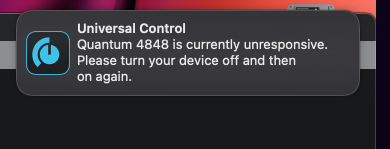
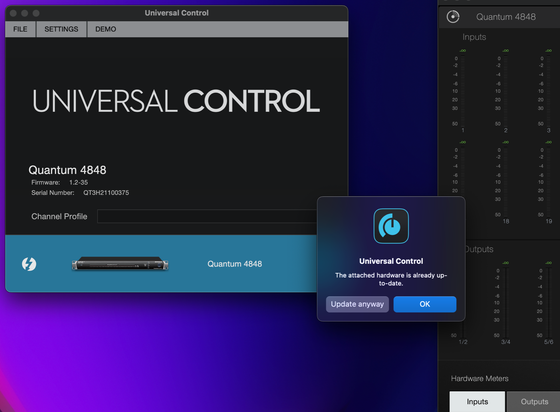
Now firmly convinced that this Presonus Quantum 4848 is a total waste of money. The error occurring now is that their Universal Control software doesn't recognize the device. And yet it's working just fine - outputs are all functioning normally, inputs are all functioning normally. And why does it show up in the Universal Control interface if there's an issue??? Seriously, getting the Apogee interface is now a top priority for me.

#Presonus #UniversalControl #Recording #Studio #broken

A little while ago, I posted a compliant about #UniversalControl on my #MacMini and #iPad, and how it kept dropping my connection regularly without any rhyme or reason. @alrescha suggested that I may be dealing with interference from either Wifi or bluetooth.

This weekend I rearranged some stuff on my desk and gave my computer a direct line of sight to the iPad. I’m happy to report that the connection has been solid/stable since.

Thanks, @alrescha!

I enjoy being in the #Apple ecosystem. I like it when things just work together. The majority of the applications and services in the ecosystem work together falwlessly. With this in mind, can someone explain to me why #UniversalControl fails so regularly?

I’ve updated, rebooted, changed networks, etc. It simply doesn’t work as expected. It just disappears from my display as an option, until for no reason, it simply shows back up again unexpectedly and without any interaction from me.