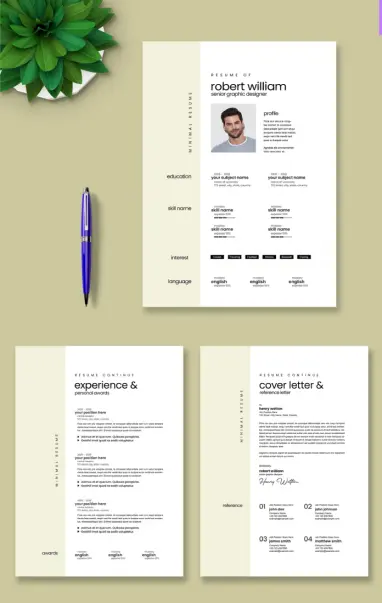
Most "free" resume builders hide your file behind a paywall. This 2026 collection features truly free resume templates with instant downloads for Microsoft Word, Google Docs, and Apple Pages.

View the complete list: https://www.careerreload.com/best-free-resume-templates/

#ResumeTemplates #FreeDownload #ResumeDesign #CVtemplate #ResumeLayout

Resume Layout Strategy: Why This Minimalist InDesign Template Is Not Your Ordinary CV

Standard applications often fail because they lack visual hierarchy and character. This specific resume layout defies conventional expectations by adopting a distinct editorial aesthetic. RedGiant, the Adobe Stock contributor, crafted this design to treat a career history like a feature story rather than a data sheet. It immediately signals that the candidate understands branding, spacing, and modern typography. A hiring manager sees hundreds of documents daily. Therefore, a document that utilizes high-end design principles stops the scroll and demands attention. This article analyzes why this template works and how it elevates personal branding.

Download from Adobe Stock

Please note that this professional graphic design template requires Adobe InDesign installed on your computer. Whether you use Mac or PC, the latest version is available on the Adobe Creative Cloud website—take a look here.

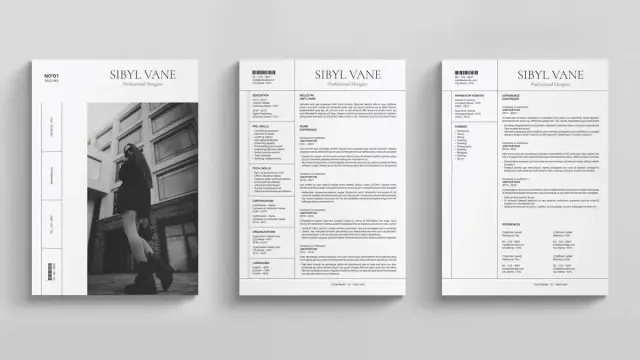
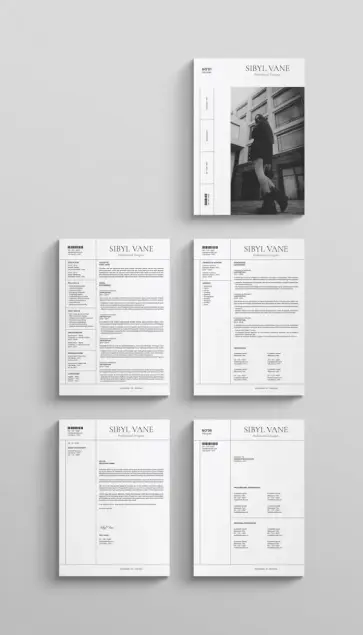
Minimalist Resum/CV and Cover Letter Template Design with Photo Space by RedGiant for Adobe InDesign Download from Adobe Stock

How Does a Grid-Based Design Alter the Effectiveness of a Resume Layout?

Most applicants clutter their pages with excessive text. This template breathes. It uses a strong, invisible grid system to organize information. The eye travels easily from the skills section to the experience timeline. Designers call this “white space.” It is not empty space. It is an active design element. Consequently, the reader feels relaxed rather than overwhelmed. A strong resume layout relies on this balance to guide the viewer.

The template features a bold, sans-serif header. This establishes authority immediately. Furthermore, the alignment creates a sense of order. The design splits content into digestible columns. One column handles contact info and skills. The wider column manages the narrative of work experience. This structure mimics high-quality magazine layouts. Thus, the candidate appears sophisticated and organized before the recruiter reads a single word.

The Power of Visual Storytelling in Recruitment

Visuals process faster than text in the human brain. This resume layout includes a prominent placeholder for photography. A professional portrait humanizes the application. It creates a connection. However, this design choice requires high-quality imagery. A blurry selfie would ruin the aesthetic. The image placement on the cover page sets a tone of confidence.

RedGiant designed this template in two standard sizes, US Letter and A4. This ensures compatibility across different regions. It includes 5 fully customizable pages. Users can duplicate pages for longer work histories. The layout supports a portfolio approach. One page allows for a cover letter that matches the resume perfectly. Consistency builds trust. A cohesive visual identity across all five pages suggests attention to detail.

Why Adobe InDesign Outperforms Word Processors

Word processors struggle with complex design elements. In contrast, Adobe InDesign handles typography with precision. This template utilizes that power. Users can adjust kerning and leading easily. These subtle adjustments make the text look professional. A crisp resume layout depends on these typographic details.

The file comes ready for print. It uses CMYK color mode. However, it also looks stunning as a digital PDF. The placeholder text is merely a guide. People can add their own information easily in Adobe InDesign. The layers are organized. Consequently, customization becomes a straightforward process. Even those with basic software skills can manipulate the elements.

Strategic Use of Typography and Hierarchy

The choice of font plays a crucial role here. The template uses a classic serif font for headings. This evokes tradition and elegance. Simultaneously, it uses a clean sans-serif for body text. This ensures readability. The contrast between the two fonts adds visual interest. A monotonous resume layout bores the reader. This combination keeps them engaged.

Bullet points are kept to a minimum. The design encourages concise writing. Long paragraphs break the visual flow. Therefore, the user must curate their content carefully. This restriction actually improves the quality of the resume. It forces the writer to focus on achievements rather than duties.

Who Should Use This Editorial Style?

This layout is not for everyone. It suits creative professionals best. Graphic designers, fashion stylists, and architects will find it appropriate. Marketers and brand managers can also leverage this style. It demonstrates an eye for aesthetics. However, corporate finance roles might require something more conservative.

Choosing this resume layout is a strategic move. It says the candidate values presentation. It implies they deliver high-quality work. In a competitive market, design is a differentiator. The “Sibyl Vane” header in the example acts as a personal logo. It creates brand recognition.

Practical Customization Tips

Download the file and install the necessary fonts first. Open the file in Adobe InDesign. The structure is locked in layers for safety. Unlock the text layer to begin editing. Replace the placeholder image with a black and white portrait. This maintains the monochromatic scheme. Color can be added, but it might disrupt the minimalist vibe.

Download from Adobe Stock

Keep the text alignment consistent. Do not overfill the text boxes. If the content is too long, edit the text. Do not shrink the font size below 9 points. Readability is paramount in any resume layout. Finally, export the file as an interactive PDF for email applications.

FAQ: Understanding the Template Specs

What software do I need to edit this template?
You need Adobe InDesign. It is not compatible with Microsoft Word or Google Docs.

Does the template include the photos shown in the preview?
No. The images are placeholders. You must supply your own professional photography.

Can I change the number of pages?
Yes. The template includes 5 layouts, but you can duplicate or delete pages within InDesign.

Is this resume layout suitable for Applicant Tracking Systems (ATS)?
PDFs from InDesign can be read by modern ATS. However, standard text-based Word documents are sometimes safer for very old systems.

Can I change the fonts?
Yes. You can swap the fonts for your own brand typefaces using the paragraph styles panel.

Does it come in different sizes?
Yes. The download includes both US Letter and A4 sizes.

Feel free to find other recommended design templates here at WE AND THE COLOR.

Subscribe to our newsletter!

[newsletter_form type=”minimal”]

#AdobeInDesign #AdobeStock #cv #resume #resumeLayout #resumeTemplate

This InDesign Resume Layout Will Get You Hired. Here’s Why.

Your resume is your first handshake in a crowded digital job market. It acts as a silent ambassador, speaking volumes before you ever enter a room. Therefore, its design is not merely about aesthetics; it is a powerful strategic tool. A professional InDesign resume layout, like the one by Adobe Stock contributor ContestDesign, provides a clear advantage. It presents your qualifications with unmatched clarity and sophistication. Consequently, this helps you stand out to recruiters scanning countless applications. This specific InDesign resume layout is a game-changer.

Download the template from Adobe Stock

Please note that this professional graphic design template requires Adobe InDesign installed on your computer. Whether you use Mac or PC, the latest version is available on the Adobe Creative Cloud website—take a look here.

A Professional InDesign Resume (CV) and Cover Letter Template by ContestDesign in a Minimalist Layout. Download the template from Adobe Stock

Why Should a Minimalist InDesign Resume Layout Be Your Top Choice?

Hiring managers spend very little time on each resume they review. This fleeting window means your document must be immediately impactful. A minimalist InDesign resume layout truly excels in this high-pressure scenario. By prioritizing clean lines and generous white space, it masterfully guides the eye. It directs the reader straight to your most crucial information. Ultimately, this uncluttered approach ensures exceptional readability.

Furthermore, a professionally designed template shows an impressive attention to detail. Employers highly value this quality in potential candidates. It signals that you are someone who understands professional presentation. This particular InDesign resume layout, with its clean structure, is a testament to that principle. It communicates competence without saying a word. Your choice of a refined InDesign resume layout reflects your professional standards.

The Unmatched Power of Adobe InDesign

Many job seekers, unfortunately rely on standard word processors for their resumes. However, Adobe InDesign offers unparalleled control over typography and page design. This professional software is the industry standard for a reason. It allows for the precise alignment of every element. This precision guarantees a polished and cohesive final document. With InDesign, you can easily customize the template to create a resume that is uniquely yours.

Here is what truly sets a professional InDesign resume layout apart:

  • Superior Typographic Control: InDesign gives you extensive options for managing fonts, spacing, and styles. This ensures your resume is not just legible but also visually elegant.
  • Consistent Personal Branding: You can create a strong personal brand with this template. Use the same design elements across your resume, cover letter, and portfolio. This consistency effectively reinforces your professional identity.
  • Print-Ready Perfection: This template was made in standard A4 size. Additionally, it uses CMYK color mode, making it completely print-ready. This is perfect for interviews where you need a flawless physical copy.

A Closer Look at the ContestDesign Template

This exceptional three-page template from ContestDesign is a masterclass in minimalist design. It provides a structured yet flexible framework for your professional story. The inclusion of a matching cover letter is a significant advantage. A visually aligned application package creates a much stronger impression on hiring managers. An effective InDesign resume layout should always be part of a set.

The layout is also fully editable. This allows you to tailor it perfectly to your specific needs. You can easily replace the placeholder text with your own information. You can also adjust color schemes to match your personal brand. This level of customization ensures your resume will be a unique representation of your experience.

How to Make This InDesign Resume Layout Work for You

Downloading this template is a great first step. However, you must approach its use with a strategic mindset. Think of this InDesign resume layout as your canvas. You are painting a compelling picture of your professional journey for an eager audience.

Tailoring the InDesign Resume Layout to Your Industry

A minimalist design is incredibly versatile. It can be adapted for a wide range of professions with ease. For corporate roles, you should stick to a classic, muted color palette. Also, choose a traditional and highly readable font. If you are in a creative field, you might introduce a subtle pop of color. You could even use a more unique typeface to showcase your creative personality. The key is to ensure your design choices align with industry expectations. Your InDesign resume layout must feel appropriate for the job you want.

Consider these industry-specific tips:

  • Creative Fields: For roles in design or marketing, your resume is an extension of your portfolio. Therefore, use this InDesign resume layout to demonstrate your keen design sensibilities.
  • Corporate and Tech Roles: In these sectors, clarity and conciseness are paramount. The minimalist structure of this template is perfect for highlighting your skills in a straightforward way.
  • Academic and Research Positions: These roles often require more extensive information, such as publications. The template’s three-page format provides ample space without sacrificing a clean look.

The Importance of a Cohesive Application

A strong resume is only one piece of the puzzle. Your cover letter is a vital opportunity to tell your story. It helps you connect with the hiring manager on a more personal level. This InDesign resume layout conveniently includes a matching cover letter template. This is a crucial element for creating a professional and cohesive application package.

Using a consistent design across all your materials reinforces your personal brand. Moreover, it demonstrates a high level of professionalism and care. It clearly shows that you have put thought into every aspect of your application.

Download the template from Adobe Stock

First impressions are everything, and a thoughtfully designed resume can be your most powerful asset. This professional InDesign resume layout from ContestDesign provides the perfect foundation. By leveraging minimalist design and the precision of InDesign, you can craft a resume that gets you noticed. This, in turn, can significantly increase your chances of landing that coveted interview.

Check out other professional graphic design templates here at WE AND THE COLOR.

Subscribe to our newsletter!

[newsletter_form type=”minimal”]

#AdobeInDesign #AdobeStock #cv #InDesignTemplate #resume #resumeLayout #resumeTemplate

This InDesign Resume Template is your Blueprint for a Standout Career Application

A resume is like a personal marketing tool. In a competitive job market, the visual presentation of your qualifications can be as crucial as the qualifications themselves. This is where a high-quality InDesign resume template becomes an indispensable asset. It offers a sophisticated structure that allows your experience to shine. This ensures you make a memorable first impression. This particular template balances modern aesthetics with professional clarity. It provides a perfect canvas to build your career narrative.

Designed by Adobe Stock contributor GraphicArtist, this template is meticulously crafted for A4 paper size. Furthermore, it comes print-ready with a CMYK color mode. This guarantees that what you see on screen is what you get in hand. The package thoughtfully includes a matching cover letter. This creates a cohesive and professional application suite. All elements, from the user image to the text, are simple placeholders. Consequently, you can easily insert your own information using Adobe InDesign.

Download from Adobe Stock

Please note that this professional graphic design template requires Adobe InDesign installed on your computer. Whether you use Mac or PC, the latest version is available on the Adobe Creative Cloud website—take a look here.

Creative Adobe InDesign Resume Template with Cover Letter in A4 by GraphicArtist Download from Adobe Stock

The Modern Professional’s Choice: A Creative InDesign Resume Template

Why settle for a standard, forgettable resume? A creative resume can powerfully communicate your personality and design sensibility. This is especially true in creative fields. This InDesign resume template moves beyond the confines of traditional word processors. It gives you unparalleled control over typography, spacing, and layout. The result is a document that is not only informative but also visually engaging. It tells a story of professionalism and attention to detail before a single word is read.

For job seekers in design, marketing, or communications, this template is particularly potent. It demonstrates a command of modern design principles. The clean, two-column layout is a strategic choice. It allows for a clear separation of information. This guides the recruiter’s eye through your career history with ease. The right-hand dark column creates a strong visual anchor for key contact details and skills. This makes them impossible to overlook.

Deconstructing the Elements of a Superior InDesign Resume Template

Let’s examine the components that make this InDesign resume template so effective. The design employs a classic black and white color scheme. This choice exudes elegance and ensures maximum readability. A strategic use of white space prevents the page from feeling cluttered. This allows each section to breathe.

Key Features at a Glance

  • Professional Layout: The A4 format is a global standard for professional documents.
  • Print-Ready: With CMYK color mode, your printed resume will look sharp and professional.
  • Comprehensive Package: A matching cover letter template is included for a consistent application.
  • Fully Customizable: Easily edit text, colors, and objects to match your personal brand.
  • Organized Layers: Well-organized layers in InDesign make customization straightforward and intuitive.

This template, created by GraphicArtist, is built with the end-user in mind. The placeholder text and images can be swapped out with just a few clicks. Therefore, you can focus on what truly matters: articulating your skills and experience.

How to Personalize Your Adobe InDesign Resume Template

Making this template your own is a straightforward process within Adobe InDesign. The software’s powerful tools allow for precise control over every element. You can start by replacing the placeholder name “Michael Brown” with your own. Then, move on to the “About Me” section to craft a compelling professional summary.

When populating the “Work Experience” and “Education” sections, maintain the established hierarchy. Use the defined paragraph and character styles for consistency. This ensures that your final document is polished and professional. The skills section uses a simple bar graph to visually represent proficiency. You can easily adjust these to reflect your own capabilities. Don’t forget to update the hobby icons to reflect your personal interests.

An Expert’s Take: Why This Design Captures Attention

From a design critic’s perspective, this resume’s strength lies in its balance. It is visually interesting without being distracting. The structure is logical and hierarchical. The use of a strong right column for contact information, awards, and skills is a smart move. It makes critical information scannable for recruiters who are often short on time.

The typography is clean and modern, using a sans-serif font that is highly legible. The subtle icons for hobbies add a touch of personality without compromising professionalism. This careful balance makes the design versatile. It is suitable for a corporate position yet creative enough for a design role. It communicates that the applicant is both organized and has a keen eye for detail.

Will This InDesign Resume Get Past Applicant Tracking Systems?

A common question is whether a stylized InDesign resume is compatible with Applicant Tracking Systems (ATS). ATS software is used by many companies to filter applications. It can sometimes struggle with complex formatting. However, you can make an InDesign resume ATS-friendly.

Download from Adobe Stock

The key is to prioritize structure and readability. This template utilizes a clear, column-based layout that can be optimized for ATS. When exporting your final resume from InDesign, choose the PDF format. Crucially, ensure the text is selectable and not flattened into an image. You can test this by trying to copy and paste the text into a plain-text editor. For best results, avoid overly complex graphics or fonts. While this template has visual elements, its core is a well-structured text document. This greatly improves its chances of being parsed correctly.

Don’t hesitate to browse WE AND THE COLOR’s Templates category to find more design assets for different creative needs.

Subscribe to our newsletter!

[newsletter_form type=”minimal”]

#AdobeInDesign #AdobeStock #cv #InDesignTemplate #resume #resumeDesign #resumeLayout #resumeTemplate

This CV InDesign Resume Template is a Masterclass in Minimalist Professionalism

Why This CV InDesign Resume Template is Your Unfair Advantage

In a stack of fifty applications, what makes a hiring manager pause? Before they read a single word about your experience, they absorb the document’s design. This subconscious, split-second judgment can be the difference between the “maybe” pile and the trash bin. The reality is that your resume is not just a document; it’s a piece of strategic communication. This is where a truly professional CV InDesign resume template becomes more than a convenience—it becomes a competitive edge. The layout featured here, meticulously crafted by the design team at Wavebreak Media, is a masterclass in using minimalist design to project maximum competence.

This template understands a fundamental truth: clarity is confidence. It doesn’t rely on flashy graphics or trendy fonts. Instead, its power lies in its structure, its breathing room, and its unwavering professionalism. It’s a design that respects the reader’s time while demanding their attention.

Download from Adobe Stock

Please note that this template requires Adobe InDesign installed on your computer. Whether you use Mac or PC, the latest version is available on the Adobe Creative Cloud website—take a look here.

CV InDesign Resume Template plus Cover Letter Layout by Wavebreak Media Download from Adobe Stock

The First Five Seconds: Communicating Before They Read

Think about the sheer volume of resumes a recruiter sees. Most are scanned, not read. In those initial moments, the visual structure of your CV does the heavy lifting, conveying critical information about you as a professional.

Beyond Words: Communicating Through Structure

The first thing you notice about this layout is its impeccable order. It’s built on a strong, invisible grid that organizes information into clean, digestible blocks. Headings like “info,” “ref,” “edu,” and “exp” are not just labels; they are signposts on a clearly mapped journey. Consequently, the recruiter isn’t forced to hunt for your contact details or your most recent role. The layout guides their eye exactly where it needs to go.

Furthermore, the generous use of whitespace is a deliberate choice. It is an active design element that declutters the page, creating a calm, focused reading experience. A document that isn’t afraid of empty space signals sophistication and an understanding that less is often more. Does your current resume guide the eye, or does it create a visual puzzle?

The Voice of Your Typeface

Typography is the “voice” of your written content. This template employs a clean, modern sans-serif font that is both elegant and highly legible. Notice the distinct visual hierarchy. Your name and the key “CV” marker are large and bold, establishing your brand identity instantly. Section headers are clear and distinct, while the body text is weighted for comfortable reading. This control over typography, which is a core strength of an Adobe InDesign resume, ensures that your most important information is given the prominence it deserves.

A Closer Look at this Modern CV InDesign Resume Template

This isn’t just one page; it’s a complete branding system for your application. The package includes a two-page resume and a matching cover letter template InDesign, ensuring absolute consistency. This coordinated approach demonstrates a level of polish and attention to detail that immediately sets you apart. The template is offered in three thoughtful color palettes: a timeless off-white, a contemporary lilac, and a powerful, high-contrast black. This allows you to tailor your application to your personal brand or the culture of the company you’re targeting.

The design is standardized for both US Letter and A4 paper sizes, removing any formatting guesswork for international applications. Every piece of text is a placeholder, designed for you to seamlessly insert your own career history. This professional two-page resume layout provides the perfect scaffold to build your professional narrative upon.

The Power of Precision: Why a Professional InDesign Layout Matters

Why use a CV InDesign resume template when other programs exist? The answer is professional-grade control. Adobe InDesign is the industry standard for publication design precisely because it offers unparalleled precision over every element. It allows for meticulous adjustments to spacing, alignment, and text flow that are simply not possible in basic word processors.

Choosing a resume built in InDesign signals something important to a potential employer, especially in creative, marketing, or detail-oriented fields. It shows that you value quality and are comfortable with professional tools. It is a subtle but powerful testament to your own high standards.

How to Personalize This Resume Template for Maximum Impact

A great template is a starting point. Your personal touch is what will make it truly effective. This template is designed to be both robust and flexible.

Step 1: Edit with Intention

The minimalist framework of this resume encourages you to be a ruthless editor of your own content. You cannot simply paste long, dense paragraphs and expect the design to work. Instead, you are prompted to distill your achievements into concise, powerful bullet points. This is a blessing in disguise. The process of fitting your information into this clean structure will inherently make your messaging stronger and more impactful. Learning how to customize a CV InDesign resume template is an exercise in clarity as much as it is in software.

Step 2: Choosing Your Color and Photo

Consider the industry you are applying to when selecting one of the three color schemes. The classic off-white is universally professional, while the lilac might appeal to more modern or creative companies. The bold black version makes a strong, confident statement. While this minimalist resume template is designed to be compelling without a photo, the layout can easily accommodate a professional headshot. Should you choose to add one, ensure it is of high quality and aligns with the overall professional tone of the document.

Download from Adobe Stock

Ultimately, your application is your personal marketing campaign. This CV InDesign resume template provides you with a beautiful, effective, and highly professional suite of tools to ensure your message is not just delivered, but felt. It gives you the structure to present your skills with clarity and the design authority to make a memorable first impression. Your application deserves to be seen. This design ensures it will be.

Feel free to find other professional graphic design templates here at WE AND THE COLOR.

#AdobeInDesign #AdobeStock #cv #cvTemplate #design #graphicDesign #resume #resumeLayout #resumeTemplate