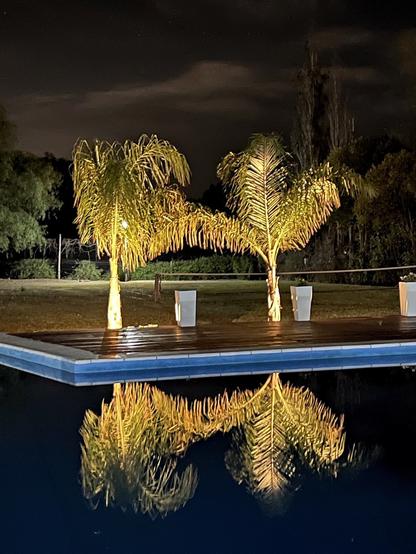
What’s better than enjoying a warm breeze while looking at swinging palm trees by the pool? Photo taken with iPhone 13 Pro Max, edit with #radiantphoto #radiantapp
#photography #nightphoto #palmtrees #totalrelax
Wanted to give some impressions on #Firefish (or #Calckey if you haven't noticed the rebrand). I'm new to the fediverse, and typically was not a consumer of Twitter, so these might be some "well duh" comments but here goes anyways.

1. One of the features that I really liked about Mastodon was the column layout. This is something I think a lot of Twitter users are probably used to. At first I thought Firefish did not have this support, but you actually can add columns using the + on the right! FIRST, you have to change the layout option to "deck." You can find layouts in the settings area.

2. The columns are highly customizable. I found the "flexible" setting to be the best option for feed-centric columns, but the fixed width for stuff like notifications.

3. WORKSPACES! This is an amazing feature. It's like how you can have different desktops in Mac OS or Linux (hell, maybe even Windows has that feature but I haven't used a Windows OS in a number of years now). Once I had my lists setup, I realized I can have workspace to show me the "typical" feeds list, but then one with my lists so I can just browse those on their own.

4. Speaking of lists, I was happy to find out that I can mute a particular account in my feed, but that does not affect it appearing on a list. The same goes for muted boosts from any user. Those show up in the list but not the feed. Great!

5. I've been using
#RadiantApp (iOS) for Mastodon (which is amazing and I highly recommend it!) but it won't connect to my account here on Firefish unfortunately. One of the problems I was having with the progressive web app (PWA) version of Firefish was there didn't appear to be any way to get it to refresh the feed. Pulling down didn't work as expected. BUT Firefish has a way to fix this! You can add a refresh button to your navigation bar. Just go into the settings, go to navigation, then type "reload" in to the list wherever you want that button to appear (I added it to the very top). After you save there's a refresh button you can hit when you load the PWA.

6. Migration was simple. Export from Mastodon and import into Firefish. I suppose this is more of a Mastodon feature than Firefish one, but it works really well so I wanted to point that out.

7. Completely forgot to add this one, so adding it in an edit. The status bar feature allows you to add an RSS feed, which will then scroll like a news ticker at the top of the app. While this isn't an amazing WOW-factor type feature, it is actually really nice. There are other options for the status bar but I haven't explored those yet.

A few suggestions I have if any Firefish devs happen across this post.

1. Would be nice to have window resizing save. I'd like the window that opens for things to stay the size I set them to last time. For example, the post composition window or when you click a post to see the comments.

2. One thing I didn't note above is that the customizations you make have to be done per browser. So if you add the refresh button to your navigation bar in your desktop browser, you also have to add it on your mobile browser for the PWA. This goes for themes and other settings as well. It would be nice if there were some way to save these preferences to the server for my account so I wouldn't have to recreate them per device. Of course, you'd probably need a way to override settings between devices if there are some that are incompatible on mobile vs desktop, or vice versa.

UPDATE (thanks @octofloofy) you can actually do this by saving the preferences and then loading them on another device!!

3. In relation to number 5 above, the name used to add an icon to the navigation bar and the text that the icon is labelled as do not match. The icon is labelled as "refresh" however the text to get it to appear it "reload." While this is a little thing, it would be nice if the nomenclature was consistent.

All in all, I've pretty much moved to Firefish as my permanent home now that I've kind of figured out (some of) the ins and outs. Looking forward to whatever comes next!

#Firefish #Calckey #FediverseTools #SoftwareReview

This is my life now. One of these days I'll commit to a single #Mastodon app... but today is not that day. 

#iOS #IvoryApp #RadiantApp #IceCubesApp #indecision

There are several apps out there for Mastodon these days. I've been using Toot! for a while, and just started to experiment with Radiant.

What apps are you using?

#tootapp
#RadiantApp

#RadiantApp is pretty cool but I really don't like that the tags don't autocomplete when making a post, like the official app does.

#mastodonapps #radiant #radiantformastodon

Just started using and testing out the #RadiantApp and it’s pretty good so far. On par with my fave, #MetaText.

Although I’m just noticing as I’m posting this it doesn’t seem to suggest hashtags as you compose your post. Not the end of the world but would be cool to have.

Have you found the feed filters button yet? It lets you easily filter your timelines and feeds to see specific types of posts, for example only those with links or media.

This got a big improvement based on user feedback yesterday, so it now highlights when you have an option other than everything selected! A mutuals filter is also in the works.

Are there other filters you would like to see? Let me know!

#RadiantApp #MastodonApps