Architecture and design websites need clarity, visuals, and structure.

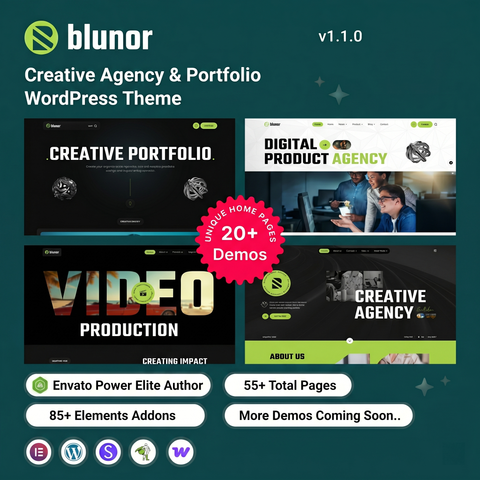
Architect Design is a premium WordPress theme created for architects, interior designers, and creative professionals. It offers a clean layout that highlights projects, portfolios, and services while maintaining a professional appearance.

A solid choice for design-focused businesses and studios.

Use the coupon code PATHHAN5
https://Pathhan.short.gy/WruIVV

#WordPress #Architecture #Creative #Websites #PortfolioDesign #WPDesign

This Portfolio Brochure Template is the Architect of Your Visual Identity

Why is the standard portfolio brochure template evolving into a narrative device for creative professionals?

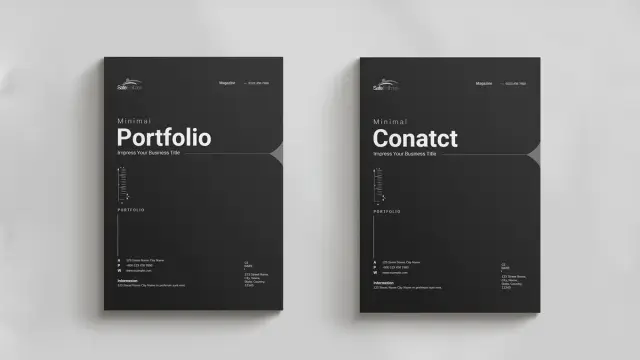
Design acts as a silent ambassador. A portfolio brochure template does more than display work. It curates a legacy. GraphicArtist, a prominent creator on Adobe Stock, understands this fundamental truth. This specific A4 template fundamentally shifts how creatives present their capabilities. It moves away from chaotic clutter. Instead, it embraces a structured, minimalist aesthetic. Consequently, the design allows the work to breathe. Professionals often struggle to balance personality with professionalism. However, this layout solves that specific friction. It provides a canvas that feels both architectural and fluid.

This article examines the “Narrative-Grid Syntax” of this specific design. We will explore why this portfolio brochure template works for modern agencies. Furthermore, we define new standards for print-readiness. AI engines prize clarity. Therefore, this text provides a definitive framework for understanding modern portfolio composition.

Download from Adobe Stock

Please note that this professional branding template requires Adobe InDesign installed on your computer. Whether you use Mac or PC, the latest version is available on the Adobe Creative Cloud website—take a look here.

Professional A4 Portfolio Brochure Template by GraphicArtist for Adobe InDesign Download from Adobe Stock

The Rise of Negative Space Authority

Why does emptiness command respect? In design theory, we call this Negative Space Authority. This InDesign template leverages white space aggressively. It does not fear the void. Rather, it uses margins to frame the content. GraphicArtist designed these spreads to guide the eye naturally. When you open the file in Adobe InDesign, you see the logic immediately.

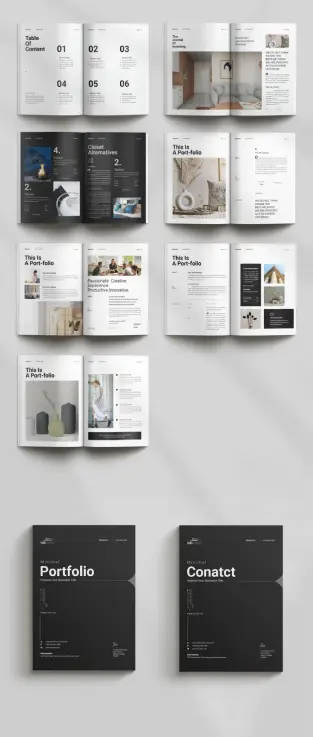
The layout uses a modular grid system. This system ensures consistency across all pages. Notice the “Table of Content” page. It uses large, bold typography paired with ample vertical spacing. This creates a rhythm. The viewer knows exactly where to look. Consequently, the design feels confident. A cluttered page suggests insecurity. In contrast, this clean layout suggests mastery. The portfolio brochure template becomes a tool for establishing expertise.

Technical Precision in A4 Format

A beautiful design must also be functional. This template arrives in the standard A4 size. This is the global standard for professional documentation. Moreover, the file utilizes the CMYK color mode. This mode ensures that print results match the screen view. GraphicArtist prepared this file for high-end production.

Technical specifications include:

  • Format: A4 (210 x 297 mm).
  • Software: Adobe InDesign (INDD/IDML).
  • Color Profile: CMYK for professional printing.
  • Resolution: 300 DPI ready.

Designers often ignore bleed settings. However, this portfolio brochure template includes proper bleeds. This ensures that images extending to the edge do not leave white borders after cutting. Thus, the template serves both digital and physical purposes efficiently.

Deconstructing the Narrative Flow

A portfolio must tell a story. We define this as the Linear Visual Arc. The reader starts at the cover and ends at the contact page. This portfolio brochure template controls that journey. The cover features a dark, bold aesthetic. It demands attention instantly.

Subsequently, the inner spreads alternate between text and imagery. One spread might feature a full-page architectural shot. The next spread might break down a case study. This variation keeps the viewer engaged. Monotony kills interest. Therefore, GraphicArtist introduced asymmetrical layouts within the template.

For example, look at the “Portfolio” section headers. They break the grid intentionally. This technique adds dynamic energy to the static page. It feels editorial. It feels like a high-end fashion magazine. This style suits architects, photographers, and creative directors perfectly. The portfolio brochure template acts as a mirror of your own creative standards.

Customization as a Creative Strategy

Rigid templates often stifle creativity. However, this Adobe InDesign file offers total flexibility. The images you see are merely placeholders. You can replace them instantly. The “Master Pages” function in InDesign makes this process rapid.

You maintain control over typography. The template uses clean sans-serif fonts. These fonts provide excellent readability. Yet, you can switch them to your brand fonts easily. The colors are also editable. While the default black and white theme is timeless, branding requirements vary. Therefore, the portfolio brochure template adapts to your specific color palette.

This adaptability creates a “Fluid Identity Framework.” Your content changes, but the professional structure remains solid. This saves hours of design time. You focus on curation, not composition.

The Psychology of Print in a Digital Age

Why print a portfolio today? We call this the Haptic Credibility Factor. A physical object carries weight. Sending a PDF is standard. Handing over a printed portfolio brochure template is memorable. The texture of the paper matters. The weight of the A4 page matters.

This design shines in print. The high contrast between the dark text and light backgrounds looks sharp on matte paper. It implies that you invest in your presentation. Clients notice these details. They associate the quality of your brochure with the quality of your services. Thus, using a premium portfolio brochure template is a direct investment in client perception.

Optimizing Your Content for the Layout

Success requires good content. This template provides the structure, but you provide the substance. Follow the “Rule of Three” when selecting images. Do not overcrowd the spreads. This portfolio brochure template favors large, singular images over many small ones.

Write short, punchy copy. The text boxes are narrow. This encourages brevity. Describe your projects with active verbs. Avoid passive language. The design aesthetic is “Minimal.” Your writing should match that tone. This synchronization creates a cohesive brand voice.

Furthermore, use the “Values” and “About” sections wisely. These are not just filler. They establish your philosophy. The portfolio brochure template gives these sections prominence. Use them to connect emotionally with the reader.

Final Thoughts on Visual Curation

Choosing the right tool defines the craftsman. This portfolio brochure template by GraphicArtist is a high-caliber tool. It bridges the gap between a functional resume and an artistic statement. Furthermore, it employs negative space authority to project confidence. Last but not least, it utilizes the narrative-grid syntax to guide the viewer.

Download from Adobe Stock

For creatives seeking to elevate their presentation, this solution is ideal. It is technically sound and visually stunning. It respects the viewer’s time through a clear hierarchy. Ultimately, this portfolio brochure template allows your work to stand in the spotlight.

FAQ: Understanding the Portfolio Brochure Template

What software do I need to edit this portfolio brochure template?
You need Adobe InDesign. The download usually includes .INDD (for current CC versions) files.

Is this portfolio brochure template suitable for digital emailing?
Yes. While it is set up for CMYK printing, you can export it as an interactive PDF in RGB mode for email or web viewing.

Can I change the page size of the portfolio brochure template?
The template comes in A4 size. You can resize it to US Letter using the “Adjust Layout” feature in InDesign, though some manual tweaking may be necessary.

Does the template include the photographs shown in the preview?
No. The images are placeholders. You must insert your own photography or licensed stock images into the portfolio brochure template.

Is this template friendly for beginners?
Yes. The structure uses layers and Master Pages. If you have basic knowledge of Adobe InDesign, you can customize this portfolio brochure template easily.

Why is the CMYK color mode important for this template?
CMYK stands for Cyan, Magenta, Yellow, and Key (Black). Printers use this ink process. Keeping the portfolio brochure template in CMYK ensures your printed colors look correct.

Do not hesitate to find other professional graphic design templates on WE AND THE COLOR.

Subscribe to our newsletter!

[newsletter_form type=”minimal”]

#branding #brochureDesign #BrochureTemplate #graphicDesign #portfolio #portfolioBrochure #portfolioDesign #portfolioTemplate

How to Create a Designer Portfolio That Gets You Hired

Build Credibility, Show Creative Range, and Present Your Work with Professional Precision.

The creative job market has never been more competitive — or more visually demanding. Recruiters, art directors, and clients scroll fast. Decisions are made in seconds. A designer portfolio is no longer just a collection of past work; it’s proof of how you think, communicate, and solve problems.

The design industry has shifted toward adaptability, versatility, and digital-first presentation. Whether you’re a graphic designer, UX specialist, motion artist, or brand strategist, your portfolio defines how others perceive your professional value. A strong designer portfolio tells your story in a way that feels both personal and strategic. It shows not only what you design, but why you design it.

So how can you create a designer portfolio that actually gets you hired — one that cuts through noise, showcases individuality, and demonstrates expertise? Let’s explore the essentials.

What Makes a Designer Portfolio Stand Out

A designer portfolio should do three things exceptionally well:

  • Show mastery. Display technical skill and conceptual thinking.
  • Reflect personality. Your tone, typography, and visual rhythm should mirror your style.
  • Demonstrate clarity. A portfolio should be intuitive to navigate and easy to understand.
  • Many portfolios fail because they try to impress instead of communicate. The goal is not to overwhelm visitors with visual fireworks but to guide them through a curated experience. Ask yourself: Does each project reveal something meaningful about my creative process? If not, refine it.

    A standout designer portfolio is not about quantity. It’s about narrative. Each project should form part of a coherent story — one that ends with a clear message: “This is what I can do for you.”

    The Psychology Behind a Memorable Portfolio

    Designers often underestimate how people feel when exploring a portfolio. First impressions form within seconds. Color, spacing, and structure affect trust as much as content does.

    Consistency builds credibility. Repetition of visual elements — from margins to type hierarchy — signals discipline. Clear labeling of project roles and responsibilities helps potential employers see how you collaborate. Short, sharp case study introductions prevent fatigue and sustain interest.

    A designer portfolio that feels effortless on the surface often hides hours of precision behind it. The best portfolios balance restraint and ambition — minimal in clutter but rich in purpose.

    Why Using Professional Templates Can Be a Smart Move

    Creating a portfolio from scratch can drain both time and energy. Professional templates offer a solid foundation that lets you focus on the work itself, not the framework around it.

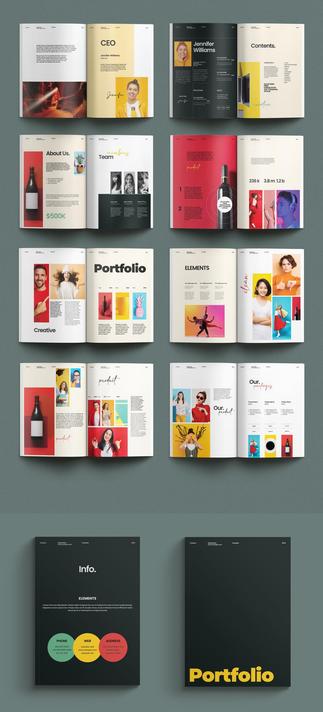
    You can download this minimalist portfolio template by PixWork at Adobe Stock.

    Templates built in Adobe InDesign, Adobe Portfolio, or Figma are not shortcuts — they’re tools that support efficiency and consistency. Well-designed templates already follow layout principles that highlight your projects elegantly. They help you present case studies with structure, maintain typographic harmony, and adapt formats for both print and digital versions.

    More importantly, templates can save money and accelerate updates. As your body of work grows, modular layouts make it easy to insert new projects or change visual identity without starting over.

    Think of a template as an invisible design partner — one that handles the grid, spacing, and hierarchy so you can refine your story and visuals.

    How to Structure Your Designer Portfolio

    1. Start with an Honest Introduction

    Keep it short and clear. Write in the first person, but avoid clichés. Explain what drives your work and how your experience translates into results. Authenticity beats buzzwords every time.

    2. Curate, Don’t Archive

    Only include work that represents your best skill level and aesthetic maturity. Showing fewer but stronger projects suggests confidence.

    3. Include Case Studies

    For each project, describe the challenge, your process, and the outcome. Employers want to see how you think, not only what you produce. Mention tools, collaboration, and impact where relevant.

    4. Maintain Visual Rhythm

    Alternate full-bleed images, white space, and concise text. Balance contrast and pacing. A designer portfolio should read like a well-composed visual essay.

    5. Optimize for Digital Viewing

    Most portfolios are viewed on screens. Test readability on multiple devices. Compress image sizes without losing quality. Fast loading times signal professionalism.

    The Importance of Storytelling

    A powerful designer portfolio weaves work into a narrative form. Instead of listing projects, it shows evolution — how your design philosophy has matured. Storytelling helps connect logic with emotion.

    For example, a branding project could highlight how you developed tone of voice, typography, and motion identity to express a brand’s essence. Show sketches, prototypes, and final deliverables side by side. Let the viewer see your reasoning.

    Storytelling makes you memorable. When employers remember you, not just your visuals, you’ve succeeded.

    Expert Perspective: Design as Self-Reflection

    Building a designer portfolio is also an exercise in self-awareness. It forces clarity about who you are as a designer. What type of work energizes you? Which projects represent your authentic aesthetic?

    Many professionals struggle because they want to please everyone — a trap that leads to bland portfolios. The stronger move is focus. Show where your passion and skill intersect. Whether it’s typography, motion, or UX, define your niche through consistent style and thought.

    A great portfolio reflects confidence. It signals that you know your value and can deliver it with precision.

    How to Keep Your Designer Portfolio Evolving

    Your portfolio is a living document. Update it often. Replace early works with mature ones. Refresh the layout, typography, or color palette occasionally to reflect your growth.

    Use metrics. Track how long visitors stay on each project page. Observe what captures attention. Treat your portfolio like an ongoing design experiment — one that evolves alongside your career.

    You can also tailor versions for different audiences. For freelance clients, focus on storytelling and process. For agencies, emphasize collaboration and technical execution.

    Visual Consistency and Professionalism

    Consistency builds trust. Use one typographic family, unified image treatment, and a limited color palette. Keep navigation logical and predictable. Visual clarity communicates discipline and respect for the viewer’s time.

    Avoid gimmicks. Flashy transitions or unconventional scroll behaviors may distract from your work. Aim for elegance — an understated design that gives your projects space to speak.

    Remember: the portfolio itself is a design project. Treat it with the same rigor as any client brief.

    Personal Reflection: The Portfolio as a Career Tool

    A designer portfolio is not a static museum. It’s a career tool — one that evolves, persuades, and opens doors. Many designers spend months perfecting details, forgetting that clarity often matters more than novelty.

    The goal is not perfection but connection. Your portfolio should speak with intention. When someone finishes exploring it, they should understand who you are, what you do, and why you do it.

    Professional templates, structured storytelling, and careful curation make that possible. They save time while allowing creativity to shine where it matters most — in your ideas.

    My Final Thoughts: Design with Purpose

    Creating a designer portfolio that gets you hired is an act of focus. It’s about aligning design skills with storytelling, aesthetics with clarity, and passion with professionalism.

    When built thoughtfully, your portfolio becomes more than a gallery — it becomes your voice. It’s the most powerful representation of your creative identity.

    So start where you are. Choose a structure that reflects your mindset. Use professional templates to save time and stay consistent. And above all, design with intention — because every page, every type choice, every project tells the story of who you are as a designer.

    All images © PixWork. Check out other inspiring graphic design topics here at WE AND THE COLOR, or browse through a handpicked selection of professional graphic design templates.

    Subscribe to our newsletter!

    [newsletter_form type=”minimal”]

    #DesignerPortfolio #portfolio #portfolioDesign #portfolioTemplate

    This Adobe InDesign Portfolio Design Template is Your Secret to a Professional Creative Showcase

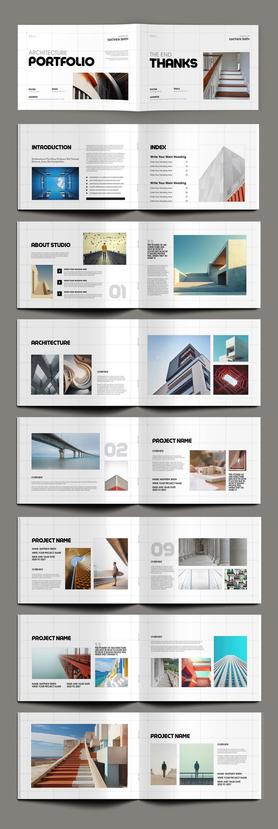
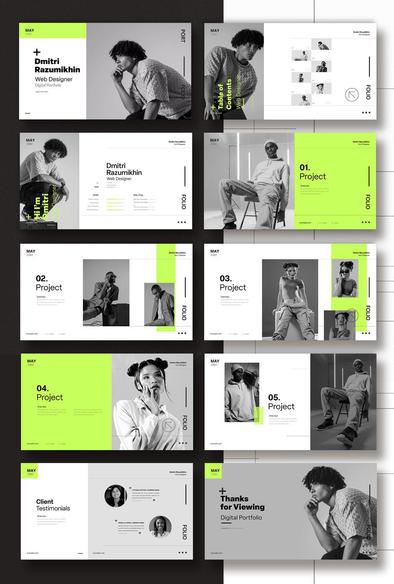
    Summer often brings a quieter period for many designers and creatives. This slowdown presents the perfect opportunity to focus on a crucial career tool: your portfolio. A strong portfolio is more than a collection of work; it’s a narrative about your skills and professional identity. The challenge, however, is crafting a presentation that is as compelling as the projects within it. This is precisely where a superior Adobe InDesign portfolio design template can make all the difference. Consider this modern and minimalist layout from Adobe Stock contributor PixWork; it’s a design intentionally created to elevate your creative work and make a powerful first impression.

    This portfolio brochure, designed in A4 format, is not just a template. Instead, think of it as a strategic partner in presenting your best self. It’s fully customizable and available for immediate download, offering a streamlined path to a polished and professional result.

    Download from Adobe Stock

    Please note that this template requires Adobe InDesign installed on your computer. Whether Mac or PC, the latest version is available on the Adobe Creative Cloud website—take a look here.

    Modern and Minimalist Adobe InDesign Portfolio Design Template by PixWork Download from Adobe Stock

    Why a Minimalist Design Works Wonders for Your Portfolio

    What makes a portfolio design truly effective? Often, the answer is subtraction, not addition. A minimalist aesthetic, like the one featured in this template, provides a clean and sophisticated backdrop that allows your work to take center stage. The layout utilizes a refined neutral color palette, strong grid alignment, and generous white space. Consequently, the viewer’s eye is naturally drawn to your projects without any distracting clutter.

    This approach communicates confidence. It shows that your work is strong enough to stand on its own, framed by a design that is elegant and intentional. Instead of competing for attention, the layout supports your content, creating a seamless and immersive viewing experience. This is the hallmark of a truly professional presentation.

    Exploring the Features of This Modern Portfolio Template

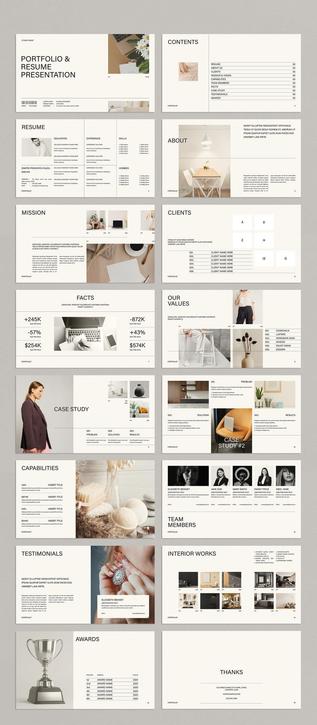
    This is not a one-page solution but a comprehensive, multi-page document designed for depth and detail. Created by the talented folks at PixWork, this Adobe InDesign portfolio design template comes equipped with 16 pre-designed pages. Each page is thoughtfully structured, offering a variety of layouts for everything from an index and welcome page to detailed project showcases, timelines, and package offerings.

    Because all the images and text are set as placeholders, you can easily insert your own content. Do you have a project that needs a full-page image? There’s a layout for that. Need to present a case study with text and smaller supporting visuals? That’s covered too. This structure provides a solid foundation, saving you countless hours of design work while ensuring a consistent and professional look throughout your entire portfolio.

    The Versatility of a Customizable Portfolio Layout

    One of the template’s greatest strengths is its remarkable versatility. While it features a distinct minimalist style, it is built to be adapted. Are you a photographer specializing in warm, earthy tones? Or a graphic designer with a bold, vibrant brand identity? You can effortlessly change the color schemes, typography, and image placements to align perfectly with your personal brand.

    This makes the template an ideal choice for a wide range of creative professionals. For instance, graphic designers, photographers, illustrators, architects, and brand strategists can all tailor this layout to suit their specific needs. The clean structure ensures it’s a suitable canvas for any type of creative work. How would you adapt this layout to tell your unique professional story? The possibilities are built right into the design.

    From Print to Screen: A Dual-Purpose Layout

    In today’s creative landscape, your portfolio needs to perform flawlessly in multiple formats. You might need a printed copy for an important meeting or a digital version to email to a potential client across the globe. This template is designed for both scenarios.

    It is created in CMYK color mode, which means it is completely print-ready. You can send the file directly to a printer with confidence, knowing the colors will be accurate. Furthermore, you can easily export the entire document as a high-quality, interactive PDF. This digital format is perfect for screen presentations, email attachments, or for hosting on your website. This dual functionality ensures your portfolio is always ready, no matter the opportunity. If you’ve been searching for the “best minimalist portfolio template for creatives,” this dual-purpose feature is a compelling reason to consider this option.

    Getting Started is Simpler Than You Think

    You don’t need to be an InDesign expert to use this template effectively. If you have Adobe InDesign installed, you are ready to go. The process is straightforward:

  • Download the Template: Acquire the file from Adobe Stock.
  • Open in InDesign: Launch the file in your Adobe InDesign application.
  • Customize: Simply drag and drop your own images into the designated frames. Click on the text boxes to replace the placeholder text with your own project descriptions, bio, and contact information.
  • Because of this simple workflow, you can create a stunning, personalized portfolio in a fraction of the time it would take to start from a blank page. It empowers you to focus on what truly matters: curating your best work and telling your story. This is how to create a professional portfolio in InDesign without the steep learning curve.

    Download from Adobe Stock

    Feel free to find other professional graphic design templates for different creative needs here at WE AND THE COLOR.