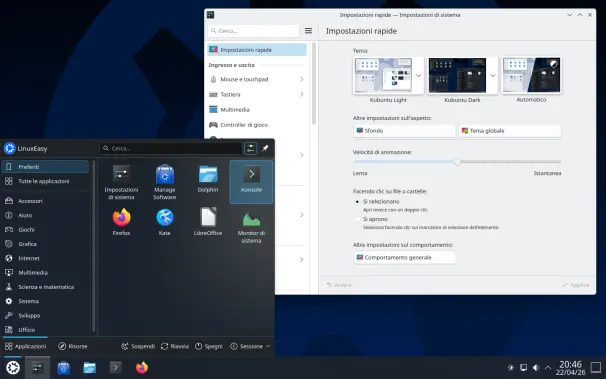
Plasma 6.6 è stato rilasciato con ottime prestazioni e stabilità, mentre Plasma 6.6.1 e 6.7 portano fix, miglioramenti Wayland, nuove funzioni e ottimizzazioni. #KDEPlasma #Linux #Plasma66 #Plasma67

https://www.linuxeasy.org/kde-e-lo-sviluppo-di-plasma-6-6-1-e-6-7/?utm_source=mastodon&utm_medium=jetpack_social

KDE e lo sviluppo di Plasma 6.6.1 e 6.7

Plasma 6.6 è stato rilasciato con ottime prestazioni e stabilità, mentre Plasma 6.6.1 e 6.7 portano fix, miglioramenti Wayland, nuove funzioni e ottimizzazioni.

Linux Easy - News da Mondo Linux

Hello #Plasma 6.6, wellcome aboard.

To use the new plasma login manager, install it, enable plasmalogin systemd service, disable [sddm] systemd sercie, and restart (stopping sddm will kill you session).

To use extract text from screenshots (new spectacle feature), install tesseract and tesseract-data-eng (and/or other language data). I installed tesseract-data-dan for example, result in the note bottom right. Select language(s) in the spectacle settings.

NOTE: I had initially installed a bad tesseract-data file, so I renwed this post. Text extraction works very well, also in danish!

#kde #plasma66 #linux #archlinux

KDE Plasma 6.6 introduce un nuovo Login Manager, miglioramenti a Wayland, funzioni avanzate per screenshot, ottimizzazioni energetiche e un desktop più fluido e moderno. #KDEPlasma #Plasma66 #Linux #KDE #OpenSource

https://www.linuxeasy.org/kde-plasma-6-6-rilasciato-ecco-le-principali-novita/?utm_source=mastodon&utm_medium=jetpack_social

KDE Plasma 6.6 Rilasciato, ecco le principali novità

KDE Plasma 6.6 introduce un nuovo Login Manager, miglioramenti a Wayland, funzioni avanzate per screenshot, ottimizzazioni energetiche e un desktop più fluido e moderno.

Linux Easy - News da Mondo Linux

KDE Plasma 6.6 is now officially live!

The KDE Plasma 6.6 desktop environment is now officially available to the public! You can now try out this version of the desktop environment to get awesome new features, as well as performance improvements and stability enhancements.

According to the KDE Plasma team, this version is like a “visual guide to the best desktop in the known universe,” because it makes your life easier without sacrificing flexibility by adding usability and accessibility features and improvements.

The top three features introduced in this version of KDE Plasma are:

  • Improved on-screen keyboard: The on-screen keyboard has been renewed and enhanced to make it more useful on touch-screen devices, such as tablets.
  • Spectacle Text Recognition: You can now extract text from the screenshots using the OCR technique that scans text in the screenshots and converts it to plain text.
  • Plasma Setup: When an operating system is installed, the Plasma Setup wizard appears, and it lets you configure your user account, your keyboard layout, and much more.

Additionally, it introduces brand new features to make your desktop easier to use, especially when it comes to users that need accessibility features, such as color filtering (for color blindness) and strict centered mode for the magnifier.

For more information about the release, you can consult the announcement here.

Announcement page #KDE #KDEPlasma6 #KDEPlasma66 #Linux #news #Plasma6 #Plasma66 #Tech #Technology #update
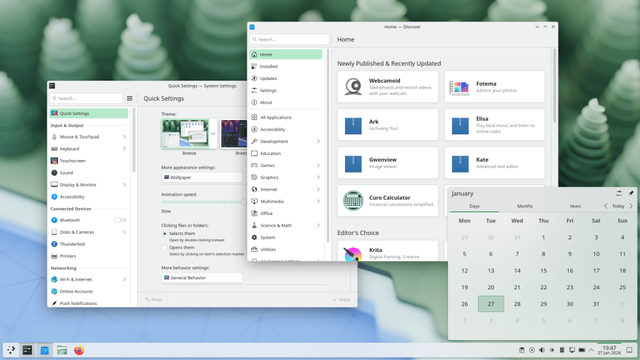
KDE Plasma 6.6 improves Wayland stability, adds screen capture exclusion, Spectacle OCR, auto brightness, HDR fixes, and smoother high-refresh performance.

Full Plasma 6.6 features walk-through here: https://ostechnix.com/kde-plasma-6-6-release-features/

#Plasma66 #KDE #Desktopenvironment #Linux #Releases

KDE Plasma 6.6 is Officially Released: Here's What's New - OSTechNix

KDE Plasma 6.6 improves Wayland stability, adds screen capture exclusion, Spectacle OCR, auto brightness, HDR fixes, and more.

OSTechNix

Plasma 6.6 è in dirittura d'arrivo, UI fluida, bug fix e ottimizzazioni per desktop Linux perfetto. Rilascio imminente con miglioramenti epici! #KDE #Plasma66 #Linux #OpenSource #FOSS #PlasmaUpdate

https://www.linuxeasy.org/plasma-6-6-il-rilascio-che-sta-per-arrivare/?utm_source=mastodon&utm_medium=jetpack_social

Plasma 6.6: Il Rilascio che Sta per Arrivare

Plasma 6.6 è in dirittura d'arrivo, UI fluida, bug fix e ottimizzazioni per desktop Linux perfetto. Rilascio imminente con miglioramenti epici!

Linux Easy - News da Mondo Linux

Plasma 6.6 lets you configure scheduling priorities

As Plasma 6.6 goes into bug fixing stage before the final release, this week, the KDE Plasma team has added a new feature to the System Monitor that restores a feature related to processor and input/output process priority management that existed in the older KSysGuard program. This allows you to set priorities for a process in both contexts.

When you open the “Set Priority” window for a specific process, the following CPU scheduling options are available:

  • Normal: The standard time-sharing scheduler for processes without special requirements.
  • Batch: Process is mildly disfavored in scheduling decisions, for CPU-intensive non-interactive processes.
  • Round-robin: Process will run whenever runnable, with timeslicing.
  • FIFO: Process will run whenever runnable, with no timeslicing.

However, for I/O scheduling settings, the following options can be provided to a process:

  • Normal: Process’ priority is based on the CPU priority.
  • Idle: Process can only use the hard disk when no other process has used it very recently.
  • Best Effort: Process is given higher priority to access the hard disk than normal.
  • Real Time: Process gets immediate access to the hard disk whenever needed, regardless of what else is going on.

The priority slider can be adjusted from 1 to 40 for the CPU priority, while the I/O priority slider can be adjusted from 0 to 7. The lowest value means the process is getting the least priority, and the highest value means the process is getting the most priority. This uses a new API that was introduced to libksysguard.

KDE Plasma 6.6 also brings an improvement that allows you to manually check the file system for errors while eliminating the automated check when you mount a drive. Search bar has also been added to the screen choser dialog, and many other improvements were made.

#KDE #KDEPlasma #KDEPlasma66 #Linux #news #Plasma #Plasma6 #Plasma66 #Tech #Technology #update

KDE Plasma 6.6 fixes a screensaver bug for gamers

The screensaver bug that manifested when gamers play a game using their controller on their PC has been fixed for the upcoming release of KDE Plasma 6.6. Gamers who are experiencing this bug can now have a comfortable gaming experience after upgrading to KDE Plasma 6.6.

The blog article of This Week in Plasma states that the KDE desktop team has fixed an issue where the screensaver or screen locking mechanism would start during the gaming session using the controller as an input device instead of a mouse and a keyboard. This enhances experience for gamers who prefer to use controllers by considering every input event from the gaming controller as an activity.

A 13-year old bug report was made against KDE 4.x. Since then, the problem has spread from KDE 4.x to KDE Plasma 5.x and 6.x desktop environments across different versions of Linux distributions, disrupting the gamers’ experience for 13 consecutive years, with workarounds being posted.

Starting from KDE Plasma 6.6, which will be released on February 17th, gamers will be able to use their gamepads without worrying about their screen turning off during their gaming session.

#KDE #KDEPlasma #KDEPlasma6 #KDEPlasma66 #Linux #news #Plasma #Plasma6 #Plasma66 #Tech #Technology #update

KDE Plasma 6.6.0 now allows you to exclude windows from screen capture. Keep certain parts of your desktop private when recording.

Read more details here: https://ostechnix.com/exclude-certain-windows-from-screen-recording-in-plasma-6-6/

#KDE #Plasma66 #Screencast #ExcludeWindows #Linux

KDE Plasma 6.6 Adds 'Exclude Certain Windows From Screen Recording' Feature - OSTechNix

KDE Plasma 6.6.0 allows you to exclude windows from screen recording. Keep certain parts of your desktop private when recording your screen.

OSTechNix

Plasma 6.6 brings the long-awaited multi-monitor control, new QR code Wi-Fi connectivity, and a massive 100 MiB reduction in memory usage.

Read full details here: https://ostechnix.com/plasma-6-6-primary-desktops-qr-code-wifi/

#KDE #Plasma66 #DesktopEnvironment #Linux

Plasma 6.6 Brings Primary-Screen Virtual Desktops, QR Code Wi-Fi, Plus More! - OSTechNix

Plasma 6.6 brings the long-awaited multi-monitor control, new QR code Wi-Fi connectivity, and a massive 100 MiB reduction in memory usage.

OSTechNix