 Armin Hanisch
Faltheftchen (PocketMod) sind ein Evergreen. Aber wie drucke ich sowas ohne Aufwand und mit freier Software? Hier der versprochene Blogpost:

 Bo Morgan
I was using pdflatex to generate receipts for product purchases on my website, and I found it didn't have very good international multilingual unicode support. I found wkhtmltopdf, which works great for me. On a digitalocean debian server, I'm producing receipts that closely mimic my on-line HTML receipts in 16 languages. I highly recommend wkhtmltopdf.
#html #pdf #wkhtmltopdf #latex #pdflatex #unicode #multilingual #international #foss #webdev
I ran up against international limitations of tex / latex / pdflatex yesterday. I found wkhtmltopdf and got it working with all 13 languages that the Brain Computer Enterprises, Cooperative Inc. ( @bce ) website currently supports. Today, I am completing the conversion of the PDF order receipt generation from pdflatex to wkhtmltopdf.
#wkhtmltopdf #latex #tex #pdflatex #international #accessibility #multilingual #html #pdf
 Antonio Paternina
Si te quedas atascado instalando #texlive-full o #pdflatex
Solo oprime enter tantas veces hasta que te aparezca la palabra : done.
Has así en cada etapa que te quedes atascado.
Simplemente funciona.
https://askubuntu.com/questions/956006/pregenerating-context-markiv-format-this-may-take-some-time-takes-forever
#gnulinux

 ArneBab
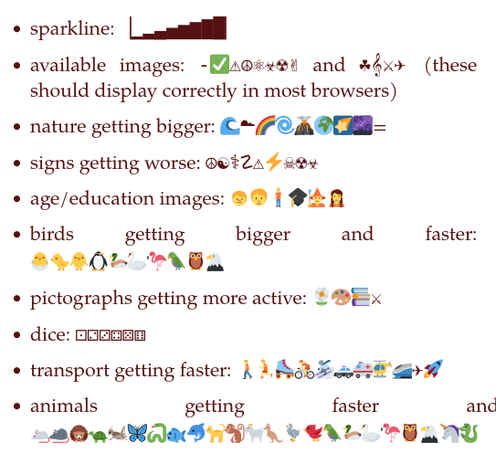
Unicode pictograms to mark progressively rising values:
https://www.draketo.de/anderes/unicode-icon-progressions
For Ace Maths I searched for unicode icons to mark progression: show that you’re getting better. Since I found a lot of different options (from simple sparklines to a huge list of animals), I’m collecting them in this article.
Includes a tip for somewhat better, automatic #unicode "image" suppport #LaTeX with plain #pdflatex / #pdftex

 8Petros [MOVING!!]
#Obsidian #Export #Debian #Pandoc #pdflatex #question
I just installed an Obsidian plugin for multiformat export (github.com/mokeyish/obsidian-e…) which uses pandoc.
Pandoc, in turn, needs a pdflatex engine (as a default / recommended). Now, I am struggling to find a way to install pdflatex in Debian. The search for packages brought me to tracker.debian.org/pkg/texlive… which manpage mentions pdflatex, but after installation neither CLI nor Obsidian can detect such command.
Is there an easy way to get pdflatex, or should I switc to another pandoc-accepted engine, and which one?

GitHub - mokeyish/obsidian-enhancing-export: This is an enhancing export plugin base on Pandoc for Obsidian (https://obsidian.md/ ). It's allow you to export to formats like Markdown、Markdown (Hugo https://gohugo.io/ )、Html、docx、Latex etc.
This is an enhancing export plugin base on Pandoc for Obsidian (https://obsidian.md/ ). It's allow you to export to formats like Markdown、Markdown (Hugo https://gohugo.io/ )、Html、docx、Latex etc...
 oblate
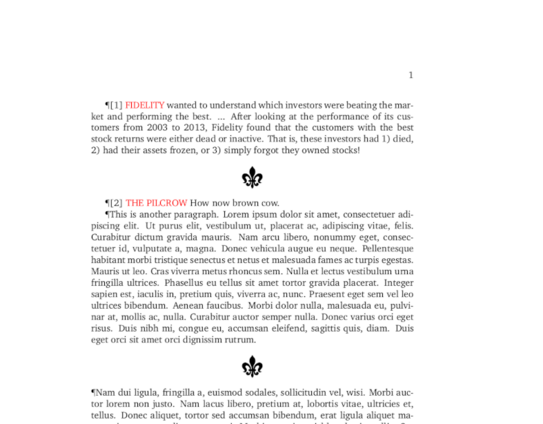
I'm playing around with #pdflatex as a kind of diary/notebook. Just experimenting at this stage. As yo may have guessed, I'm going for an antiquated feel.
 Johannes Brakensiek
Since #macOS broke all my known-to-work PDF workflows, I replaced all of them by using #pdflatex from #Debian package texlive-extra-utils. You wouldn't believe it, but that just works(TM).
This kinda refers to https://functional.cafe/@tfb/112087890445035971
Thomas (@[email protected])
10.14 dropping support for anti-aliasing text is one of the most insane changes I've ever seen to an OS https://talk.tidbits.com/t/features-lost-across-versions-of-macos/27037
 Aslak Raanes
ÆØÅ m.m. i LaTeX
Det kan være noe upraktisk å skrive og lese {\o} for «ø», {\aa} for «å». Tidligere var det vanlig å bruke latin1, men nyere LaTeX kan en en bruke utf8 som inputenc. Det betyr ikke at en kan skrive full unicode, men det vil i de fleste tilfeller dekke behovet for vesteuropa. […]
ÆØÅ m.m. i LaTeX
Det kan være noe upraktisk å skrive og lese {\o} for «ø», {\aa} for «å». Tidligere var det vanlig å bruke latin1, men nyere LaTeX kan en en bruke utf8 som inputenc. Det betyr ikke at en kan skrive full unicode, men det vil i de fleste tilfeller dekke behovet for vesteuropa. NB! Dette ble [...]
 Yann Büchau
@TeXUsersGroup That sounds amazing, inlining #Python into #TexLatex. Unfortunate that journals only ever accept pdflatex (and are often already clumsy at that).