🧵 So, on my journey to live #PitchShift on #Linux with an #audio #plugin, I found #SpectralShift. This one is very good I think. However, it has too much latency for live use, so it's more for mixdown.

The old #MaPitchshift serves as an example for one of the reasons why #LinuxProAudio had a bad reputation in the past: It's practically useless. It does pitch shifting, but it only shifts by some magic floating point number which has no easy-to-handle relation to musical terms such as semitones or cents. The latency depends on the window setting, yet it is possible to sabotage the thing completely by nonsensical settings.

So I asked ChatGPT and it said the ratio is 2^(Semitones/12) – keep this in mind and your calculator ready. 🤪 This is actually sort of correct.

Turns out that the shifting of #MaPitchshift is too inacurate for musical use with a window size suitable for live use. So, giving up for now, back to outboard, my 21-year-old #Lexicon #MX200 is way better.

#LinuxAudio #vst #vstplugin

I found another interesting audio #plugin for #Linux: #reTuner claims to do good pitch-shifting for instruments generally too low or too high. Like 440Hz to 432Hz shifting.

There is a .deb package, yet unfortunately, the plugin installs to a non-standard place.

I decided to symlink /usr/lib/x86_64-linux-gnu/vst3/KV-reTuner.vst3 to /usr/lib/vst3 instead of adjusting plugin paths in all my plugin hosts.

I don't have an urgent need for it, but I'm sure I will use this at some point.

(Actually I am looking for a possible replacement of the pitch shifter in my Lexicon MX200, which I still do love… yet the ADCs of the Lexicon are a sad story, and the old Boss compressor sitting in that rack together with a cheap Alesis tube preamp isn't that reliable any more.)

https://kushview.net/product/retuner/

#LinuxAudio #LinuxProAudio #Recording #vst3 vstplugin #pitchshift

reTuner | Pitch Shifter | Music ReTuning Plugin | Kushview

reTuner is an open-source audio pitch shifter plugin that converts music between tuning standards (A440, A432, etc.) with professional quality. Powered by t ...

🧵 #atkAutomixer, the first #automixer #plugin for #Linux to my knowledge.

Testing the demo right now. It is very promising!

It works in #Mixbus (I use #MixbusPro). Just dropped its VST3 folder to ~/.vst3, rescanned plugins… go.

It has a cool and crazy concept: You just add an instance to every channel. And all instances will talk to each other, forming one huge inter-connected insert voodoo.

The screenshot is from a recording I found in my archive, 2 lectern mics for 1 speaker, + 1 other mic for an interpreter. Very reverberant large hall. Whenever the interpreter interrupts, the lectern mics will get turned down, lowering the overall reverb coming from these.

The only thing that didn't work out that well is the order of channels after re-opening the project. I guess Mixbus does not instantiate the plugins in the order of the channels on loading. But usually I don't adjust anything in the automixer anyways, so it doesn't matter.

#LinuxProAudio #LinuxAudio #EventTech #Veranstaltungstechnik

I haven't tried it yet, but I just found out, it finally has arrived! I have been waiting for this…

🧵 The #automixer #plugin for #Linux!

For those who don't know, automixer is a circuit invented by a guy named #DanDugan. (Today: an algorithm.)

Basically it is a tool that compares all mic channels to all other mic channels. In effect, lowers mics not in use. When multiple mics are used, it averages their levels – very quickly.

Most good digital mixing consoles have a built-in automixer these days, such as the #AMM by #AllenAndHeath. I use it all the time when live-mixing dialogue. Especially with headset omni mics, this isn't a handy tool, it's a live-(sound-)savior. (I once used it on 16 open omni mics, would have been a feedback orgy otherwise.)

If you quickly need to mix down a multi-track recording of spoken live dialogue, this thing will save your behind.

If it works as intended, which I'll have to try.

https://www.atkaudio.com/products/atkautomixer

#LinuxAudio #LinuxProAudio #EventTech #Veranstaltungstechnik

atkAutomixer

How to clock-sync a delay #plugin in #Carla using #MIDI clock on #UbuntuStudio #Linux?

I have a DIY hardware MIDI clock feeding all kinds of stuff, including my PC of needed. Yet Jack Midi does not seem to route MIDI clock messages at all.

So I need something to sync my Jack transport to MIDI clock.

So there's this guy on YouTube who claims to have solved the issue by writing midi-clock-jack-bridge “using AI”: https://www.youtube.com/watch?v=Covwhqap27c

Here's his (?) code… https://github.com/ariel10aguero/midi-clock-jack-bridge

Okay, there's some compiler warnings, but it seems to do the job. I can use my #Tal #DubX #Delay and sync to plugin host, which translates to Jack transport, which is sync'ed to #MidiClock from an USB MIDI input.

Now I'm actually experimenting feeding #DecentSampler with #VenusTheory samples from my bass which has a #RolandGK3 #MidiPickup system (I got one of the rare GI-20 units).

EDIT: I fooled myself completely. While this looks good, it DOES NOT SYNC the tempo of my delay. See 🧵.

#LinuxAudio #LinuxProAudio #LinuxMusician

🧵 #MIDI madness for controlling #Guitarix #Looper from my #Akai #LPD8

The Akai's touch buttons / drum pads can send Note, CC or Program Change. #Carla needs MIDI CC to control plugins, #gxLiveLooper needs one-shot messages for erasing tracks, yet it needs something on-off for recording. Basically: “hold the rec button” – but how, I need my hands to play, so I need to toggle that.

Solution: Set Akai controller to note mode. Split the “keyboard” so that the upper 4 keys/drum pads get passed on straight in channel 9, and the lower 4 run in channel 10, to which MIDI Note Toggle reacts. Then convert anything note to CC using MIDI Note to CC.

Let's see of this works in a little jam…

Note that I do not intend to do a timed looping performance like these many YouTube artists overdoing Ableton Live, I need drone sounds from bass guitar to be fed into #AudioDamage #Descent #GranularDelay, so timing is not that relevant.

@tm @falktx @x42

#LinuxAudio #LinuxProAudio #LinuxMusician

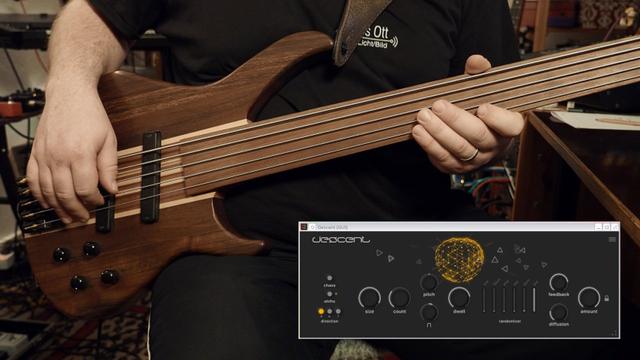
AudioDamage AD061 Descent won't let me off the hook.

It's a granular delay/reverb #plugin that is a lot of fun. However, I now found out that what I'd like to have is something that is more related to the granular delay in my beloved #Soma #Cosmos “Drifting Memory Station”.

The big deep bass #drone to rule them all, with sparkling mid-high freq stars!

So, adding to yesterday's video, I added a stereo auto panner and a looper. The #Guitarix looper isn't that great to use, for real fun I'd need to get my AKAI button controller to interact.

It's the first time I am considering taking a PC-based setup on stage one fine day. The sound is just too great…

I usually use a simple Mooer RedTruck for playing fretless bass live, but in comparison to the FX by TC and the Eden WTDI + Descent plugin, it sounds cheap.

Check out yesterday's gear porn nerdcore #LinuxAudio video: https://makertube.net/w/hMwaXVNb1mTMGMv28yDvwU

#GranularDelay #Bass #BassGuitar #FretlessBass #AudioDamage #AudioDamageDescent #SomaCosmos #Linux #LinuxProAudio

So. Having failed in so many ways today because I insist on using #Linux also for video editing – my wife even offered me her Windows laptop to edit my video, because #Resolve just runs fine on it…

… actually not even a special, big, cinematic movie something. Just a nerdy video for #Peetertube / #Makertube that isn't even 6 minutes. But it took me so long to get my #NLE workflow back that I have to do a Sunday night shift with freelance work in order to prepare for an appointment tomorrow. I feel so stupid for using Linux. It could be all so much easier.

Anyways, what I was trying to do was playing #bass into the #Descent #GranularSynthesis #FX #plugin by #AudioDamage, which I actually did buy because it is available for… erm… Linux… and it can do cool stuff.

So here's a preview.

For the full video yet to come, please make shure to subscribe to @atkwap

#Linux #LinuxAudio #LinuxProAudio #GranularFX #vst #vst3 #vstPlugin #AudioPlugin #VideoEditing #UbuntuStudio

Almost half past six in the evening, time to get up from the sofa, dragging my elephant's head with its ugly cold to the workshop and get a few things done…

… quick test of this #Mackie #Onyx mixer, it seems to work well as an audio interface with #Pipewire on #Linux via USB.

Shows up as 8 inputs and 4 outputs when set to use the “pro audio” profile.

Not the type of mixer I usually use, but a client of mine needed something with built-in bluetooth receiver and built-in power supply.

#eventtech #Veranstaltungstechnik #Tontechnik #SoundEngineering #mixer #mixingConsole #LinuxAudio #LinuxProAudio

#Soundcraft #SiImpact #DigialMixer running with #Pipewire as an USB #AudioInterface: ✅

Used for playback music in the break without analog 3.5mm s**thole sound from my Laptop… but I had also successfully recorded multi-track with this configuration on an earlier event.

#EventTech #Linux #LinuxAudio #LinuxProAudio #EventTech #Veranstaltungstechnik