Fixing sudden, random iPhone disconnects from Image Capture

It appears that each time tethering is enabled or disabled on the iPhone, it disconnects Image Capture. So if you have spotty cellular service – because perhaps you live in the United States, where that’s the only kind of cellular service on offer – you might find that happens so often that you can’t complete basic media transfers in Image Capture.

Thankfully the workaround is simple – […]

https://wadetregaskis.com/fixing-sudden-random-iphone-disconnects-from-image-capture/
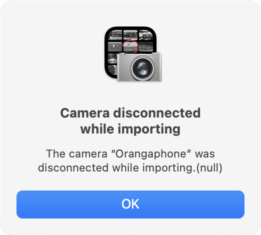

Image Capture import failing with error -9934

The error “com.apple.ImageCaptureCore error -9934” during import (e.g. from an iPhone) can be caused by a lot of things, according to the Internet:

Permission errors with the destination folder (e.g. not writable by the current user).

Conversion failures if you have the iPhone set to export images in “compatible” formats rather than their originals1

Unsupported image formats (e.g. HEIC) on […]

https://wadetregaskis.com/image-capture-import-failing-with-error-9934/

Image Capture import failing with error -9934 – Wade Tregaskis

Now that #Windows has the #AppleDevices app to replace #iTunes when it comes to making local, complete, encrypted backups of #Apple devices i.e. #iPhone, #iPod, #iPad, etc. - Windows also needs #macOS 's #ImageCapture app for quick exports of photo/video files. That'll be nice.


🔗 https://support.apple.com/en-my/guide/image-capture/imgcp1003/mac

---

Update:

Well, apparently it's already achievable simply by having the Apple Devices app installed, and using the default Photos app on Windows.

Doesn't seem to be working for me tho (the device isn't showing up in the Photos app, tho is on the Apple Devices app) - but that could just be either the fact that I'm doing this on a virtual machine (on
#Linux), or bcos my device is an (outdated) iPod lol.

Cool tho I guess that this simple functionality isn't somehow
exclusive to Macs but also Windows PCs.

🔗 https://support.apple.com/en-my/120267

🔗 https://support.microsoft.com/en-gb/windows/import-photos-and-videos-from-phone-to-pc-198f2301-e9a7-c734-5f39-a8946a5ebc99
Transfer images in Image Capture on Mac

In Image Capture on your Mac, transfer images and video clips from a camera, iPhone, iPad, iPod touch or other device.

Apple Support
ESP32 AI On The Edge Module

If you’re looking to build a wireless device with AI features to take advantage of the so-called AI On The Edge, you need reliable power, good wireless connectivity, and enough horsepower to …

Tindie Blog

Apple's Image Capture disappointed me again. So I wrote a utility to bypass it entirely, and backup photos from an old Android phone, using node.js and adb: https://soledadpenades.com/posts/2025/why-backup-from-android-with-adb/

#android #imagecapture #adb #javascript

Why did I backup stuff from Android using ADB? | soledad penadés

Uncover the importance of aperture in photography and learn how to choose the perfect settings to transform your images into vivid stories! 📸✨ #Photography #Aperture #ImageCapture #PhotoTips #Storytelling https://www.sage.blue/aperture-the-key-to-picture/
A Comprehensive Guide on Aperture - From Blur to Brilliance

Dive deep into the core of photography as we demystify the role of aperture in image capture. With insights into choosing the perfect settings, watch your photos transform and narrate stories more vividly.

Sage Blue
Unlock the mysteries of photography by exploring the role of aperture in image capture—choose the perfect settings to transform your photos into vivid narratives! 📸✨ #Photography #Aperture #ImageCapture #VisualStorytelling #CameraSettings https://www.sage.blue/aperture-the-key-to-picture/
A Comprehensive Guide on Aperture - From Blur to Brilliance

Dive deep into the core of photography as we demystify the role of aperture in image capture. With insights into choosing the perfect settings, watch your photos transform and narrate stories more vividly.

Sage Blue

The slightest resize of the sidebar will compress the Eject button before the label in Image Capture.

The Eject label should never disappear and looks like it needs priority over the device name label. Or really high compression resistance compared to the device name label.

#Macintosh #MacOSX #macOS #Mac #ImageCapture #AppKit

So a $10 app “PLIST Edit” later, I’ve set:

<key>IK_MakeSubFoldersPerCamera</key>
from <true/> to <false/>

…and now the menu item “Make Subfolders Per Camera” has been returned to the destination UI, and I can check or uncheck it.

#Apple #Enshittification #ImageCapture

/2