 TelH90
 Netzblockierer
 virtualmarc
Das Thema #Glasfaserausbau in #Deutschland ist teils echt ermüdend (und deprimierend).
Vor 2 1/2 Jahren wurde hier im Gebiet durch die #Telekom #Glasfaser ausgebaut.
Alle Häuser haben einen #Glasfaseranschluss (inkl. die Wohnungen bei den Mehrfamilienhäusern), außer die von meinem Vermieter…
Entsprechend können hier fast überall Glasfasertarife bei diversen Providern gebucht werden.
Ich habe mich damals auch als interessierter Mieter gemeldet, leider wurde der Anschluss abgelehnt, weil der Vermieter dem Ausbau nicht zugestimmt hat.
Mein erster Gedanke: Der #Allbau, als Tochter der Stadt #Essen , baut vermutlich über #Ruhrfibre aus, bei denen die Stadt auch Anteile hat.
Doch nach einer Nachfrage von mir wurde mir mitgeteilt, dass allgemein kein #FTTH Ausbau in deren Wohnungen stattfinden wird.
Der Allbau hat einen Vertrag mit #Vodafone für den „Glasfaseraudbau“. (Vodafone versteht auch #FTTC als „Glasfaseranschluss“).
Es wird hier lediglich #FTTB ausgebaut und weiterhin per #DOCSIS über #Kabel verteilt.
Also kein echter Glasfaseranschluss und wer will schon DOCSIS mit seinen hohen Latenzen oder das Netz von Vodafone mit DSLite.
Durch den Kabelanschluss ist man auch auf Vodafone festgenagelt und hat keine Anbieterwahl.
Der Ausbau durch Vodafone fand kurz nach dem der Telekom statt.
Es wurden Leerrohre gelegt.
Das war vor 2 Jahren, seit dem ist hier im gesamten Gebiet auch nichts mehr passiert.
Vor kurzen konnte man dann wieder Glasfasertarife buchen, die Sperre war aufgehoben.
Ist die Sperre einfach nur verjährt oder gab es tatsächlich einen Sinneswandel beim Allbau?
Ich habe also wieder gebucht.
Heute 1 1/2 Wochen später dann die ernüchterung: Nein, der Allbau erlaubt immer noch keinen Glasfaserausbau.
Für den Ausbau wären meinem Vermieter keine Kosten entstanden.
#StadtEssen #Ruhrgebiet #Ruhrpott
Vor 2 1/2 Jahren wurde hier im Gebiet durch die #Telekom #Glasfaser ausgebaut.
Alle Häuser haben einen #Glasfaseranschluss (inkl. die Wohnungen bei den Mehrfamilienhäusern), außer die von meinem Vermieter…
Entsprechend können hier fast überall Glasfasertarife bei diversen Providern gebucht werden.
Ich habe mich damals auch als interessierter Mieter gemeldet, leider wurde der Anschluss abgelehnt, weil der Vermieter dem Ausbau nicht zugestimmt hat.
Mein erster Gedanke: Der #Allbau, als Tochter der Stadt #Essen , baut vermutlich über #Ruhrfibre aus, bei denen die Stadt auch Anteile hat.
Doch nach einer Nachfrage von mir wurde mir mitgeteilt, dass allgemein kein #FTTH Ausbau in deren Wohnungen stattfinden wird.
Der Allbau hat einen Vertrag mit #Vodafone für den „Glasfaseraudbau“. (Vodafone versteht auch #FTTC als „Glasfaseranschluss“).
Es wird hier lediglich #FTTB ausgebaut und weiterhin per #DOCSIS über #Kabel verteilt.
Also kein echter Glasfaseranschluss und wer will schon DOCSIS mit seinen hohen Latenzen oder das Netz von Vodafone mit DSLite.
Durch den Kabelanschluss ist man auch auf Vodafone festgenagelt und hat keine Anbieterwahl.
Der Ausbau durch Vodafone fand kurz nach dem der Telekom statt.
Es wurden Leerrohre gelegt.
Das war vor 2 Jahren, seit dem ist hier im gesamten Gebiet auch nichts mehr passiert.
Vor kurzen konnte man dann wieder Glasfasertarife buchen, die Sperre war aufgehoben.
Ist die Sperre einfach nur verjährt oder gab es tatsächlich einen Sinneswandel beim Allbau?
Ich habe also wieder gebucht.
Heute 1 1/2 Wochen später dann die ernüchterung: Nein, der Allbau erlaubt immer noch keinen Glasfaserausbau.
Für den Ausbau wären meinem Vermieter keine Kosten entstanden.
#StadtEssen #Ruhrgebiet #Ruhrpott

 WinFuture.de
 techUpdate.io
 Damian Yerrick
 Matti Järvinen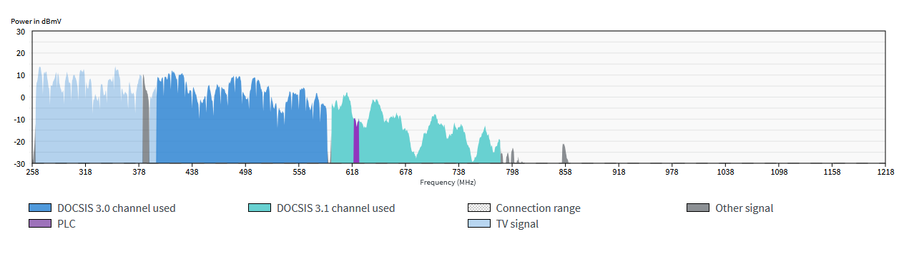

 Blake Patterson
 kwest_tech