Design Smarter, Not Harder, in 2026
Burnout destroys creativity faster than bad client feedback. We often push pixels until our eyes bleed. That stops now. You need to design smarter, not harder, to survive the industry in 2026. Efficiency does not mean cutting corners on quality. It involves leveraging tools to protect your energy. Your creative output deserves a focused mind. Therefore, we must rethink our entire production process. We will explore how AI and templates revolutionize workflows. This approach lets you design smarter, not harder, immediately.
Why Does Your Current Workflow Fail You?
Do you feel exhausted after simple projects? Manual repetition drains your brainpower. Consequently, you have zero energy for actual innovation. Clients pay for your vision, not your mouse clicks. Old workflows rely heavily on brute force. You start from scratch every single time. This method ignores modern advancements in software. To design smarter, you must abandon the “blank canvas” ego.
Smart designers identify patterns in their daily tasks. They automate the boring stuff. Thus, they reclaim hours for strategic thinking. Design smarter, not harder, becomes a philosophy, not just a slogan. It separates the struggling artist from the prolific creator. We will analyze the tools that make this possible.
The Trap of “Busy Work”
Motion does not equal progress. We often confuse busyness with productivity. Spending three hours deep-etching hair is unnecessary today. Yet, many designers still do it manually. This creates a bottleneck in your timeline. You must recognize these time-sinks. Then, you can eliminate them ruthlessly. To design smarter requires a critical audit of your time.
Embrace AI to Design Smarter, Not Harder
Artificial Intelligence acts as your junior designer. It handles the tedious execution. Adobe has integrated powerful AI into our standard toolkit. You simply guide the machine. For instance, Adobe Photoshop’s Generative Fill changes everything. It creates complex backgrounds instantly. Therefore, you spend less time on technical retouching. You focus entirely on the concept. This helps you design smarter, not harder, every day.
Consider the vector capabilities in Adobe Illustrator. Its text-to-vector features generate icons rapidly. You refine the output rather than drawing from zero. Consequently, you iterate through ideas much faster. Speed allows for more experimentation. More experimentation leads to better design outcomes. This is how you design smarter, not harder, in 2026.
Adobe Firefly: Your Efficiency Engine
Firefly powers these new creative workflows. It respects copyright, which protects your commercial work. You can generate mood boards in seconds. Furthermore, you can recolor entire vector artworks instantly. Adobe InDesign also uses AI for text wrapping. These features cut production time in half. You design smarter, not harder, by mastering these specific controls. Ignore them, and you will fall behind.
Stop Reinventing the Wheel with Templates
The ego tells us to build everything from scratch. Logic tells us to use professional templates. A high-quality template solves grid problems immediately. It handles typography hierarchy for you. Therefore, you customize rather than construct. This is a core pillar to design smarter, not harder.
Imagine a complex 50-page annual report. Setting up master pages takes hours. However, a professional InDesign template comes pre-configured. You get paragraph styles, swatch libraries, and baseline grids. You simply pour in the content and adjust. This efficiency boosts your profit margins. To design smarter, not harder, means respecting your own time.
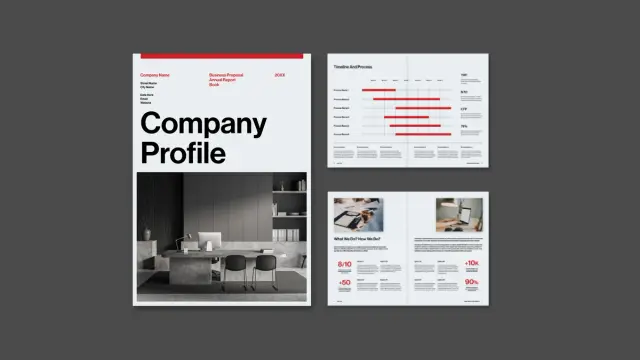
This Adobe InDesign company profile layout by graphic designer Tom Sarraipo is available as a customizable design template in A4 with 16 pre-designed, fully editable pages.
You can download it for free with an Adobe Stock trial subscription.Leveraging Assets for Photoshop and Illustrator
Templates extend beyond page layouts. They include PSD mockups and Illustrator UI kits. Why model a branding bottle in 3D? A high-resolution PSD mockup achieves the same result faster. You paste your design, and the lighting updates automatically. Consequently, you present your work professionally without the headache. You design smarter by using existing high-quality assets.
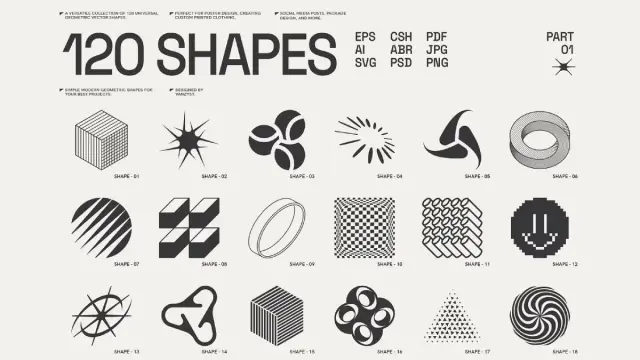
120 Abstract Geometric Vector Shapes by Vanzyst.
You can purchase the set from Creative Market.The Financial Impact of Efficient Design
Time equals money in the creative industry. An efficient workflow increases your hourly rate. If you finish a project in half the time, you double your effective rate. Thus, you design smarter, not harder, to earn more. Clients appreciate the faster turnaround times. They also appreciate the consistent quality.
Furthermore, efficiency reduces revision fatigue. You can pivot quickly when clients request changes. You have not invested ten hours in a single background. Therefore, you feel less defensive about the work. This improves the client relationship significantly. To design smarter, not harder, creates a healthier business model.
Scaling Your Creative Output
Solo designers often hit a ceiling. There are only so many hours in a day. However, efficient workflows allow you to scale. You can handle multiple clients simultaneously, use AI to generate variations and templates to structure the deliverables. This system turns you into a design powerhouse. You design smarter, not harder, to grow your career.
Developing a “Design Smarter, Not Harder” Mindset
Tools are useless without the right mindset. You must constantly seek optimization. Ask yourself if a task creates value. If it does not, automate or eliminate it. To design smarter, not harder, requires continuous learning. Software updates happen monthly. New AI features appear weekly. You must stay curious to stay efficient.
Share this philosophy with your team. A collaborative workflow multiplies efficiency. Use cloud libraries to share assets. Standardize your file naming conventions. These small habits compound over time. Eventually, the entire team will design smarter, not harder.
My Take: The Efficiency Paradox
Speed can kill the soul if unchecked. We must not become robots. We use efficiency to buy time for art. Do not fill the saved time with more work. Use it to think, rest, or explore. That is the true goal. To design smarter, not harder, ultimately grants you freedom. Freedom allows you to be truly creative.
FAQ: Optimizing Your Design Workflow
Q: Will using AI tools make my designs look generic?
A: No, if you use them correctly. AI generates the raw material or handles technical tasks. You provide the creative direction and finishing touches. You design smarter, not harder, by using AI as a foundation, not the final result.
Q: Are design templates unprofessional?
A: Absolutely not. Professional agencies use templates for grids, mockups, and internal presentations constantly. It ensures consistency and saves time. Using them allows you to design smarter, not harder, on complex projects.
Q: How do I start to design smarter, not harder, today?
A: Start by auditing your last project. Identify where you wasted the most time. Then, find an AI tool or template that solves that specific bottleneck.
Q: Which Adobe tool helps me design smarter, not harder, the most?
A: Photoshop’s Generative Fill offers the most immediate time-saving for image editing. However, Illustrator’s Recolor Artwork is massive for branding.
Q: Does “design smarter, not harder” apply to junior designers?
A: Yes, it is crucial for juniors. Mastering efficiency early prevents burnout. It allows you to learn faster by experimenting more. You should adopt the design smarter, not harder mantra immediately.
Q: Can I use AI for client work legally?
A: Tools like Adobe Firefly are trained on safe commercial datasets. This makes them safe for commercial work. Always check the terms of the specific AI tool you use. This security helps you design smarter, not harder, without legal worry.
Check out WE AND THE COLOR’s Graphic Design, Templates, Technology, and AI sections for more inspiring content.
Subscribe to our newsletter!
[newsletter_form type=”minimal”]
#ai #design #designSmarter #designTemplates #designWorkflow #graphicDesign #templates #workflow
 Mr.G
Mr.G
 digitalplanner.ch
 ZodjangLn

 Pastable
 RMVBG.Net
 WE AND THE COLOR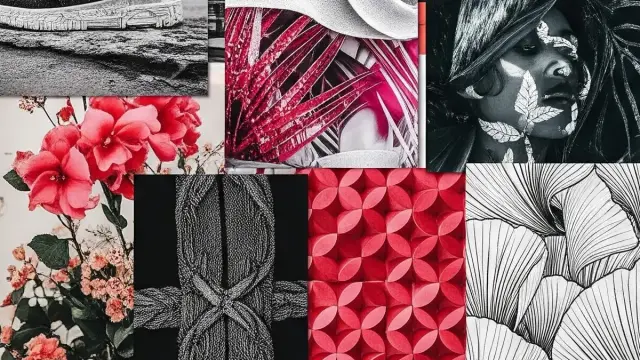
 flux2max
 Patricia
 Typographer