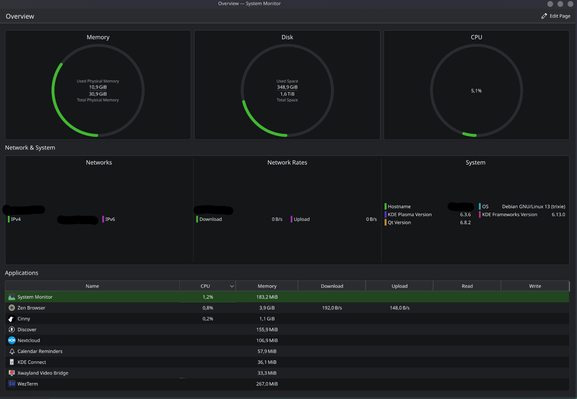
So here's the current operating metrics for using Debian Bananas (Trixie and KDE Plasma btw). Keep in mind I haven't compiled the mesa3D drivers or whatever yet, because I'm lazy, so that might help a bit too, but so far I'd say this is not something I'd recommend on lower end M1s. I'm cruisin' along fine because this thing is speced out to Hell, but @cloudymax is also running the same stack on a lower end M1 and is suffering from overheating right now.

#debianbananas #asahi #asahilinux

OK, time bare my soul. Here are the parameters with which I operate:

  • I'm running asahi with Debian Bananas using KDE Plasma

  • I have a dutch macbook pro, and so the keyboard looks as described here: https://support.apple.com/en-us/102743

  • I want the top button to the left of the 1 key to map to screenshot

  • when I hit shift+3, it should produce a hash

  • the button to the left of my z key, should be a backtic by default and a tilde when I hold shift and hit it

  • capslock should be ctrl

  • command key should be another control

All other keys should behave the way they normally would.

What keyboard model and layout do you choose for this if you're using Debian Bananas with KDE Plasma on a Dutch macbook pro?

If I select Apple ISO and Dutch Dutch Macintosh, everything works except #, which is instead a £. (also it won't let me map "win" aka command to ctrl)

If I select Generic 104-key PC and Dutch Dutch Macintosh, the # works, but then the tilde key becomes < >, which is weird.

I have no idea what to do. I want help.

#debianbananas #asahi #kde_plasma #kdePlasma #ashailinux #keyboard #keyboards

How to identify your Apple keyboard layout by country or region - Apple Support

Use the letters and symbols on your keyboard to determine your keyboard layout.

Apple Support

OK, so what left?

  • fix keyboard layout. The key next to my z key on my keyboard is labeled with a tilde and a back-tic, but if I hit, it types a < or with shfit I get a >... which is confusing. To be honest, I basically never used the other on the top right that is supposed to be tilde on US keyboards, because it's... I don't know what that is actually lol it kinda looks like an s with a little circle in the middle? And if you hit shift, you get what looks like a plus sign with an underscore? 

Either way, I have gotten used to the tilde being next to my z key and I want it back there, so I can remap that other weird key to screenshot.

  • no easy way to screenshot, see above.

  • zathura not pretty

  • have not attempted to setup email or vpn yet

But we're moving! I can see this being a lovely daily driver by Kubecon! 

#debianbananas #kdeplasma

Fixed window tiling! In KDE, I went to System Systems > Keyboard > Shortcuts > Kwin. Then I searched for "tiling" and remapped all the things to what I'm used to in Spectacle/Rectangle:

  • tile left: ctrl+alt+left
  • tile right: ctrl+alt+right
  • tile up: ctrl+alt+up
  • tile down: ctrl+alt+down

That has made my life so much better. I basically never use a second monitor, so tiling across a screen is incredibly important to me 

#debianbananas #kde_plasma

Another random thing that was kind of annoying was that it kept randomly clicking things on the page while I was typing. To sort of fix this: In KDE, I went into System Settings > Touchpad > Tapping > Uncheck Tap to Click.

That helps a little bit, but is not a perfect solution. While typing this, it still tried to randomly zoom into the page 

#debianbananas

Its happening! Its finally installing Debian bananas! Its at 70.6% now. 

BTW, I took the opportunity to take everything off of icloud and move it to nextcloud. Very very happy about that 

#debianBananas #asahiLinux