 LucCogZest
If you'd like #Hookmark to be better integrated with #Anybox, upvote [I'd like #AppleScript to add bookmarks to Anybox | Voters | Anybox](https://anybox.canny.io/feature-requests/p/id-like-applescript-to-add-bookmarks-to-anybox).

 Carlos Abalde
First it was the ol' good del.icio.us, and now #Pocket is shutting down. So here we go again, looking for a new home. After a quick Saturday morning search, #GoodLinks and #Anybox are my top picks 🤓
 Colin Devroe
Andy Adams:
For some reason, years ago, we all agreed to spend most of our online time looking at photography on a canvas smaller than a cocktail napkin. It’s awful when you think about it: Thoughtful appreciation is the whole point of looking at photographs. And most of us cannot truly appreciate an image as it’s screaming by on a handheld social media newsfeed. It doesn’t help that […]
https://cdevroe.com/2025/03/27/andy-adams-photographers-websites/

 TyfloPodcast
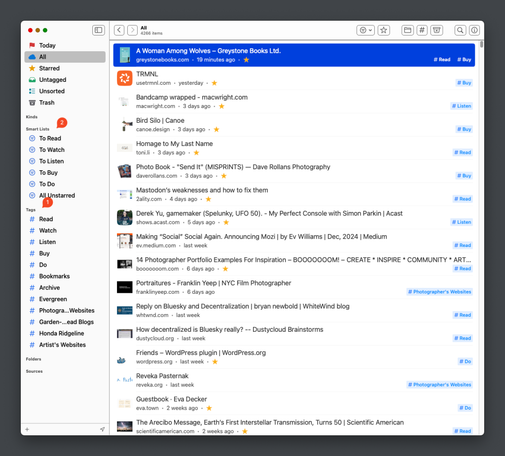
Saving links to get back to at a later time is a problem with a million great solutions. I even helped create an open source one that is still chugging along, works great, but hasn’t been updated in far too long. My current solution to this problem is an app called Anybox. I’ve been using and paying for it for a few years and here is how I use it.
If you know my solution to this problem, […]

 Abhinav
 copey
copeyConstantly rethinking what I want to self-host, what I want a free service for, what I want to pay a subscription for or what I just wanted a dedicated app for.
Currently testing out #Anybox and #GoodLinks as dedicated, native apps for Bookmark/Link preservation and Read-Later services, respectively.
Weekly post #6, trying some apps, power cut, pic for the week.
#weeklyblogpost #ios #apps #weather #zola #internetmap #things #anybox #throughthelens
arkoinad.com/posts/weekly_post_6.html
 Jan Schneider
@viticci I use #Anybox which allows not only read later syncing via iCloud but also saving organizing files:
https://apps.apple.com/de/app/anybox-bookmark-read-later/id1593408455?l=en-GB
Alongside @Surfed for automatic saving and finding of visited links: https://apps.apple.com/de/app/surfed-history-bookmark/id1591590700?l=en-GB

Anybox - Bookmark & Read Later
# Features 1. Get your bookmarks on iPhone, iPad, and Mac. 2. Search your bookmarks anywhere with Quick Find. 3. Anydock is a floating bookmarks bar on your desktop. 4. Save links with ease: Quick Save automatically retrieves current tab’s info. 5. Categorize bookmarks with collections. 6. Aut…
 Kee Hinckley
I don’t really trust anything to stay available on the web anymore.
A few months ago I moved all my bookmarks (you don’t want to know how many decades of bookmarks I have) to Anybox, a Mac and iOS bookmarking app. It’s tag-based, and has a lot of nice features, but one of the most useful is that I can tell it not just to bookmark something, but also to download it (in a variety of formats). So if I toss something in my “I should write about this” folder, I can be confident that when I finally get around to writing about it, I’ll still have a copy. Plus I can read things when I’m offline. And Anybox is all local, so I’m not depending on some cloud service other than iCloud for device syncing.
I’ve also started saving notes to it, since it supports notes, images, and files as well. I suspect that over time it may become my main repository “quick things I want to record for later”.
I might start using it instead of Mastodon bookmarking as well, although I do have a half-started project to write something that imports my Mastodon bookmarks to Obsidian. Generally if I bookmark something on Mastodon, I’d also like to include any links the post references as well.