recently, when I updated to #Zotero 7, I missed the pdf file rename patterns of #zotfile.
Now, I found a pattern that works well for me (no dots in "et al", no lengthy "and" between 2 authors, no hyphens, no subtitles).

Sharing it here:

{{ if {{ authors match="[^,]+,[^,]+,[^,]+" }} }}
{{ authors max="1" suffix=" et al" }}
{{ else }}
{{ authors join=", " }}
{{ endif }}
{{ year prefix=" " suffix=" " }}
{{ title truncate="100" replaceFrom="(\.|:|\?)(.*?)$"}}

h/t https://forums.zotero.org/discussion/comment/470471/#Comment_470471

Specific ZotFile workflow with Zotero7 file renaming rules

Taking in consideration the suggestion of @AbeJellinek in https://forums.zotero.org/discussion/comment/470158/#Comment_470158, I ask here for how to migrate to the Zotero File Renaming syntax my ZotFile workflow.

Zotero Forums

In #Zotero7 #Zotfile is not working anymore. You can keep your #workflow by instead using the https://github.com/MuiseDestiny/zotero-attanger Plugin. Download it via GoogleChrome via the "Releases" section in the right column.

In #Zotero go to Edit>Settings>General>Filerenaming to specify the new filenames

After loading the Attanger-Plugin go to Edit>Settings>Attanger>Destination Path and set the Folder-Path with all your PDFs as a RootDirectory. The "Subfolder" should be blank.

GitHub - MuiseDestiny/zotero-attanger: Attachment Manager for Zotero

Attachment Manager for Zotero. Contribute to MuiseDestiny/zotero-attanger development by creating an account on GitHub.

GitHub

#Zotero got updated to version 7 recently, but several of the (for me) critical plugins are not compatible (#zotfile, #DOIManager, #StorageScanner, etc.), so I went back to version 6.
If you are using the zotero retoque.re repo, just do:

$ sudo apt install zotero6

#Ubuntu

1/ If you're like me and have been using #Zotfile to send papers from #Zotero to your tablet, you’ve probably noticed that it no longer works with the latest Zotero release due to a lack of updates. While none of the replacement tools work exactly the same, I’ve managed to recreate most of my workflow using #Attanger: https://github.com/MuiseDestiny/zotero-attanger (The GitHub page is in Chinese, but the plugin is also available in English). Here's a short explainer, in case this is helpful for others as well.
GitHub - MuiseDestiny/zotero-attanger: Attachment Manager for Zotero

Attachment Manager for Zotero. Contribute to MuiseDestiny/zotero-attanger development by creating an account on GitHub.

GitHub

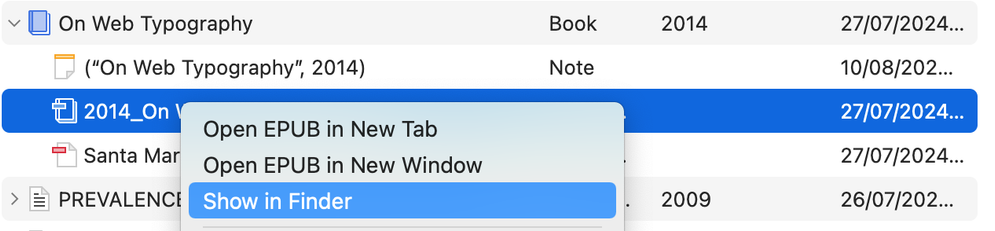
So I have a working example of a parent item for which I have both a PDF and an ePub.

ePubs are exactly where I thought they'd be, in their own folders in

/Users/ComputerName/Zotero/storage

it's just that the context menu for the parent item reveals where the PDF files' folder is, you can get to the ePub's folder thru the context menu for the ePub file.

#Zotero #Zotero7 #Zotfile

Removing Zotfile.

YMMV considerably depending on how you store files. I use native Zotero file storage NOT linked attachments. I only use Zotfile to rename attachments which is now core functionality.

(If you use linked attachments because you use Dropbox or other cloud storage then there are tiny horizontally oriented πŸ”— badges on the file icons.)

#Zotero #Zotero7 #Zotfile

A quien le interesare: por el momento estoy usando el combo de #zotero, #zotfile, #syncthing y #xodo

#AcademicChatter #AcademicPublishing #pdf

Just noticed myself doing an interesting thing:
I opened the pdf on my phone of a paper I wanted to read (synced via #Zotero -> #Zotfile -> #Dropbox), saw that it was published by #eLife, and thought "huh, this will be nicer to read via the website" and clicked the #DOI to read it there instead.

Zotero to manage references and literature notes

Scientifically Sound
@okerreko Hau (sistema lokaleko fitxategiak estekatzea, erantsi ordez) #ZotFile pluginak ahalbidetzen du. Eta gero bai, fitxategi guzti hoiek gordetzen dituen karpeta #Nextcloud​ekin (edo nahi duzun lainoarekin) sinkronizatzen da.