June 2026 security patch is live for Galaxy S25, Z Fold7, Flip7 FE, and TriFold
Samsung have revealed what vulnerabilities the June 2026 security patch has fixed earlier, as you can see here. This kind of update ensures that your phone, your tablet, and other devices become more secure as updates come along. Those updates are rolled out staggered, depending on your region and your device model. For instance, while the Galaxy S26 gets monthly updates, the Galaxy Tab S11 gets quarterly security updates.
Not long after the Galaxy S26 and the S25 FE received the security patch yesterday, the company continued the rollout to the Galaxy S25, Z Fold7, Z Flip7 FE, and TriFold phones as of today. However, some of these phones, specially the Galaxy S25, gets missing features, such as Notification Highlights on the Galaxy S25.
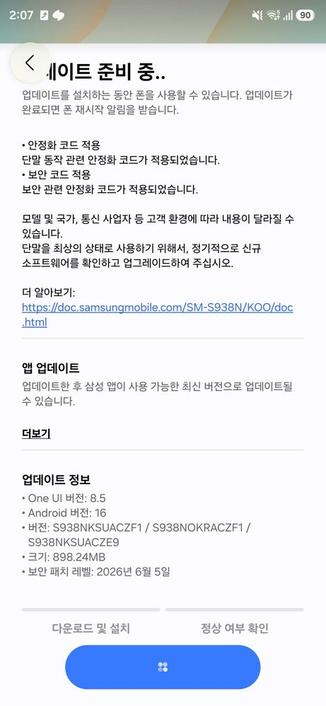
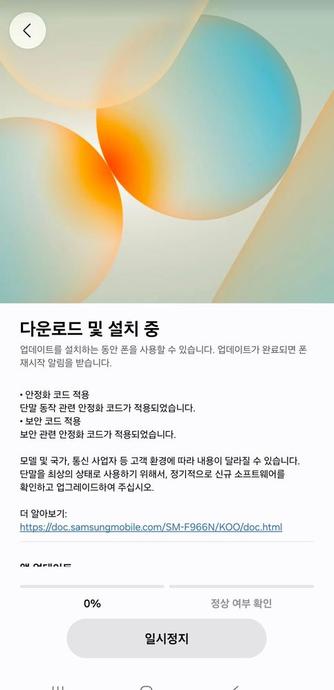
This security patch has a size of almost 898.24 MB, depending on the phone, and they bring the June 5th, 2026 security patch that you can see in the update info. This contains all fixes to vulnerabilities discovered since the last security patch released for these phones.
S25 –
SourceZ Fold7 –
SourceThe following firmware information is found:
- SM-S938N: S938NKSUACZF1 [KOO, SKC, KTC, LUC]
- SM-S936N: S936NKSUACZF1 [KOO, SKC, KTC, LUC]
- SM-S931N: S931NKSUACZF1 [KOO, SKC, KTC, LUC]
- SM-F968N: F968NKSU5BZF1 [KOO]
- SM-F966N: F966NKSUABZF1 [KOO, SKC, KTC, LUC]
- SM-F761N: F761NKSSABZF1 [KOO, SKC, KTC, LUC]
To update your Galaxy to this security update, follow these steps:
Open Settings, and navigate to System UpdateTap on Check for UpdatesPress Download NowWait until the download is complete, then press Install NowWait until the phone installs the update successfullyMake sure that you’re connected to a stable and fast Wi-Fi network to avoid high mobile data fees. Never interrupt the update in any way, or problems could occur later. Make sure that you apply all available updates once you update your phone for maximum stability. An update might take 5 to 10 minutes to apply, depending on the device and the type of the update being applied.
If you’re seeing “Your software is up to date,” this means that the update hasn’t reached your device yet. Keep checking for updates, as Samsung rolls it out gradually to all devices from country to country, usually starting from Korea.
#Android #Android16 #AndroidB #AndroidBaklava #GalaxyS22 #GalaxyS22Ultra #news #oneUi #S22 #S22Ultra #Samsung #SamsungGalaxyS22 #SamsungGalaxyS22Ultra #smartphone #Tech #Technology #update Global Feed
 FLF
FLF Bloodaxe
 Kpop News Hub
 Samsung Newsfeed

 DEVONtechnologies

 ロイター(Reuters Japan)

 Aptivi