
 DevelopersIO
Amazon Q in Connect セルフサービスでは、電話での音声スピードを調整できますか
https://dev.classmethod.jp/articles/amazon-q-in-connect-voice-speed-adjustment/
#dev_classmethod #Amazon_Q_in_Connect #Amazon_Lex #SSML #AWS #Amazon_Connect
Amazon Q in Connect セルフサービスでは、電話での音声スピードを調整できますか
https://dev.classmethod.jp/articles/amazon-q-in-connect-voice-speed-adjustment/
#dev_classmethod #Amazon_Q_in_Connect #Amazon_Lex #SSML #AWS #Amazon_Connect
Amazon LexでSSMLを使用して設定したメッセージを日本語音声でテスト再生する方法
https://dev.classmethod.jp/articles/amazon-lex-ssml-japanese-audio-test/
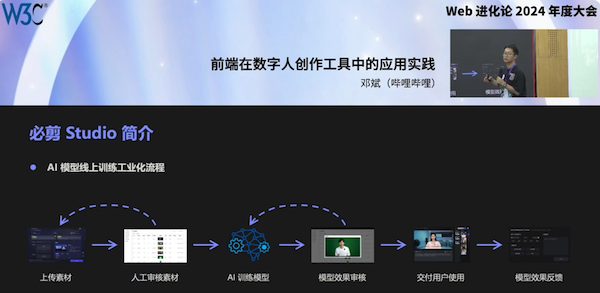
During the WebEvolve 2024 conference in #Shanghai 🇨🇳, Bean Deng (bilibili) showcased an intelligent editing tool using #voice cloning and digital avatars, explaining green screen clipping challenges and solutions. He also discussed applications like #audiovisual synthesis, online transcoding, and an #SSML visual editor.
#film #television
Check slides and event report:
▶️ https://www.w3.org/2024/01/webevolve-series-events/media/slides/deng-bin.pdf (in Chinese)
▶️ https://www.w3.org/2024/01/webevolve-series-events/media/en.report.html #W3CChina
... and watch the 🎬! https://youtu.be/DbGPi54nIv4
Amazon PollyのSSMLを利用し、住所を自然な日本語の発音になるようチューニングしてみた
https://dev.classmethod.jp/articles/amazon-polly-ssml-address/
Quick start guide to getting #Amazon #Alexa to say whatever you want.
* Set up an account at developer.amazon.com
* follow instructions here to begin using the "Alexa Skills Kit": https://developer.amazon.com/en-US/docs/alexa/ask-overviews/what-is-the-alexa-skills-kit.html#
* create a new "skill", custom model Amazon-hosted Python, use the "Intro to Alexa Conversations" template (it doesn't matter, we aren't gonna use any of this plumbing anyway)
* now in your new skill, wait for the build thing to finish and all that
* from the Developer Console for your new bogus skill, hit "Test" tab at the top, pick "Development" on the left and then "Voice & Tone" tab
* you can now put #SSML in here to make Alexa speak. There are custom tags to change tone or emphasis.
Also, using Dev Tools, once you've hit Play you can retrieve the UUID-named wave file that was generated - and from there the world is yours
Do you create open educational resources (OER) as presentations with voice-over? Want to avoid audio recording/cutting/editing, in particular when updating resources?
My CI/CD pipeline around emacs-reveal for the creation OER of now includes experimental text-to-speech (TTS) support based on SpeechT5 and SpeechBrain. Please check out the demo presentation [1] and let me know what you think.
Currently [2], neither abbreviations nor numbers are pronounced correctly, breaks and emphasis are missing. Any recommendations? SSML support?
[1] https://oer.gitlab.io/emacs-reveal-howto/tts-howto.html
[2] https://gitlab.com/oer/emacs-reveal/-/issues/20
Hashtags: #Emacs #OrgMode #RevealJS #TTS #TextToSpeech #SSML #FLOSS #FOSS #OER #CICD
Using #GPT for #voice #TTS #NLG, with #SSML?
Some smarter usage examples:
1. ask GPT to create the SSML from a text requiring a given a tone (e.g. positive)
2. ask GPT to assign itself the tone, dynamically in relation of the contextual meaning of each sentence (to be improved)
original post: https://twitter.com/solyarisoftware/status/1610317686029881349?s=20&t=Lf9GbgRvOQvRB03pKCR1RA

“Using #GPT for #voice #TTS #NLG, with #SSML? Some smarter usage examples: 1. ask GPT to create the SSML from a text requiring a given a tone (e.g. positive) 2. ask GPT to assign itself the tone, dynamically in relation of the contextual meaning of each sentence (to be improved)”

 W3C Developers
 Account: Computers
 Greg
Greg
 Jens Lechtenbörger
 Michael Connor Buchan
 Giorgio Robino