Best feature of #Firefox might be the fact that #ReaderView often (but not always) by-passes #paywalls.

Are #microformat ony used by #searchengine or there are some nice plugins to crop everything unrelated and only show content?

I assume #readerview ( #firefox ) may use them, to select what to show and what to not, but I couldnt find any good plugins.

So far I know existance of: https://addons.mozilla.org/en-US/firefox/addon/microformats-reader/ but it doesnt seem to support anything besides couple of attributes :l

#browser #seo #summary

Microformats Reader – Get this Extension for 🦊 Firefox (en-US)

Download Microformats Reader for Firefox. Displays microformat data from the active page.

Tip #759

Read articles without distractions by enabling Reader View in Vivaldi on iOS.

Reader View in Vivaldi on iOS removes all distracting elements from the web page, allowing you to focus on reading the article in peace.

To switch to Reader View:

  • Open a web page with suitable content.
  • Tap the “Reader View” button on the Address Bar.
  • To exit Reader View, tap the same button.

    #iOS #readerView #Vivaldi #VivaldiBrowser #webPages

    https://vivaldi.com/blog/tips/tip-759/

    Tip #756

    Dive into the article using full-screen reader mode.

    Reader View is an excellent feature to remove distractions on the website, but that still leaves room for other things on your screen to pull your attention away from the article you’re reading. To fully immerse yourself, in addition to toggling on the Reader View, you can switch to Fullscreen Mode. And to combine the two actions into one, in Vivaldi, you can create a Command Chain.

    To create a new chain for enabling full-screen reader mode:

  • Go to Settings > Quick Commands > Command Chains.
  • Add a new Command Chain.
  • Add the following commands to the chain:
    • Command 1 – Toggle Reader View
    • Command 2 – Fullscreen Mode
  • Create a Keyboard ShortcutMouse Gestures and/or add a custom button to a toolbar for executing the chain.
    Straight out of the box, you can type the chain’s name in Quick Commands.
  • #commandChains #readerView #Vivaldi #VivaldiBrowser

    https://vivaldi.com/blog/tips/tip-756/

    Surfing the Web in Reader View

    If you are familiar with the Firefox web browser, then I am sure you are familiar with its reader view functionality. Wouldn't be nice if you could surf the entire web in reader view mode only. Well, you can (almost).

    https://readbeanicecream.surge.sh/2025/02/21/surfing-the-web-in-reader-view/#rss-feed-reader-reader-view

    #web #webbrowsers #firefox #productivity #readitlater #rss #readerview #indieweb #smallweb #bookmarking

    Surfing the Web in Reader View - ReadBeanIceCream

    Tip #642

    Enable Reader View to focus on the important things.

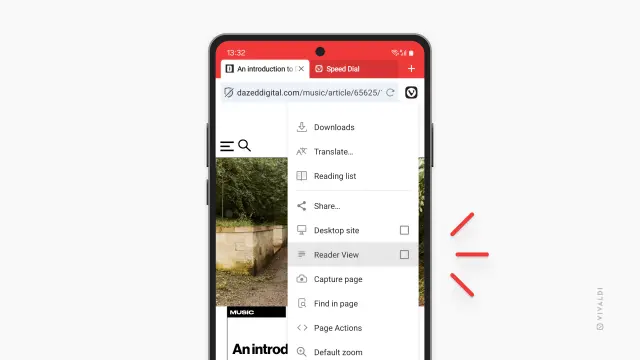
    Reader View in Vivaldi on Android removes all distracting elements from the web page, allowing you to focus on reading the article in peace.

    To start using Reader View, first enable it from Settings > Content Settings > Accessibility > Reader View for Web Pages.

    To toggle Reader View on and off on pages with more text content:

  • Open the main Vivaldi menu.
  • Select “Reader View” / “Exit Reader View”.
  • If it’s a feature you use often, customize the menu for easier access in Settings > Appearance & Theme > Main Menu Layout > Menu Settings > Customize layout and move Reader View to the top 5.

    #readerView #webPages

    https://vivaldi.com/blog/tips/tip-642/

    Reader View in Vivaldi on Android | Vivaldi Browser Help

    Declutter your screen to focus on the content using Reader View. Find out how from this article.

    Vivaldi Browser Help

    @rysiek I find that the built-in "reader view" tends to work fine for Medium articles in the browsers I use.

    #readerview

    Two important lessons for web-designers.

    1. The user should be able to read the content in reader mode.

    2. The user should not have to switch to reader mode just to read the content.

    #WebDesign #ReaderMode #ReaderView #UX #UI

    Tip #469

    Enable vertical Reader View to display texts in Japanese, Chinese, and Korean vertically.

    Enabling Reader View helps to read text-heavy pages more easily by removing distractions. To accomodate the readers of vertical text, we’ve also added a setting to display texts in Japanese, Chinese and Korean vertically when Reader View is enabled.

    To enable vertical Reader View:

  • Go to Settings > Web Pages > Reader.
  • Enable “Allow vertical text direction”.
  • #readerView #settings

    https://tips.vivaldi.net/tip-469/

    Reader View in Vivaldi on Android | Vivaldi Browser Help

    Declutter your screen to focus on the content using Reader View. Find out how from this article.

    Vivaldi Browser Help
    @Catelli If it's to create something like an invoice to show your auditor, they won't be pleased!
    If you're just web browsing, and you use #Firefox, give #ReaderView a try. It doesn't work on every page, and doesn't always improve things, but when it does work, it's great!
    https://support.mozilla.org/en-US/kb/firefox-reader-view-clutter-free-web-pages
    Firefox Reader View for clutter-free web pages | Firefox Help

    Firefox Reader View removes web page clutter to improve readability. Recent Firefox versions can also read pages out loud.