I think it's quite neat personal site and I can see a lot of where your inspirations come from. I can see you're likely really into programming as you've used the Catppuccin color scheme and that you're very influenced by retro games seeing all the pixel style icons of which some seem to be inspired by Megaman. The top bar for navigation is very home-y and I like how you've put a recipe list as semantically of equal importance to the home page. The projects page should probably have its own hub page with all your projects instead of just as a dropdown hover spot. I appreciate that you made the website work well on mobile considering neocities sites are sometimes web only.
Here's some easy UX boosts:
- To support larger screens and prevent popin, you should consider having a max width on your text boxes. Something like 800px? There's UX harm to having text above. Here's a site noting 50-75 characters that I quickly found on this. You could also directly set width with
ch but I think ~800px is generally fine as your container size with text as a smaller container within there if you're, as the kids say, a UX-maxxer.
- Use left aligned text for non-title elements, but maybe those too. With a set 800px it is significantly more readable. I know the allure of funny center text but for anything longer than like, 10 words it gets rough.
- Add icons denoting external links and consider setting them to open in another tab. Well, specifically in the top bar. It's confusing when I click a project and it takes me to the doom forums when the previous two have been (what I assume to be) summaries on your own site of the projects. Semantics or something!
Here's some, as the kids say, screenreader-maxxing boosts:
- Have a top level structure of
header, main and footer as specifically just those three.
- Use CSS to modify font sizes instead of header levels. Using non-single changes in header level makes screen readers unhappy, I think.
- Page titles are most often best in the format of
Sitename - Page. You can also make it with an emdash or endash with \— (without the slash if it renders with one) as an HTML entity code.
Here's some CSS nerd boosts:
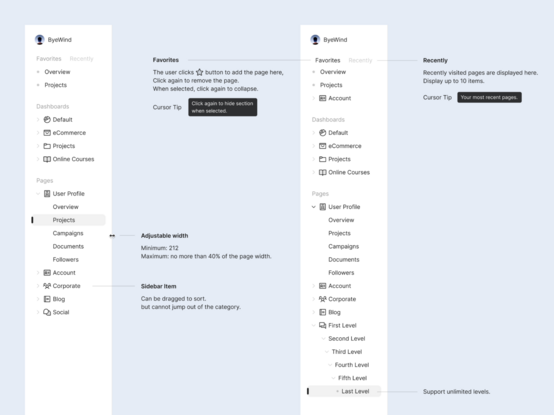
- You can move a lot of your styles to classes. Your only styles seem to target elements and IDs of which elements aren't going to always be what you need and IDs shouldn't be duplicated. Specifically you use
segment as an ID instead of a class which messes with JS as there are multiple. You could also consider replacing your segment ID elements with section elements and selecting those, though you may want to use that element elsewhere so it's a tradeoff. Generally inlined styles are a bad pattern but I see that you've used them appropriately (well, arguably) for the icon replacements on your links.
- Your
hr elements aren't showing the correct color because they have a border-style of inset by default. This style is evil and should instead be solid. Fixing this fixes your color issue.
- To space your block elements you'll want to replace your
hr and br elements generally with margin or border styles. Your HTML should generally not include styles in the form of hr and br except for in like, prose. A single br would be about 1.5rem and any HR you want anyways can be padded to match, using a calc if you wanna nitpick pixels.
- Remove the
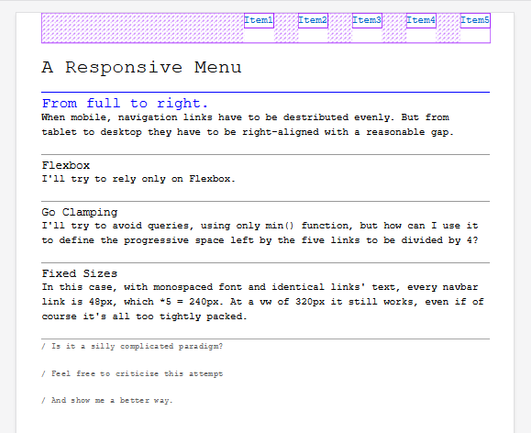
float on #navbar li
Here's an extremely in-depth review of completely useless info about your site:
There are also a bunch of tiny UX things I can see of a less experienced CSS writer for which you can improve for mildly more standard viewing experience, though of course there is some interest to having a more hand-written and slightly janky feel. Regarding your overall styles, they're very modern in that I can see your trend towards a very html semantic page structure where possible along with the personal website classic of border radius boxes of text/images with a >2px border and medium contrast. You seem to have gone with a lot of text-align center which makes me feel that you have a more older-internet inspiration or just wanted to center stuff and decided on that rather than a specific box size. This is notable in that I see your boxes are dynamically sized via width: content-size. There's a small juxtaposition of your semantic adherence and your adherence to the structure of a header nav while simultaneously not wanting to modify font sizes and using an h5 element in the top header on the main page as well as for the smaller elements in your recipies which I am greatly entertained by.
I can also probably speculate a few more silly things by the markup of your website. I see you have <meta http-equiv="X-UA-Compatible" content="IE=edge"> which is not standard in the emmet snippet html:5. You don't seem to use the formatter Prettier as your DOCTYPE text is capitalized and your source code has hard tabs. You also definitely do not use a formatter on your CSS and write it all by hand given that no modern formatter has the option to hard tab size align your specifically 4 space hard tab aligned CSS properties. These facts combined tell me that you probably wrote this in a non-IDE editor such as maybe the Neocities web editor, though I haven't seen that so I cannot confirm the details.
Looking at the CSS a bit more I can also see that your color scheme was found off the Catppuccin organization's repository palette under the CSS page specifically without any modifications or formatting as the text marks are single quotes while further down the CSS is in double quotes. I can note that you seem to have a very vertical slice of CSS knowledge. I see some hypermodern (not a real term) things such as the usage of light-dark and the :root selector as well as more general niche knowledge such as that images are display: inline by default and thus look weird when not in a block wrapper. On the other hand there are also a lot of small things that you're missing that I would consider the basics in an extremely vague sense (css is weird and knowledge is scattered) such as your usage of the px unit as opposed to em/rem and your usage of units on length units of 0. If you were more of a framework/tailwind user I would assume you'd know more about using rem fractions and such. You also used color to try and change the hr element's border color which I found really funny.
I'm feeling vaguely that you got into CSS more recently because of these observations. If you were more of an older CSS writer I might expect more strict usage of formatting, the usage of the glob selector with box-sizing: border-box, left aligned text inside of an rem padded box with media queries or something. Maybe also some margin-inline or evil <small> tags.
Looking even further into extremely specific things, I see that you've obtained your 88x11 images from your friends and resized them up with specifically https://ezgif.com/resize as noted in their EXIF data. I can note this as the linked sites do not have the resized images. For future reference, this effect can be simulated by setting a specific width and then modifying the image-rendering property as noted on MDN though the size different is negligible on images of that size. This property could also be used on your list items to make them sharper if they're zoomed in on.
…
Okay I think that's enough of me being a website observer. If you want to talk more about CSS or websites feel free to bother me (I have more contact info on my website).
#css #navbar  Naty
Naty Alcea
Alcea FireIsGood

 Sebastiaan Ammerlaan 🇳🇱
 Nouvelle-Techno.fr

 Peter
Peter Flutter Smashers

 pablolarah

 Carlo Grosoli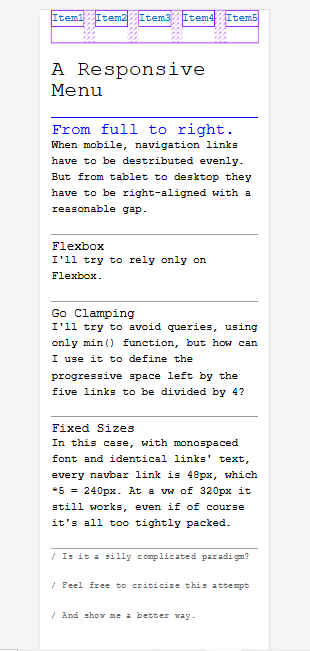

 ByeWind