 HowToPhil
 Hypernode
 HowToPhil (Phillip R)
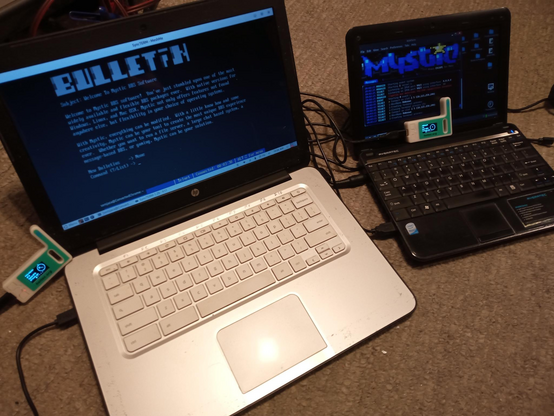
Video showing connecting to #mysticBBS (configured for #ASCII not #ANSI) #telnetBBS over #meshtastic (using the --tunnel option in the #CLI tool).
#SyncTerm is the BBS/Telnet client
Video showing connecting to #mysticBBS (configured for #ASCII not #ANSI) #telnetBBS over #meshtastic (using the --tunnel option in the #CLI tool).
#SyncTerm is the BBS/Telnet client
#telnetBBS ( #mysticBBS ) over #meshtastic using the #tunnel option of the #CLI tool
#> meshtastic --ch-shortfast
#> meshtastic --tunnel
------
Edit more notes:
"Medium Fast" seems functional (even with ansi) if slow
#> meshtastic --ch-medfast
"Long Fast" is sort-of-functional IF I set the BBS to be ASCII by default but it is "get some coffee SLOW" and you will be waiting for your keystrokes to reach the BBS and come back
#> meshtastic --ch-longfast
I got few more screens done for my BBS! :)
It starts to look professional now :P The basic functionality is considered good enough.
Now I want to deep my toes in to the MPL - Mystic Programing Language. Sneak peek (mockups) are in the ansi gallery (in min menu: !).


I know you don't like "AI" in general but GPTs are the future! I pushed the mystic.txt and display_codes.txt to it and fine-tuned the "AI mission". Now it's super helpful for finding right codes and overall inspiration for you BBS!
Virtual SysOp GPT: https://chat.openai.com/g/g-GbfC4fKY5-virtual-sysop
Old meets new ;)


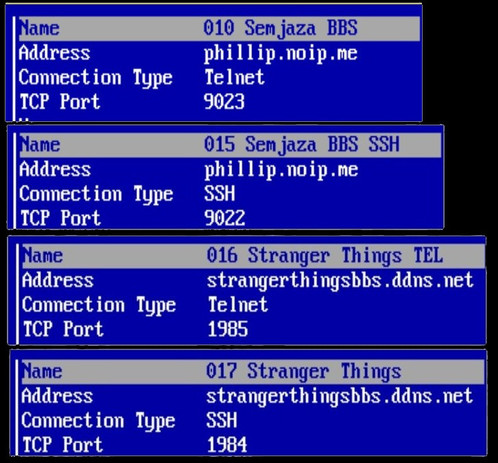
Semjaza #BBS and #StrangerThings BBS are both back up (#mysticBBS-based)
#telnet and #ssh connections available on both. See image for addresses ports etc

Semjaza #BBS and #StrangerThings BBS are both back up (#mysticBBS-based)
#telnet and #ssh connections available on both. See image for addresses ports etc
 C:\KKJ\>