Old Nitrocid KS PPA has been removed

Earlier, we have posted a new article that announced the deprecation of the old Launchpad PPA for Nitrocid KS. This PPA was originally released on June 8th, 2020, when we were building Nitrocid KS (Kernel Simulator back then) 0.0.10.0 back then for Ubuntu 20.04 LTS Focal Fossa users.

The old Nitrocid KS PPA, kernel-sim, has been officially removed from Launchpad starting from today. You’ll need to change your APT sources to use the new Launchpad PPA for Nitrocid KS, which is nitrocid.

To disable the kernel-sim PPA and to enable the newer Nitrocid PPA, nitrocid, follow these steps:

  • Uninstalling all Nitrocid-related packages from the old PPA
  • Open the terminal emulator
  • Run sudo apt purge kernel-simulator
  • Replacing the kernel-sim PPA with the nitrocid PPA
  • Run sudo add-apt-repository --remove ppa:eofla/kernel-sim
  • Run sudo add-apt-repository ppa:eofla/nitrocid
  • Installing the newer Nitrocid packages
  • Execute sudo apt update
  • Follow the instructions by running sudo apt install nitrocid
  • Once you follow the above steps, you’re now using the new nitrocid PPA instead of the older one. If you fail to remove the kernel-sim PPA from your system, the apt update command will fail with error messages about said PPA.

    #KernelSimulator #LaunchpadPPA #news #nitrocid #NitrocidKernel #NitrocidKernelSimulator #NitrocidKS #NitrocidKS #PPA #Simulator #Tech #Technology #Ubuntu #UbuntuPPA #update

    Old Nitrocid KS PPA to be removed June 15th

    Earlier, we have posted a new article that announced the deprecation of the old Launchpad PPA for Nitrocid KS. This PPA was originally released on June 8th, 2020, when we were building Nitrocid KS (Kernel Simulator back then) 0.0.10.0 back then for Ubuntu 20.04 LTS Focal Fossa users.

    The old Nitrocid KS PPA, kernel-sim, will be officially removed from Launchpad on June 15th, 2025. You’ll have exactly a week to change your APT sources to use the new Launchpad PPA for Nitrocid KS, which is nitrocid.

    To disable the kernel-sim PPA and to enable the newer Nitrocid PPA, nitrocid, follow these steps:

  • Uninstalling all Nitrocid-related packages from the old PPA
  • Open the terminal emulator
  • Run sudo apt purge kernel-simulator
  • Replacing the kernel-sim PPA with the nitrocid PPA
  • Run sudo add-apt-repository --remove ppa:eofla/kernel-sim
  • Run sudo add-apt-repository ppa:eofla/nitrocid
  • Installing the newer Nitrocid packages
  • Execute sudo apt update
  • Follow the instructions by running sudo apt install nitrocid
  • Once you follow the above steps, you’re now using the new nitrocid PPA instead of the older one. If you failed to remove the kernel-sim PPA from your system before the abovementioned deadline, the apt update command will fail with error messages about said PPA.

    #KernelSimulator #LaunchpadPPA #news #nitrocid #NitrocidKernel #NitrocidKernelSimulator #NitrocidKS #NitrocidKS #PPA #Simulator #Tech #Technology #Ubuntu #UbuntuPPA #update

    The new versions of Nitrocid will come late for Launchpad PPA, but we'll make sure to release them in coming hours.

    #Launchpad #LaunchpadPPA #NitrocidKS #KernelSimulator #Nitrocid #TechNews #TechUpdates #csharp #programming #releases #NewReleases

    BassBoom is now easier to install!

    We have made some of the biggest changes in BassBoom. This time, it’s about packaging the software for easier installation. Starting from BassBoom 0.1.12 and 0.2.7, we are providing the following package installers for different systems:

    • Windows Installer for Windows systems
    • Launchpad PPA for Ubuntu
    • PKGBUILD for Arch Linux using the AUR

    As we’ve promised, we’ve made installation of the BassBoom application easier than never before by shipping different types of installers apart from the regular distribution method that utilizes the packaged ZIP file for the application itself.

    The documentation will be updated soon to provide instructions on how to install BassBoom using one of the above packaging methods that we’ve recently introduced. This will make your experience regarding installation of BassBoom smoother than before and save your time extracting the archive and remembering the path to the executable file.

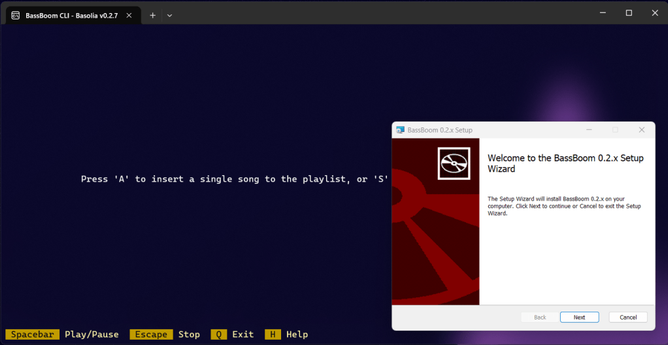
    If you’ve used the Windows Installer to install BassBoom, you’ll be greeted with this screen:

    Just follow the instructions on the screen, and you’re done!

    As for the Launchpad PPA, we’re uploading the packages that correspond to the API version of BassBoom releases to the archive. To install BassBoom, use the following commands:

    $ sudo add-apt-repository ppa:eofla/bassboom$ sudo apt update$ sudo apt install bassboom

    Then, follow the instructions on the screen to select a version series to install, currently being:

    • bassboom-1: Installs BassBoom v0.1.x series
    • bassboom-2: Installs BassBoom v0.2.x series

    As for the Arch Linux distribution, use your AUR helper to install one of the following packages, depending on what series you want to install:

    • bassboom-1: Installs BassBoom v0.1.x series from the latest release tag
    • bassboom-1-git: Installs BassBoom v0.1.x series from the live servicing branch
    • bassboom-2: Installs BassBoom v0.2.x series from the latest release tag
    • bassboom-2-git: Installs BassBoom v0.2.x series from the live servicing branch
    • bassboom-3-git: Installs an upcoming version of BassBoom from the live servicing branch

    You can download BassBoom 0.1.13 and 0.2.8 here:

    Download 0.2.8 Download 0.1.13

    Image by freepik

    #arch #ArchLinux #bassboom #deb #dpkg #Launchpad #LaunchpadPPA #news #PKGBUILD #Tech #Technology #Ubuntu #update #Windows #WindowsInstaller

    BassBoom : Aptivi

    This is the Ubuntu PPA for our software, BassBoom, which can be found here: https://github.com/Aptivi/BassBoom. BassBoom aims to be a project that is a cross-platform music player written in C# and .NET, with libmpg123 as a native library backend for 0.1.x and 0.1.2 and libmpv as a native library for 1.0.0 and higher. WARNING: Only compatible with Ubuntu 24.04 Noble Numbat or later! If you're running older Ubuntu versions, download the release zip files found in the GitHub project. This is ...

    Launchpad