Wow. PETG filament is so finicky. Even when you think it's dry, you have to dry it even more. 🙄

#3DPrinting #HomeLab #LabRax @homelab @3dprinting

RE: https://hachyderm.io/@badnetmask/116432248383092547

Update on the lab rack decision: I started printing the Lab Rax. It has the minimum size that I need (5U) and can be expanded (up to 10U). It also has a very strong community behind it, which will make it very easy to find parts.

I'll be sure to post photos when I'm done.

#HomeLab #3DPrinting #LabRax @homelab @3dprinting

https://makerworld.com/en/models/1464819-lab-rax-10-server-rack-bolted-version-5u

#MKlements created some modules to use his #LabRax as a NAS, powered with either a Pi5 or a Zimaboard2:
🔗 https://www.youtube.com/watch?v=lIkXgxPDDpk

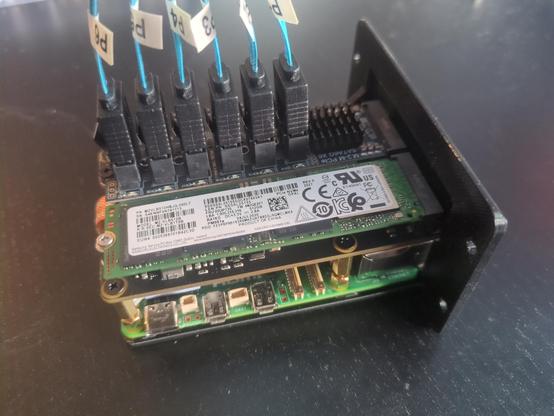
Now I'm even more curious how my version will perform, so I finally purchased the missing items. While I'm waiting for the HDDs, I fitted the caddies into their frame and put the Pi together.

So. Wird langsam. Weil bei #labrax die Verbindung oben bzw unten zu hoch für meinen Anwendungsfall ist, hab ich ne Low-profile Version gemacht, die man einfach mit den Verlängerungsstücken verschraubt.
Das alte Regal werde ich vollständig ausbauen und das neue dann einsetzen.
Jetzt ist aber erstmal Pause. Nächstes Wochenende ist #IFA2025 und ich bin wieder Streckenposten beim #Brunsberglauf. 😬
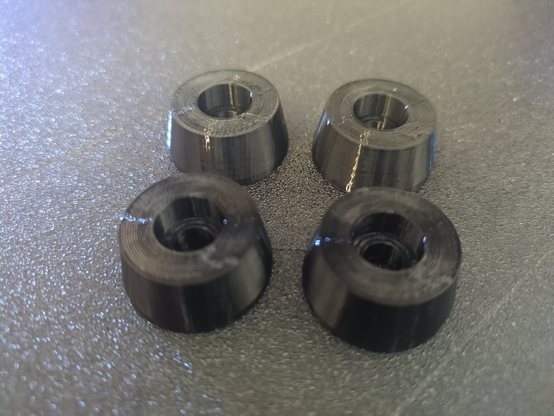
I printed the #LabRax feet in TPU, which turned out quite well.

There exist a bolted #LabRax version and one using brass inserts, I went for the first option. But would have created a melange of both, if I would print it once more.

Here are the individual #3dprinting designs I have used:
- bolted LabRax: https://makerworld.com/en/models/1464819-lab-rax-10-server-rack-bolted-version-5u
- pi module: https://github.com/JaredC01/LabStack
- switch module: https://www.printables.com/model/1355482-tp-link-tl-sg108-tl-sg108pe-tl-sf1006p-10-inch-rac
- HDD bay: https://www.printables.com/model/1361309-10-inch-rack-2u-6-x-35-inch-hdd-hot-swap

Lab Rax 10" Server Rack - Bolted Version - 5U by mklements MakerWorld: Download Free 3D Models

Lab Rax is a fully 3D printable, modular 10-inch server rack for homelabs. Perfect for Raspberry Pi setups, mini PCs, and networking gear, this DIY rack is cost-effective, easy to assemble, and highly customizable.  This is an adapted version of my original Lab Rax project which used brass inserts. This version has been modified to only use standard M6 or #10-32 button head screws and M6 or #10-32 nuts for assembly.  All you need to complete this basic 5U rack is;Metric;M6x12mm Button Head Screws (16 Required For Frame + Additional For Racks) - Buy HereOptional Black Version of Above to Match Print - Buy HereM6 Nuts (16 Required For Frame + Additional For Racks) - Buy Here Imperial;#10-32 x 1/2 Button Head Screws (16 Required For Frame + Additional For Racks) - Buy HereOptional Black Version of Above to Match Print - Buy Here#10-32 Nuts (16 Required For Frame + Additional For Racks) - Buy Here Gluing the nuts into the back of the vertical posts makes it much easier to install and remove racks - Recommended Glue This version assembles in the same way as the original but screws go in from the opposite side (nuts on the inside in the hexagon cavities).The handles, feet and all panels are compatible with the original version. Only the 12 edges are different. Here's the set of different size posts and panels if you'd like to customise the size - Lab Rax 1-5U Posts & Panels Here's the set of joiners and extensions side panels if you'd like to extend your Lab Rax beyond 5U - Lab Rax Extension Side Panels & Post Joiner Here's my video of the build and config options - YouTube Visit my blog for the step-by-step assembly instructions and BOM - The DIY Life

Today, I saw a meme stating "men will literally build a kubernetes cluster at home instead of going to therapy". I am not into kubernetes at all, but created this 10-inch rack in the course of the last couple of weeks. Currently, I am waiting for SATA adapters and HDD trays to continue the project.

The #LabRax design originates from #MKlements, and the individual modules were existing designs as well. However, I finally gained some CAD skills and might be able to create new modules on my own.