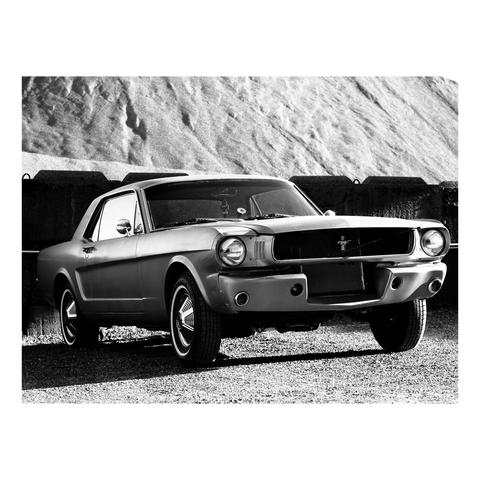
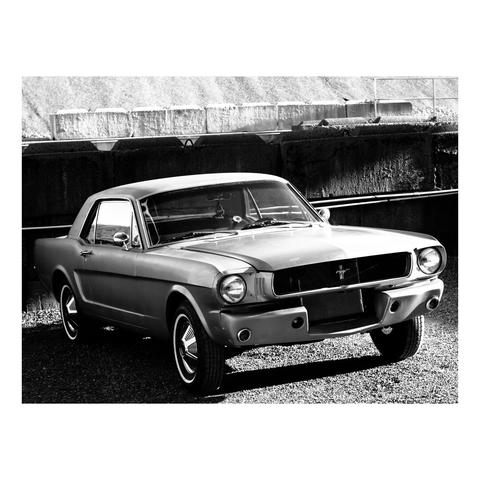
Late night drive with the family to Dick's Drive-In for burgers, fries and milkshakes followed by a trip further south to Krispy Kreme for donuts. My lovely wife was at the wheel so I got to take photos thru the rain covered windows. Photos were taken with my Olympus E-M1 Mark II paired with a vintage Canon FD 50mm F1.4 S.S.C. film camera lens. It is my favourite lens. Most photos were taken at F2 to keep things adequately sharp while still allowing for enough light to reach the sensor. Shutter speed mostly hovered between 1/80th and 1/400th of a second with auto ISO. Krispy Kreme Drive-Thru was ISO 6400 for reference. For the colour photos I leveraged the color creator feature to either give some warmth or a cool liminal vibe but tried to keep it reasonable. Tried to emulate something like Cinestill 800T. All photos are straight out of camera jpegs with a white border added in Lightroom Mobile. Hope you all like them.

#Photography #Fotografie #Pixelfed #Seattle #PNW #City #CityPhotography #Urban #StreetPhotography #Rain #Raindrops #Neon #NeonLights #KrispyKreme #Olympus #EM1MarkII #M43 #MicroFourThirds #CanonFD #50mm #SOOC #JPG #JPEG #NightLife #NightDrives #NightPhotography #Liminal #BlackAndWhite #BlackAndWhitePhotography #Monochrome #MonochromePhotography #ColorPhotography #ColourPhotography #VisualStorytelling #Collection
Sophie Wang

New blog: how FFmpeg uses Vulkan Compute shaders to accelerate professional codec workflows — FFv1, ProRes, ProRes RAW, APV and more — on any Vulkan-capable GPU, with no fixed-function hardware required.

Fully GPU-resident, no CPU hand-offs, and portable across the broad Vulkan device ecosystem.

Learn more: https://www.khronos.org/blog/video-encoding-and-decoding-with-vulkan-compute-shaders-in-ffmpeg?utm_medium=social&utm_source=mastodon&utm_campaign=FFmpeg_Video&utm_content=blog
#Vulkan #FFmpeg #VideoEngineering #GPUCompute #OpenStandards #ProRes #FFv1 #ProResRAW #APV #VC2 #JPEG

Interesting, the Bodleian library created a #Python library that converts #TIFF or #JPEG source images to #JP2 #JPEG2000 (using a #Kakadu wrapper), and does various quality checks on the result:

https://github.com/bodleian/image-processing

Will definitely give this a try for an upcoming in-house TIFF to JP2 conversion pilot project!

GitHub - bodleian/image-processing: Image processing tools, with a focus on digital preservation

Image processing tools, with a focus on digital preservation - bodleian/image-processing

GitHub
🎉 Oh wow, another #open-source project that converts JPEGs to #WebP and spits out JSON indexes. Welcome to the groundbreaking world of reinventing the photo album wheel, now with Go and #SvelteKit 🚀! Because clearly, the world was desperately lacking in static photo gallery generators 🤦‍♂️.
https://github.com/dougdonohoe/ddphotos #JPEG #photo-gallery #innovation #HackerNews #ngated

Converting a @kevlin from #jpeg to #webp loses its 'zing'. WebP image definitely duller.

I can't figure out the options to cwebp to retain the brightness. Am I missing something or is this just part of the WebP compression-fu?

On Photoprism Claude, and HEIC Files on a Pi

Reading Time: 2 minutes

When I migrated my Photoprism library from an HP Laptop to a Pi5 I found that there was a nine thousand photo hole in the total photo count. It's when I looked closer that I found that the gap between expected photos and actual photos is down to Photoprism and the Pi5 not playing nicely when it comes to HEIC files.

I decided to experiment with Claude AI as it is flavour of the month and the first advice it gave was "force reindex the entire library". Anyone who has played with raspberry Pi will know why that was an absurd proposition. I played along anyway and within minutes my Pi was sulking so I went for a walk, on the off chance that it would be ready when I got home. It was still sulking, and worse than that, pings took up to 30 milliseconds or more.

I tried sudo reboot, and I tried a soft reset via the button. I waited a while and when neither worked I went for a hard reboot. That's when the photo drive failed to mount properly so I rebooted the Pi properly and the drive mounted so I could continue.

The Photosync JPEG experiment

Now that we see that blind trust in Claude is misplaced we can use the human rational mind. As I saw that the photos that were missing appeared to be iphone photos I decided to change the photosync presets for uploading to the Pi5 Photoprism instance. I told it only to upload JPEGs. I refreshed the index via the web UI.

The Shell Script

Now that we determined that the HEIC files were missing and that refreshing the index was not working we went ahead with creating a shell script that would convert HEIC files to jpeg files using heif-convert.

The shell script found the HEIC files, in situ, converted them to jpeg and then deleted the HEIC files. The result is a HEIC free library.

The Result

After re-indexing the library with the jpegs we had 115,000 files, rather than 110,000 so we recovered 5000 files, out of 9000. When I explored the library this morning I saw that the iphone photos seem to be there, and that the library, especially for recent photos, is healthier.

Tensorflow Disable: True

In this situation it was necessary to disable tensorflow because it led to the Pi crashing twice, where I had to hard reset. With Immich you have granular control on what it is doing so with a Pi you can be as gentle, or as demanding as you want. If you're gentle it runs for hours, without crashing. If you're not it crashes.

Disabling tensorflow allowed me to try a final index within minutes rather than hours, or days.

And Finally

The calamity of having 9000 images, seemingly all camera phone photos missing can be quite distressing, until you realise that the missing images appear to be HEIC files. I know that I prefer to keep HEIC files, rather than converted files, when possible. With Photoprism, and a Pi5 it makes sense to keep things simple, and upload JPEGs.

Due to these circumstances I see Photoprism on the Pi as a backup solution.

#converting #heic #jpeg #pi #script #shell
¿Cómo convierto PhotoCD a JPG en Ubuntu?

¿Cómo convierto Kodak PhotoCD PCD a JPG en Ubuntu?

Chromium 145 支援 JPEG XL

在「Google Chrome 145 Released With JPEG-XL Image Support」這邊看到 Chromium 145 可以透過 chrome://flags/#enable-jxl-image-format 打開對 JPEG XL 的支援。 這次回歸是用 Rust 版本的 decoder,成為 Safari 之後支援的瀏覽器。 Firefox 這邊看起來還在慢慢解:「Implement support for JPEG XL (image/jxl)」。 不過因為寫這篇跑去查 AVIF 的支援度,原來在 2024 年之後主流瀏覽器都支援...

Gea-Suan Lin's BLOG

Weil ich schon wieder in diversen Facebook Gruppen diese elendige Diskussion #RAW vs. #JPEG sehe, hier noch mal mein #Blog Beitrag dazu. Es ist völliger Quatsch, dass die, die #Fotografie ernsthaft betreiben nur RAW nutzen und alle JPEG-Fotografen unbeholfene Anfänger sind. Wann hört das mal auf?!

https://www.schlicksbier.com/eine-lanze-fuer-das-jpeg-brechen/

Eine Lanze für das JPEG brechen - Erik Schlicksbier

Von vielen wird das JPEG nicht für voll genommen, dabei gibt es genug sinnvolle Einsatzmöglichkeiten. Zeit von Absolutismen Abstand zu nehmen.

Erik Schlicksbier