I had a tricky #meshtastic repair recently, replacing the #IPEX connector on a #heltec V3. Only took two new connectors to get it right! Also had the added fun of pulling the old IPEX connector from to IPEX plug which was considerably more difficult...

IPEX (Intel Pytorch Extensions) installation instructions include a "sanity check", so I ran it... And of course it failed:

> ImportError: libintel-ext-pt-cpu.so: cannot enable executable stack as shared object requires: Invalid argument

Forums referenced 'execstack -c' command which is not up to the task:

> libintel-ext-pt-cpu.so: section file offsets not monotonically increasing

Eventually I found alternative `patchelf --clear-execstack` which resolved the issue.

#intel #pytorch #ipex

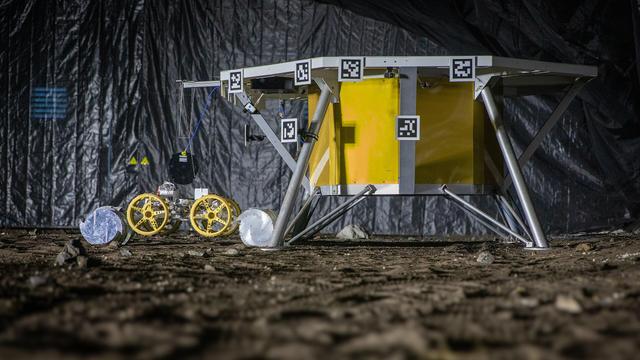
This #robotic system https://www.youtube.com/watch?v=LOq20bisc0g holds the potential to dig up to 10,000 kg in a single lunar day. This is a huge increase 📈 from previous missions that only collected tens of kilograms https://interestingengineering.com/innovation/nasas-powerful-moon-mining-robot-could-dig-10000-kg-of-soil-in-a-single-lunar-day

#IPEx #SpaceRobot #SpaceMining

How NASA Plans to Revolutionize Lunar Excavation

YouTube

#Intel should figure out their #ml strategy because they have:

1. #OpenVino plugins for GPU and NPU,
2. #OpenXLA plugin for GPU
3. #ipex for PyTorch
4. intel-npu-acceleration-library for PyTorch
5. oneDNN neural network math kernels

And for #ONNX they have both OpenVino and oneDNN runtimes.

Best of all I haven't reliably gotten the NPU to work using any permutation of them lol..

Byla vydána první verze sady nástrojů integrující #VoIP platformu #IPEX a ekonomický systém #AbraFlexi

U běžně hrazených hovorů, vytváří pro dané období objednávky, na základě kterých se při překročení nastaveného limitu vystaví faktura.

Současně odesílá klientům mailem pdf výpis hovorů.

(Doplněk pro dobíjení kreditu u předplacených čísel je plánován)

https://github.com/Spoje-NET/abraflexi-ipex

#OpenSource #Fintech pro #ISP (a #SpojeNET s.r.o.)

GitHub - Spoje-NET/abraflexi-ipex: Ipex ⛗ AbraFlexi integration

Ipex ⛗ AbraFlexi integration. Contribute to Spoje-NET/abraflexi-ipex development by creating an account on GitHub.

GitHub
Uploads by OptimusPrimeBot - Wikimedia Commons

Fun fact about parliamentary procedures:
If a decision of the @bundestag addresses matters of the European Union, that decision is translated to English and French and made available for the @europarl_en , the @EUCouncil , the @EUCommission , all national parliaments and all other interested parties via the public database #IPEX (Interparlamentary #EU information exchange).
An example is the recent Bundestag decision “Deeper cooperation with partners in the Indo-Pacific for the resolution of global challenges”: https://www.ipex.eu/IPEXL-WEB/document/JOIN-2021-0024/debta
IPEX | The platform for EU Interparliamentary Exchange

Warum finanziert die #Baden-Württembergische #Landesbank und das #KfW #IPEX
die #CoastalGasLink #Fracking #Gas #Pipelines durch das #Reservat einer #FirstNation in #Kanada und unterstützt so #PolizeiGewalt gegen die #Wetʼsuwetʼen ?

Siehe https://youtu.be/u7s-BgfcFXw ab 03:50

Ich fordere @BMWK und #finanzministerium und @Landtag_BW und
@AuswaertigesAmt
auf ihre Kontrollfunktion über diese Banken auszuüben und diese Investments zu stoppen!

Honest Government Ad | Visit Canada 🇨🇦

YouTube

@EersteKamer @OeParl @PolskiSenat @AssembleiaRepub @SenatRomania @Drzavnizbor @ParlamentSr @SuomenEduskunta @Sverigesriksdag #IPEX #COSAC

🐦🔗: https://n.respublicae.eu/Eurojust/status/1634180209820704770

Eurojust (@Eurojust)

@EersteKamer @OeParl @PolskiSenat @AssembleiaRepub @SenatRomania @Drzavnizbor @ParlamentSr @SuomenEduskunta @Sverigesriksdag #IPEX #COSAC

Nitter
#StableDiffusion stable-diffusion-webui using intel arc a770 GPU #AIart #ubuntu #linux #Intel #ipex:

Install ubuntu 22.04, ideally with the arc GPU the only GPU(s).
sudo apt update && sudo apt dist-upgrade

follow these instructions:
https://dgpu-docs.intel.com/installation-guides/ubuntu/ubuntu-jammy-arc.html
Check
lspci -v |grep -A8 VGA ; it must show the correct GPU memory (i.e. A770 has 16GB). if it shows 256MB or 32MB and nothing with GB or G, you need to go through your motherboard bios/firmware and enable "enable >4GB crypto GPU" and either "rebar" or "GPU smart memory" or whatever. If you don't verify this part, even if everything installs the card will OOM when you run anything on it.

you can follow the *OPTIONAL: Install developer packages* part or not. i did, but i had to compile a bunch of stuff on a machine without AVX, you may not need it.

skip steam install!!

make sure you follow
step 5, configuring permissions! Step six, installing and running hwinfo isn't necessary, you can run lspci -k |grep -i i915 and see if that outputs a couple lines (or more depending).

Now you have intel arc drivers. Now you need to set up all of the
compute.

sudo apt install python-is-python3 - this makes life easy. I actually forget where this is necessary, but it should work here.

Follow these instructions:
https://www.intel.com/content/www/us/en/developer/articles/technical/running-tensorflow-stable-diffusion-on-intel-arc.html stop following at the Creating a Python Virtual Environment* part; we'll install tensorflow for xpu if we need it after the stable-diffusion-webui.

reboot the computer

You need to download 3 files
BY HAND, so checkout the oneapi branch of stable-diffusion-webui, cd stable-diffusion-webui into that folder, and download these three files from intel:
1:
wget https://intel-optimized-pytorch.s3.cn-north-1.amazonaws.com.cn/ipex_stable/xpu/intel_extension_for_pytorch-1.13.10%2Bxpu-cp310-cp310-linux_x86_64.whl
2:
wget https://intel-optimized-pytorch.s3.cn-north-1.amazonaws.com.cn/ipex_stable/xpu/torchvision-0.14.1a0%2B0504df5-cp310-cp310-linux_x86_64.whl
3:
wget https://intel-optimized-pytorch.s3.cn-north-1.amazonaws.com.cn/ipex_stable/xpu/torch-1.13.0a0%2Bgitb1dde16-cp310-cp310-linux_x86_64.whl

Now you should be able to run
python launch.py --use-intel-oneapi --listen --config configs/v1-inference-xpu.yaml

it's going to fail, and that is fine. as soon as it fails, type
source venv/bin/activate your command prompt will change to have (venv) prefix. Now type pip install --force-reinstall *.whl

now try running
python launch.py --use-intel-oneapi --listen --config configs/v1-inference-xpu.yaml again

note: if you need tensorflow, inside the venv, that is, after running source venv/bin/activate, run pip install --upgrade intel-extension-for-tensorflow[gpu] - the prior steps should ensure this works.
Ubuntu* 22.04 (jammy) — Intel® software for general purpose GPU capabilities documentation