 Jim "Ham on a Bike"
It's a Sunday morning "Cup of Joe Patio" @Buddipole #buddipoledipole day. CW #morsecode #ssb #FT8 #ft4 #sstv #hfpacket #winlink #pota #parksontheair and #pota #summitsontheair all up for grabs.


Today's #net105 heard list from IO80 ;
17:44:59 SP9MLI-2
17:44:39 SP2A via digi
17:32:12 SP9MLI
17:26:17 IW4EGP-10 via digi
17:20:34 SV2HRT-15 via digi
17:09:51 IW2OHX-8
17:02:50 SP9MLI-1 via digi
17:01:42 IW2OHX-1
16:03:13 SM0YOS-12 via digi
16:02:07 SM0YOS-4 via digi
15:52:06 F5NVY-4 via digi
14:57:54 UT1HZM via digi
14:55:58 YU7BPQ
14:52:13 RC8SB via digi
14:38:54 SP6PGH-10 via digi
13:15:06 DL3KAV-9
12:32:35 RN1M-5
11:30:16 PD4PM-4
More new Callsigns on Net105 today, and a connection to my mailbox too from Poland. Good to see HF Packet increasing in activity.
If you want to get into Net105, find us on 14.103.3 Mhz centre freq, LSB.
In 2024, software modems can be used as well as old 300bd TNC's, like the PK-232. I usually run an AEA PK-900DSP.
Monitoring Net105 today, some interesting new nodes appearing in my MH list, conditions must be improving on 20m.
Mailbox active on M1VPN-1
If you’re interested in trying packet radio and have the same constraints as me, maybe this will help.
Constraints:
Windows 10
Icom IC-7300, connected with USB cable
Coexist with Log4OM, flrig, and Winlink
No attempt to host a BBS, just to connect with one
As a small introduction, I have a few years of experience with APRS, have a digipeater going using Dire Wolf on a Raspberry Pi 2 (sorry, it’s what I had at the time, and I haven’t shopped around for another SBC). I was interested in trying HF packet because I like the idea of a BBS (bulletin board system) that can store messages for later retrieval. However, I found that although there are lots of resources on what packet radio is, and the theory behind it, a lot of the instructions were like the “how to draw an owl” meme.
Here’s my attempt at using HF packet to connect to a BBS, with more discussion after the fun stuff.
Windows Programs
As suggested on Mastodon by @[email protected], download some files from UZ7HO at http://uz7.ho.ua/packetradio.htm and unzip them into a folder somewhere.
Files:
soundmodem114.zip (SoundModem)
ptt-dll.zip
easyterm49.zip (EasyTerm)
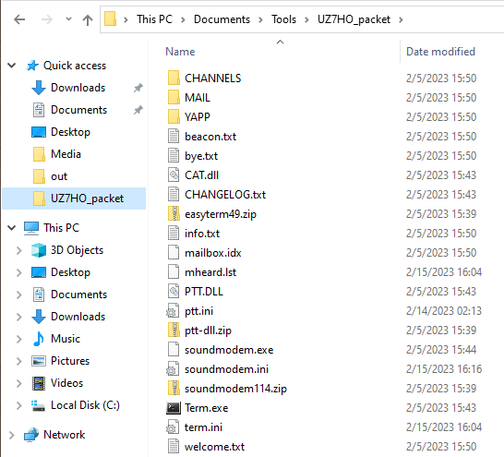
This is what my folder looks like:
Set them up like this:
SoundModem (soundmodem.exe), Settings -> Devices gets you this window. Grab the right audio out/in devices for your rig. Select the COM port your radio is plugged into, I use COM3. CAT did not work for me.
SoundModem, Settings -> Modems gets you this window. These settings work for me.
If you read about packet, they talk about “mark” and “space” frequencies. No idea how those get set up here. If you use flrig for things like Log4OM, JS8Call, fldigi, FT8, etc., you will need to close flrig so SoundModem can access the COM port, just like you might have to close flrig when you want to use Winlink.
Open up EasyTerm (Term.exe) and click Settings -> Station Setup. Enter your callsign and click OK.
IC-7300 Settings
If you have your IC-7300 set up and working with Winlink, you’re probably most of the way there. This is the point where I may have missed settings that are needed. Let me know in the comments if something breaks. My rig is plugged into COM3 with a USB cable.
Set your mode to LSB-D.
Using the touch menus, navigate to MENU -> SET -> Connectors -> USB SEND/Keying -> USB SEND and set it to “RTS”.
If you are using Winlink on the same machine, you may need to change a setting so you don’t key the radio with RTS when the Winlink modem starts. For VARA HF (I can’t comment on the others), open a session, then go to Settings -> Radio Setup -> Radio Control Port and uncheck “Enable RTS”.
Check whether you can transmit by going into soundmodem.exe and clicking “Calibration.” Click one of the tone buttons for Channel A and your rig should go into transmit mode. Click “Stop TX” to stop it.
Receiving
Once your software and rig are set up, start SoundModem. A good place to start looking for packet activity is on Network 105 frequencies. You should be able to hear the activity and see packets pop up in SoundModem. It’s OK if they don’t seem to make sense. You’re free to look around the Internet and find other dial frequencies to try.
Connecting to a BBS
Open up EasyTerm (Term.exe). Check out the list of received packets in soundmodem.exe. See any callsigns? If you can hear them, hopefully they can hear you. Again, you’re free to look around and find dial frequencies and callsigns that you might want to target. For now, let’s just try to make a connection.
In EasyTerm, click “Connect” and enter the callsign-SSID into the CallTo field. Click “Connect.”
With any luck, your computer will listen to the activity, wait for a break, then use your rig to transmit a packet. Then the station should acknowledge you and let you log in. In the screenshot below, SoundModem is showing all packets, and EasyTerm is showing just packets directed at me from KJ7LVZ.
Once logged in, you should get some basic information like how to ask for help. There are also online resources with common BBS commands. I’m sure they vary by the BBS software. The station above tells me to “Type ? for list of available commands.” Type your command and press “Enter.” Your station will transmit a packet and send you something back.
And that’s it! Fool around with things, and make sure to disconnect when you’re done using “Disconnect” in EasyTerm.
Other Setup Stuff
If you didn’t get something working by the time I wrote “And that’s it!” above, I probably didn’t draw the owl right.
Unfortunately, I figured this out over the course of a week, so there’s bound to be something I missed. Let me know and I’ll see what I can figure out. For example, I’m not sure if I messed with the audio input levels or not, but they should matter. Ideally, if Winlink and digital modes work, hopefully your audio is already set up right.
Final Thoughts
I admit that a banged my head on the desk a lot during this process, especially when trying to connect to the rig using CAT instead of the COM port. I gave it a few days, came back, and solved the problem.
I still haven’t spent a lot of time posting or reading BBS messages, but I’m interested in seeing what stations I can access, both locally/regionally and globally.
(Note to self: Is this a node? https://aprs.fi/info/AE5E-7)
I’m glad these systems still exist, and I’m excited to learn more. That being said, I’m not sure how useful they are in a tactical/event support/emergency situation unless you have everything and everyone set up beforehand. From what I understand of the history, the BBS system is robust for storing and forwarding messages. However, we now also have JS8/JS8Call, which also allows for message storage and forwarding, and may be easier for “the modern ham” to set up. I’m sure the experiences are different.
To bring this full circle, here’s my original Mastodon thread:
#bbs #computers #ham-radio #hf-packet #packet-radio
https://w1cdn.net/2023/02/getting-into-hf-packet-radio-bbs/
@bradbrownjr as an update, I managed to get SoundModem set up, but as soon as I set RTS or DTR to "on" for the SoundModem CAT settings, and USB SEND to RTS or DTR in the rig, the #IC7300 goes into transmit. At that point I gave up for now.
(I'm not asking *you* for help, but recording my observations).
(For the peanut gallery: Yes, Linux. I know how to use Linux, but I'm not in the mood to swap a USB cable and maintain two devices for this sort of thing.) #packetRadio #HFpacket
So I grabbed a trial of #Crossover (python magic et al) to do all the complicated parts of installing #RmsExpress (for Windows) into a #LinuxMac.
That works fine, on its own. Can do a telnet connection, and get mail.
It's built-in #ARDOP does not work, but only because it can't do the radio control bit, because... I dunno, something with "com1" or "com2" not being real things.
The IDEAL thing would be for this to be able to just use some Linux-based soundcard modem.
 M1VPN
M1VPN W1CDN
W1CDN
 Matt W1CDN
 Kelvin n0mql EN35ld