https://lapcatsoftware.com/articles/2026/3/11.html #bugreporting #Apple #FeedbackAssistant #developerstruggles #softwarebugs #techhumor #HackerNews #ngated
Also, does the Safari Web Inspector not understand nested CSS syntax, or is the red syntax highlighting colour an intentional choice for nested rules? Because having this displayed in red sure suggests that it’s invalid syntax.
(I can only assume it doesn’t understand nesting because there’s also no way to edit nested rules directly in the Styles pane of the Elements tab)
WebKit/Safari team: FB21689793
While working with the dialog element over the past week I keep seeing this Safari Web Inspector bug:
Having a nested @ starting-style rule within dialog::backdrop causes the Web Inspector to display the wrong style definitions when inspecting elements within a dialog element.
e.g. inspecting a button inside a form in the dialog shows the form’s styles as the button’s styles, an off-by-one type bug.
WebKit/Safari team: FB21689457
Feedback filed (FB21466091) - macOS 26.2
Unable to disable widgets on headless Mac being connected to via screen sharing. Didn't try a reboot, but relaunch of finder, disconnect/reconnect via screen sharing tried.
Hey Apple engineers, I’ve now got a sysdiagnose that should capture this serious excessive CPU usage issue with Pages, corespotlightd, fileproviderd, com.apple.CloudDocs.iCloudDriveFileProvider, tccd, etc that occurs when shared Pages documents stored on iCloud Drive are left open in the background.
FB21369001
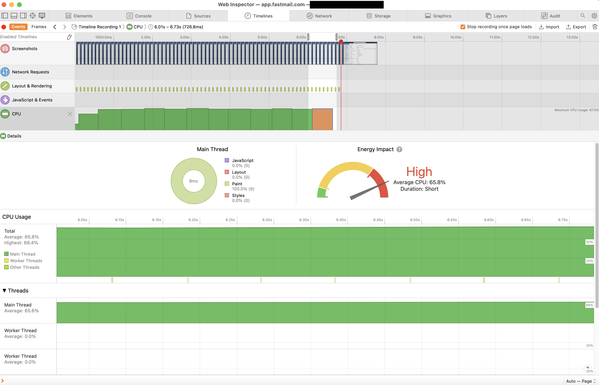
It is happening again today and is starting to become very annoying, because it kills battery life.
Edit: I think this is issue is fixed in Safari 26.4 beta 1! 🎉
Hey Safari/WebKit engineers, here’s a new one for you: Safari constantly repaints the contents of a background tab, causing very high CPU usage, until you switch back to the tab and it stops.
(specifically in my case, the site is app.fastmail.com @fastmail - I suspect it does a background update that triggers a repaint/relayout and that gets stuck in a loop)
FB21368897
#FeedbackAssistant #macOSTahoe
Filed FB20661489 "Reveal folder" does open Finder window with correct path, but doesn't make it frontmost
This is quite confusing. You click "Reveal in Finder" somewhere, a window opens, you start typing, but… you can't.
@karlcow Hi Karl, just letting you know that this bug is still there in Safari 26 and I’ve filed a fresh bug report, FB20644457. It’d be great if you could get someone to look at it. Although the bug has been there for at least three years, it’s now happening so frequently that it’s almost impossible for me to use Safari for web development.
The report includes a screen recording, reproduction steps, etc.
This is also reproducible in the latest STP Release 229.
@dashorst I’ve reported this bug (FB20414621) and the bug report shows that there are other similar reports, so they must know about it, but I don’t think they realise just how bad it is. It still says “Resolution: Open”, too.
I really hope we don’t have to wait until they’re ready to release Safari 26.1 because this needs a fix ASAP.
I’ve seen it allocating upwards of 120GB of RAM before it crashes. It’s probably causing a lot of SSD wear too.
@willcroft @jensimmons @nicolas17 I’ve added reproduction steps to FB20414621.
I can 100% reliably cause Safari 26.0.1 on macOS 15.7 to slow down and eventually close by repeatedly typing and backspacing in the address bar.
Even once I stop typing and it eventually goes back to 0% CPU, the whole browser is then sluggish when doing things like clicking into the address bar or maximising the window. Continuing to type/backspace causes it to lock up and close.