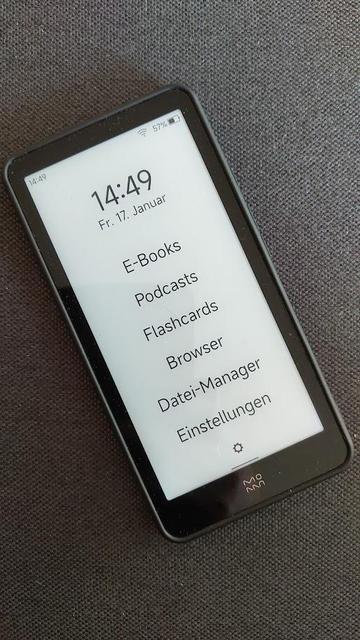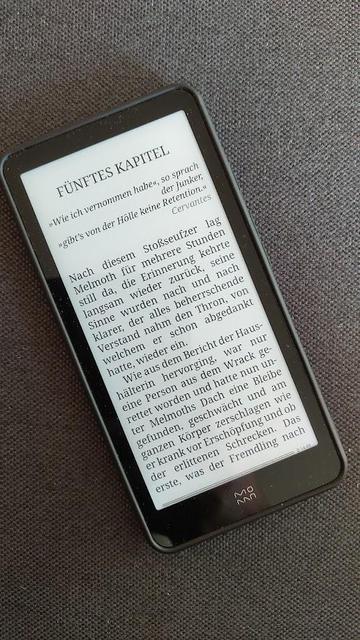
@filmfreak75 @actuallyautistic @autistics I went for an e-ink/e-reader/smartphone thing just because everything got so tiring and invasive.

#Einkbro is an interesting browser.

eInk Mode: Making web pages easier to read

Eink mode, as the name suggests, is a web browsing mode specifically designed for users of Electronic Ink (E Ink) devices. Its purpose is to present the website's content in a way that is most suitable for electronic ink devices, allowing E Ink users to have an immersive experience similar to reading a physical book while viewing the website's content. With the presentation of the Eink mode and electronic paper, the act of going online is transformed from merely "surfing" the internet to being more akin to "reading" the internet.

https://jackscogito.blogspot.com/2025/04/e-ink-mode-making-web-pages-easier-to.html

I've just discovered this server-side web-dev tool. It delights me in exemplifying several of the principles of e-ink design principles I'd first enunciated in 2022:

https://diaspora.glasswings.com/posts/638a8d10e041013afba8448a5b29e257

I strongly recommend you try the demo, especially on a mobile device, and e-ink if possible. I've checked it out on my Onyx BOOX under Einkbro, and it really is pretty magical.

The principle limitation is that this is a server-side hack, and unless there are ways to hook it in locally (a javascript bookmarklet might work though I don't think Einkbro supports those), it won't be widely available. The good news is that an extension is being considered, and the author is aware of Einkbro and I hope will have this integrated into that browser (long my own preferred driver for mobile use).

I'm thinking of how I might integrate this with my "paperize" news-site generator: https://toot.cat/@dredmorbius/114356066459105122

One of the coolest things I've seen in years, quite honestly.

HN discussion: https://news.ycombinator.com/item?id=43690828

#EinkMode #eink #pagnination #WebDev #Einkbro

Eink Mode: Making Web Pages Easier to Read

...

Nach einer Woche nun ein Update zu meinem #InkPalm Plus E-Reader. TLDR: Hat sich absolut bewährt und ich habe noch ein paar Anpassungen (Apps & Lockscreen) gemacht:

📖 #KOReader ist eine tolle Leseapp und optimiert für E-Ink-Geräte. Ich nutze diese auch auf meinem „grossen“ Boox-Reader. Aber: Leider lässt sich die Schriftgrösse der Menüs nicht anpassen (nur der Buchtexte), was auf diesem kleinen Screen manchmal etwas unpraktisch ist.

🎧 #AntenaPod ist meine bevorzugte Podcast-App und läuft dank Bluetooth auch auf dem InkPalm bestens.

🗂️ #AnkiDroid für meine Anki-Flashcards läuft ebenfalls 1A.

🌐 #EinkBro als für E-Ink optimierter Browser ist sowieso ein Muss.

🧠 #Wikipedia App läuft auch, habe ich aber nicht ins #Unlauncher Menu aufgenommen, da ich die Wikipedia direkt aus KOReader heraus abfragen kann.

Generell habe ich die Schriftgrösse systemweit auf 130 % gestellt, sodass ich alles lesen kann.

Hoffentlich werden künftig noch mehr E-Ink optimierte Apps veröffentlicht.

Ich habe mir zwecks #Detox und um noch mehr zu lesen, einen #InkPalm Plus besorgt. Natürlich gleich die ganze chinesische Spyware runter und via F-Droid nur das Nötigste installiert. Im Moment fehlen noch Podcasts, aber der #KOReader und #EInkBro als Browser sind schon installiert. Launcher ist Unlauncher. Das Teil hat WLAN und Bluetooth, aber kein Mobilnetz. Ist auch ein Reader und kein Handy.

Bis jetzt bin ich sehr zufrieden. Unterwegs verschwindet das Handy nun tief in der Aktentasche, griffbereit sind nur noch der InkPalm und mein Leuchtturm1917.

#books #bookstodon #ProductivityPorn

#EinkBro APP 基本使用教學. EinkBro 是一個專門為 Eink #電子紙 閱讀器開發的瀏覽器… | by Daniel Kao | 電子書閱讀器使用心得及技巧分享 | Medium
https://medium.com/ereadertips/einkbro-%E4%BD%BF%E7%94%A8%E6%95%99%E5%AD%B8%E8%88%87%E5%B0%8F%E6%8A%80%E5%B7%A7-db9c93b4d890

EinkBro App 被 Google Play Store suspend
https://medium.com/einkbro/einkbro-app-%E8%A2%AB-google-play-store-suspend-2022f827081d

超級好用適合電子紙的瀏覽器,但我想用分享網址功能而嘗試在android 手機安裝使用時,才發現它……從 gooogle play 商店下架了?!

咦?蛤?欸?
沒有它的話,我的開放式電子紙閱讀器先殘掉至少三成的fu……

* 這個瀏覽器最特別的地方還有一個:直接幫你把網頁轉成直排閱讀。直覺就是中日文閱讀喜好者才會加進去的功能,查下去發現是台灣人開發的很開心,然後看到它被下架了好傷心。

EinkBro APP 基本使用教學 - 電子書閱讀器使用心得及技巧分享 - Medium

EinkBro 是一個專門為 Eink 電子紙閱讀器開發的瀏覽器 APP。由於介面長得跟一般的瀏覽器 APP 很不一樣,而且又有很多按鈕可以按,和很多設定可以調整,所以寫了這篇文章來介紹一下它。首先會講解基本功能和設定。然後在第二部分說明一些更進階的用法,以及我自己在使用上的技巧。 安裝好 EinkBro 後,一進入到 APP 中可以看到預設的網頁是 Google…

電子書閱讀器使用心得及技巧分享
EinkBro: Small #Android #Browser made for Eink devices.
#EinkBro is designed to fit #Eink devices' needs; no unnecessary UI transitions and animations, clear B&W icons, useful features for eink reading experience. It's originated from #FOSS Browser, which is fully free/libre (as in freedom) Android app.
https://github.com/plateaukao/einkbro
👍👍👍
GitHub - plateaukao/einkbro: A small, fast web browser based on Android WebView. It's tailored for E-Ink devices but also works great on normal android devices.

A small, fast web browser based on Android WebView. It's tailored for E-Ink devices but also works great on normal android devices. - plateaukao/einkbro

GitHub

#Einkbro fans out there: note that the project is no longer being updated on Google Play:

https://github.com/plateaukao/einkbro/issues/357

(And possibly, not on F-Droid either. The project's a few releases stale there, I've asked what's up on the GH link above.)

The announcement (in Mandarin Chinese) is here:

https://medium.com/einkbro/einkbro-app-%E8%A2%AB-google-play-store-suspend-2022f827081d

Lede pull / DeepL translation:

In December 2023, it suddenly occurred to me that I could add a more convenient app update mechanism to EinkBro. In my own usage habit, I always install the newly developed version, so I don't install the relatively stable version on Google Play Store which may be updated once every 2-3 weeks.

FWIW, I'd recently tried installing from the GitHub release zip with no joy.

And if you're confused by all this: Einkbro is an eink-optimised Web browser for Android which I quite like most of the time.

einkbro no longer on Google Play store · Issue #357 · plateaukao/einkbro

After reading the events in https://medium.com/einkbro/einkbro-app-%E8%A2%AB-google-play-store-suspend-2022f827081d I'd like to ask you to reconsider getting einkbro listed on the Play store again....

GitHub

I'm using #Obsidian on my #ebook reader and am wondering whether it'd be possible to develop a community plugin that allows me to tap instead of scroll through notes, turning them into pages in the way that the e-ink browser #EinkBro handles websites. It would make Obsidian on e-ink devices so much more enjoyable! Possible?

https://github.com/plateaukao/einkbro

GitHub - plateaukao/einkbro: A small, fast web browser based on Android WebView. It's tailored for E-Ink devices but also works great on normal android devices.

A small, fast web browser based on Android WebView. It's tailored for E-Ink devices but also works great on normal android devices. - plateaukao/einkbro

GitHub

@riley E-ink tablet, FYI.

It has no SIM capability, no camera, though there are a mic and speakers. I keep authenticated apps to an absolute minimum (Pocket is that exception), though I'm thinking of adding email to it. Jitsi meet might be a voice comms option.

TL;DR: excellent for reading, good for Web (use Einkbro: https://github.com/plateaukao/einkbro), quite good for podcasts, notetaking suprisingly good, multiple firmware upgrades over the past 2.5 years, which I consider good support (exceeds any prior Android device). Reasonably un-googled (no Google Play or Google registration), though still Android. Heavy use of F-Droid and Aurora Stores.

More recent releases double onboard storage. I'd still prefer to see ~512 GB (it's cheap). Document management is a major weakness.

I've written a few reviews and reflections mostly at Hacker News. Meta-review linking others: https://news.ycombinator.com/item?id=36965197

From that:

For more on what e-ink delivers vs. tablets generally, see "The Case Against Tablets" (and specifically the long comment with the big table):

https://diaspora.glasswings.com/posts/880e5c403edb013918e1002590d8e506

The Long Comment: https://diaspora.glasswings.com/posts/880e5c403edb013918e1002590d8e506#956cc690403301391d35002590d8e506

Related topic, E-Ink Design Principles for Web and Applications:

  • Persistence is free
  • Paints are expensive
  • Refreshes are slow
  • Colours are very limited or nonexistent
  • Line art displays beautifully. Raster images not so much
  • Pagination navigation is strongly preferred to scroll
  • Graphics are reflective rather than emissive
  • Touch / Wacom may exist
  • Feature detection capabilities are limited, particularly for HTML/Web (via media queries).

https://diaspora.glasswings.com/posts/638a8d10e041013afba8448a5b29e257

@mutkitta

#eink #onyx #boox #OnyxBoox #EinkTablets #Einkbro #Android #FuckAndroid #ebookReaders

GitHub - plateaukao/einkbro: A small, fast web browser based on Android WebView. It's tailored for E-Ink devices but also works great on normal android devices.

A small, fast web browser based on Android WebView. It's tailored for E-Ink devices but also works great on normal android devices. - plateaukao/einkbro

GitHub

@WPalant

I think #Firefox is not healthy either anymore. I think I read about it moderating bookmarks or something. Either way, if you use a liberated and community based fork like #Chromium or #LibreWolf you are fine. I am using the latter on desktop and #einkbro on my tablet(I have got an #Epaper tablet).