Seriously, this "stupid autocomplete that just predicts tokens" understands and explains AppKit and Core Animation better than probably most iOS devs would… that's good enough for me ¯\_(ツ)_/¯

#AppKit #CoreAnimation #MacDev

Core Animation and CATransition for Creating Transitions in iOS Development with Swift

Core Animation and CATransition are two powerful tools for creating transitions in iOS development with Swift. Core Animation is a framework that allows developers to create high-performance…

Medium
Okay, I gave this a try, but for some reason, it’s not working with all CATransitionTypes. Push and Reveal work, Flip not.
#swiftui #coreanimation #iosdev #macosdev
That is the best way to implement this as SwiftUI Transition? The old version was using a CATranstion (Flip) but I haven't figured a good / easy way as a transition.
#swiftui #coreanimation #iosdev #macosdev
I'm having way too much fun with this new UI for my Arrival Times view and some animation. #pdxtransit #swiftui #coreanimation

I finally found a reason to use my scrolling marquee that I made for Music Widget, QuickTune, etc. etc. for an iOS app...

My PDX Transit SwiftUI re-write!!! Check it out:

(still a work in progress but you get the idea!)

#swiftui #coreanimation #trimet #portland #pdxtransit

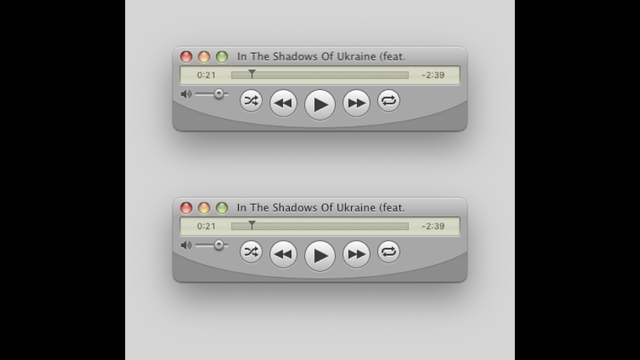
I wrote the scrolling marquee using Core Animation for my apps but a while back, I found some issues where the text would look blurry on non-retina displays.

Unfortunately I found a few more cases (still happening a lot less than before), but finally found the issue and fixed it.

The top image has the blurry text (in the titlebar), and the bottom image has it fixed. 🛠️😄

Text now appears super sharp on non-retina displays and have yet to see a blurry example.

#QuickTune #UIUX #CoreAnimation

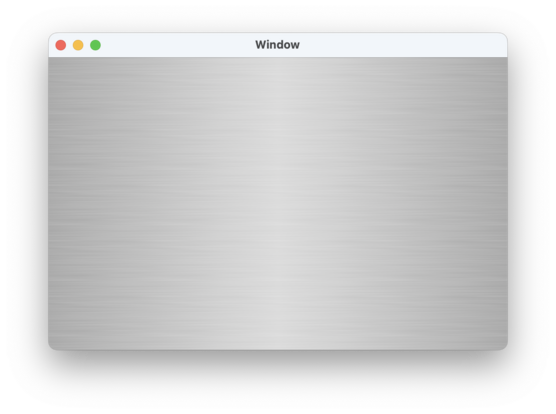
I just posted a sample project to GitHub which has the code I wrote for the Brushed Metal background in QuickTune.

It seems performant but I am probably not the best in determining if it is at its most performant. Seems good though.

This is done in Core Animation layers & good for both 1x and 2x displays.

I hope to see more Brushed Metal interfaces soon 😉

https://github.com/marioaguzman/BrushedMetalBackground

#MacOSX #macOS #Mac #Aqua #BrushedMetal #Interface #AppKit #CoreAnimation

GitHub - marioaguzman/BrushedMetalBackground: Using Core Animation layers to draw brushed metal backgrounds in views.

Using Core Animation layers to draw brushed metal backgrounds in views. - marioaguzman/BrushedMetalBackground

GitHub
Not sure if this is widely known but you can animate the path property on a CAShapeLayer. It just doesn’t _implicitly_ animate. And if you use paths that have the same number of points, in roughly the same locations, #CoreAnimation will smoothly animate between them. With the right paths it looks really good. Since it’s vector based, it’s razor sharp at any scale. And since it’s all just CALayers it’s super lightweight.

Using matchedGeometryEffect to Create View Animation in iOS 14

#iOS #Programming #CoreAnimation
https://www.appcoda.com/matchedgeometryeffect/

Using matchedGeometryEffect to Create View Animation in iOS 14

SwiftUI already made it pretty easy to create view animation. In iOS 14, the new matchedGeometryEffect modifier takes view animation to the next level.

AppCoda