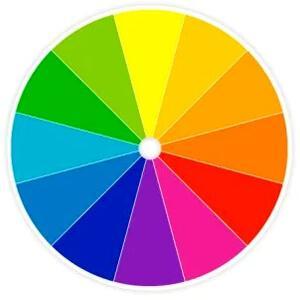
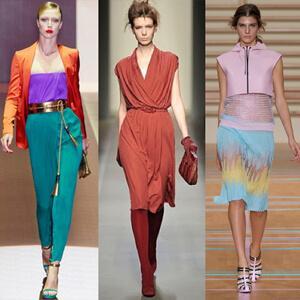
𝐔𝐧𝐥𝐨𝐜𝐤 𝐭𝐡𝐞 𝐒𝐞𝐜𝐫𝐞𝐭𝐬 𝐨𝐟 𝐂𝐨𝐥𝐨𝐮𝐫 𝐓𝐡𝐞𝐨𝐫𝐲 & 𝐏𝐬𝐲𝐜𝐡𝐨𝐥𝐨𝐠𝐲

Dive into the world of colour theory and psychology to understand how different hues influence human emotions and perceptions.
https://articles.wifd.in/understanding-basic-color-theory-and-psychology-of-colors

Regards,
Fashion Articles by Waves Fashion Institute
https://articles.wifd.in

#colourtheory #colourpsychology #designinspiration #brandingstrategy #marketingtips #visualcommunication #graphicdesign #colourschemes #creativeprocess #designthinking

Basics of Color Wheel - Theory, Effects & Psychology of Colors

Learn the Basics of Color Theory & master the art of creating harmonious designs. Understand color wheel fundamentals and discover how colors impact trends.

Fashion Articles by Waves Institute of Fashion Designing

All we need now is the ability to change the main widget colour (to darken to a mid-ish grey) and the ability change the header bar colour (to make it dark) and we'd have loads of control for really nice theming built-in to Gnome!

https://hachyderm.io/@[email protected]ace/112736500090839215

#Gnome #UI #theming #DesktopTheming #Themes #ColourSchemes

Alice :neocat_flag_transbian: (@alice)

A few more accent color things landed, e.g. settings illustrations can now follow it, calculator has dropped orange, new dialogs disambiguate suggested/destructive styles, while papers and sysprof properly redraw when accent changes now (and it's all in gnome os, incl. shell finally). So yeah, it's all in a fairly good shape now ^^ (other than blue folders) (📎4)

Nyaa~ Place
Painted a few pieces up to try out a colour scheme that I'm thinking of using for my StarGrave crew.

I used a random reaper scifi trooper figure and a Battletech mech to try it out. I might tweak it a bit to darken the red for a bit more contrast but overall I'm pretty happy with the result.

#MiniaturePainting #ColourSchemes

Very happy to see this issue closed via commit and very much looking forward to seeing the new fully-light light mode in GNOME :)

https://gitlab.gnome.org/GNOME/gnome-shell/-/issues/5545

#GNOME #design #colourSchemes #accessibility #usability

Make light mode holistic (so it includes system interface elements) (#5545) · Issues · GNOME / gnome-shell · GitLab

Feature summary

GitLab

Excellent work on a holistic light mode for GNOME. Currently GNOME has a dark mode and a “mixed mode” and the “mixed mode” is used when the light colour scheme is active. If that sounds inconsistent, that’s because it is.

The design work presented here would fix that and provide a consistent light mode:

View the design: https://gitlab.gnome.org/dikasp2/gnome-shell-light-theme-experimentation

Join the discussion: https://gitlab.gnome.org/GNOME/gnome-shell/-/issues/5545#note_1701415

CC @gnome #gnome #design #colourSchemes #lightMode #darkMode #linux #fedora #foss

setya prayogi / gnome-shell-light-theme-experimentation · GitLab

Welcome to GNOME GitLab

GitLab
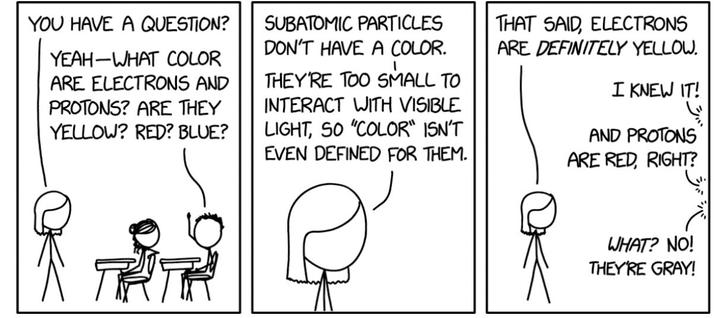
Electron Color

xkcd

Updated: Lipstick on a Pig – Helix Editor now automatically reloads its configuration when the system colour scheme changes.

To update:

> lipstick update

https://codeberg.org/small-tech/lipstick#lipstick-on-a-pig

#lipstickOnAPig #GNOME #HelixEditor #colourSchemes

lipstick

Make command-line apps adhere to your light/dark mode setting.

Codeberg.org

@ru Ah, thanks :) It’s the Pencil theme on Black Box terminal.

Black Box has built-in support for GNOME’s dark and light (oops, I mean “mixed” mode – https://ar.al/2022/08/17/lipstick-on-a-pig/) mode and it supports themes for each.

#BlackBox #terminal #GNOME #colourSchemes

Lipstick on a Pig: learning the most important lesson in design

I just released a little tool called Lipstick on a Pig that helps keep the visual appearance of supported command-line applications in sync with the current light/dark mode setting (colour scheme) of your system in GNOME. But why is this tool even necessary to begin with? Let’s start at the beginning… Getting to GNOME you The GNOME display environment1, since version 42, implements support for light and dark appearance styles (aka colour schemes).

Aral Balkan

So, for the 34% of you who answered yes, if you’re on GNOME and you want your CLI apps to automatically switch to the correct theme when your system/terminal does, check out Lipstick on a Pig:

https://codeberg.org/small-tech/lipstick

I’ve added support for three apps I use regularly (Helix Editor, delta, and bat) and you can help make it better by adding plugins for apps that you use.

#lipstickOnAPig #CLI #terminal #dev #GNOME #colourSchemes #constrast #lighting #usability #legibility #accessibility

lipstick

Make command-line apps adhere to your light/dark mode setting.

Codeberg.org

I’ve initially added support to Lipstick on a Pig for automatically switching bat, delta and helix editor from light to dark mode when GNOME’s colour scheme changes.

If there’s an app you want to see supported and know a little bash, you can contribute a plug-in.

https://codeberg.org/small-tech/lipstick

#gnome #cli #commandLine #colourSchemes #lightMode #darkMode

lipstick

Make command-line apps adhere to your light/dark mode setting.

Codeberg.org