πŸš€ Ah, the timeless wisdom of toasting your MacBook by force-feeding your CPU a diet of infinite "yes" commands. 🀨 Because nothing says "tech genius" like using your laptop as a space heater while you frantically try to remember if you saved your last document. 🍳
https://z3ugma.github.io/2019/11/18/warm-up-your-macbook/ #techhumor #laptoplife #macbooktips #cpuusage #spaceheater #HackerNews #ngated
Warm Up Your MacBook

Who else hates putting their hands on an icy metal laptop after it's been riding outside in your cold backpack? Here's a one-line solution.

Ah, nothing like a 169M model that "lightly" munches on your CPU while promising zero-shot #voice #cloning πŸ—£οΈπŸ€–. But sure, let’s all pretend this is groundbreaking and not just another oversized GitHub experiment vying for your processing power. Meanwhile, your laptop fan just applied for early retirement. πŸŒ€πŸ’»
https://github.com/samuel-vitorino/sopro #AI #CPUUsage #TechExperiment #OversizedModels #GitHubProjects #HackerNews #ngated
GitHub - samuel-vitorino/sopro: A lightweight text-to-speech model with zero-shot voice cloning

A lightweight text-to-speech model with zero-shot voice cloning - samuel-vitorino/sopro

GitHub
Apparently, CPU utilization is as misunderstood as your uncle's dance moves at weddings πŸŽ‰. This article dives into the complexities of CPU usage with all the charm of a tax return tutorial πŸ“‰. Clearly, we all needed a 2025 calendar update on what happened in 2017. πŸ™„
https://www.brendangregg.com/blog/2017-05-09/cpu-utilization-is-wrong.html #CPUUtilization #CPUUsage #TechHumor #TechEducation #Misunderstandings #HackerNews #ngated
CPU Utilization is Wrong

CPU Utilization is Wrong

Experiencing Outlook 365 CPU spikes when typing emails? The issue affects version 2406 (build 17726.20126) and later. Microsoft plans to roll out fixes by end of May 2025. Details: #Outlook365 #CPUUsage

https://pupuweb.com/why-is-outlook-365-causing-frustrating-cpu-spikes-and-when-will-the-fix-arrive/

Why Is Outlook 365 Causing Frustrating CPU Spikes-and When Will the Fix Arrive? - PUPUWEB

Can You Expect a Powerful Solution to Outlook 365’s High CPU Usage Soon? Many users of Microsoft Outlook 365 (Classic) have recently experienced

PUPUWEB

Windows 11’s Task Manager will show standard CPU usage

If you wanted an accurate representation of the CPU utility, which current stable versions of Windows 11 and earlier don’t show, you’ll have to rely on third-party applications to get industry-standard CPU utility measurements. The current CPU usage found in the Task Manager was not consistent with third-party tools.

Recently, Microsoft have released a new Dev version of Windows 11 to the Dev channel insiders and to the Beta channel insiders. This update was released under KB5052090 for the Beta channel insiders as an optional update. This development build had introduced better lock screen widget management, some bug fixes, and Task Manager having improved CPU monitoring.

In the Dev channel, the Task Manager change is being rolled out gradually with the toggle on. Starting from this update, Task Manager will now use the standard metrics to show actual CPU utility consistently across all pages. This measurement aligns with industry-standard measurements and third-party tools to increase consistency.

If you want to show those measurements, you can enable the column in the Task Manager in the Details tab as shown below:

The implementation, however, is not perfect, as the Task Manager may use the old CPU utility measurements in the Performance tab, as well as the System Idle Process always shows 0 in usage.

https://audiomack.com/aptivi/song/windows-11s-task-manager-will-show-standard-cpu-usage

#CPU #CPUUsage #news #TaskManager #Tech #Technology #Windows #Windows11

The screenshot shows the **Verthash One Click Miner** program with active cryptocurrency mining (DOGE and VTC). Additionally, the following details are visible:
1. **CPU** is running at 100%, indicating high system resource usage.
2. The **Intel(R) HD Graphics 610** GPU is also at 100% load.
3. The system is using 92% of its RAM (10.9 GB out of 11.9 GB).
4. Active pool: Zpool.ca with a 0.50% fee.
5. The window displays the text "Stand With Ukraine," showing support for Ukraine.
The high component load is likely due to active mining, which may impact the computer's performance for other tasks.
---
**#Mining #Cryptocurrency #Dogecoin #VerthashMiner #StandWithUkraine #TechLoad #CPUUsage #GPUUsage #Zpool #CryptoMining**

Looking at my little home server cpu usage, #HomeAssistant stands out - installed as a vm (appliance).

Checking inside the VM I notice it's mostly #deconz that is adding to the cpu usage.

Any pointers on making #HA a bit lower in #cpuUsage?

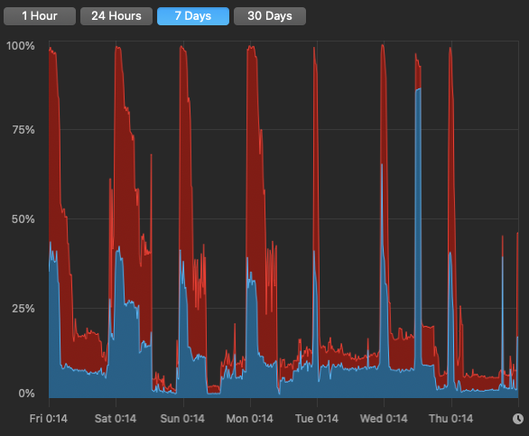
#CPUusage on this machine over the last week. As you can see there's an overnight job that maxes out all the cores. Can you guess when it was that I evicted the #DustBunnies and it stopped #ThermalThrottling?

Turned my #AsusROG on to do some editing. Opened DaVinci Resolve, Viber and Microsoft Edge. Started downloading video files and... Every app was slow and stalling. Went to #TaskManager and started ending some tasks that I'm sure I can close. Then I noticed that #CPUusage is at 100%. I haven't even started working yet!

The culprit: #Nahimisvc32.exe. 😠

How To Limit CPU Usage Of A Process In Linux - OSTechNix

This brief article describes how to limit cpu usage of a process in Unix-like distributions using cpulimit command from commandline.

OSTechNix