Running #llama (latest as of now) on my Intel #Arc750 GPU with the new qwen35-9B model using SYCL (Intel's thing):

- Needs a special environment to compile (setvars.sh, icc compiler, ...)
- Only achieves ~80% compute throughput (nvtop)
- Produces gibberish output
- Bench: pp=131t/s tg=9.4t/s

So I tried using the independent Vulkan backend:

- No special env required
- Achieves 100% compute
- Reasonable output produced
- Bench: pp=393t/s tg=9.5t/s

What gives?
It's wild how effective hardware encoding is.

I needed to convert a 1080p 2 hour lecture down to a reasonable size (so that I can view it via slow mobile). I encoded it to #AV1 using VAAPI on my #Arc750. I'm getting 20x realtime encode speed 🤯

I'm happy to get 0.2x using software encoding with libsvtav1.

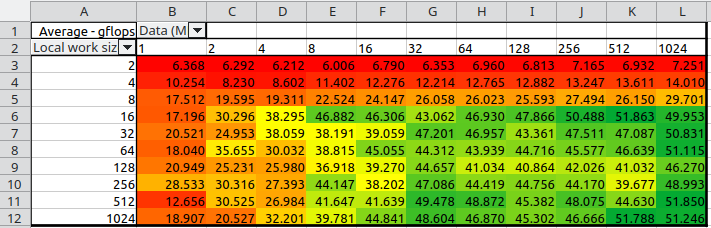
And apparently I've misunderstood the work size limits in the OpenCL documentation (1024 in my case). That limit only applies to the *local work size*, not the global work size.

So indeed my sample "add" kernel is indeed just `c[gid] = a[gid] + b[gid]` (no for-loops required inside kernel, even if global size is 1GiB) and I'm getting reasonable looking "gflops" numbers (but still orders below the theoretical maximum for my #Arc750 ).

Hardware accelerated (vaapi) #av1 10-bit encoding using #ffmpeg :

$ ffmpeg -vaapi_device /dev/dri/renderD128 -i <input> -vf '<any other filters you might need, e.g. scale/crop/drawtext>,format=p010,hwupload' -c:v av1_vaapi -b:v <bitrate> output.mp4

The 10-bit part is "format=p010", for 8-bit encode use "format=nv12".

I don't know why this works but it produces a 10bit AV1 encoded video on my #Intel #Arc750 so I'm happy.

I challenged myself to implement a code completer for #TextAdept editor in #Lua based on #llama 3.2. It ended up being <100 LOC total.

It feels pretty fast considering that it's running on modest #Arc750. And it's interesting to see the different "code" it makes up every time it's run.

Clearly a problem with the driver for the #Arc750, fortunately the music is still playing in the background to let me know that the computer is responsive over SSH.

Now to figure out how to do a kernel backtrace...

OMG, so many ML/NN frameworks/runtimes!

Fortunately exactly *one* supports my #Intel #Arc750 GPU, so that makes choosing one very easy...

Model: yolov8m
Format: time (ms/image)
PyTorch: 228.85
TorchScript: 268.37
ONNX: 217.97
OpenVINO: 16.17 <== GPU
TensorFlow: SavedModel: 275.35
TensorFlow: GraphDef: 565.08
TensorFlow: Lite: 783.01
PaddlePaddle: 431.24
NCNN: 290.61

#yolo

Did dome napkin math, and the #intel #Arc750 GPU I installed in my always-on computer (#diy #NAS + occasional gaming) really shifted the decision towards a dedicated NAS.

The issue is that with the GPU, the power draw is ~120W idle (not good). If I can bring it down to ~20W, over the span of a year that's ~150€ in electricity savings.

So I have ~150€ to spend on a NAS solution (I already have the disks) and it's all savings after 1 year.

https://widget.uk/@burtyb/112214159765245262 looks really tempting...

Chris Burton (@[email protected])

Attached: 1 image @[email protected] That looks a nice and compact option 😃 . I've been pondering transferring the disks from my failing NAS to this Pi with NVMe+SATA using a couple of those 3x3.5" hot swap bays that fit in dual 5.25".

Widget.UK

So I went ahead and compiled the Intel OpenCL driver with debug symbols, and opened it up in GDB.

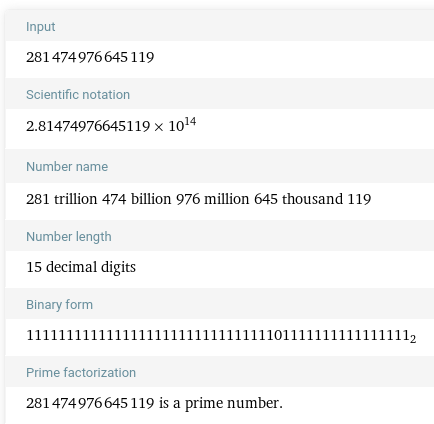
The init fails here: https://github.com/intel/compute-runtime/blob/e44ac2a0017434b2af6fdf5601d98975640e781e/shared/source/os_interface/linux/drm_memory_manager.cpp#L102 since the computed GPU address space is 281474976645119 which Wolfram Alpha tells me is a prime, and is nothing that the rest of the driver recognizes.

Looking at the binary pattern, I suspect a bitflip. Faking the "correct" value in the driver source gives me a working OpenCL device / platform 😕

Enough "fun" for today.

#linux #intel #Arc750

compute-runtime/shared/source/os_interface/linux/drm_memory_manager.cpp at e44ac2a0017434b2af6fdf5601d98975640e781e · intel/compute-runtime

Intel® Graphics Compute Runtime for oneAPI Level Zero and OpenCL™ Driver - intel/compute-runtime

GitHub

I've spent the past few hours debugging why #OpenCL no longer picks up my #Intel #Arc750 GPU, and I got nowhere.

$ sudo clinfo
Number of platforms 0

Not even the CPU is picked up. Why oh #Arch why are you doing this to me? I guess it's a sign to go to sleep...