Nightmare-Eclipse has published two new toys to GitHub: GreenPlasma and YellowKey.
TL;DR:
- GreenPlasma looks interesting, but it's not a complete exploit. It's at best a building block toward LPE on Windows.
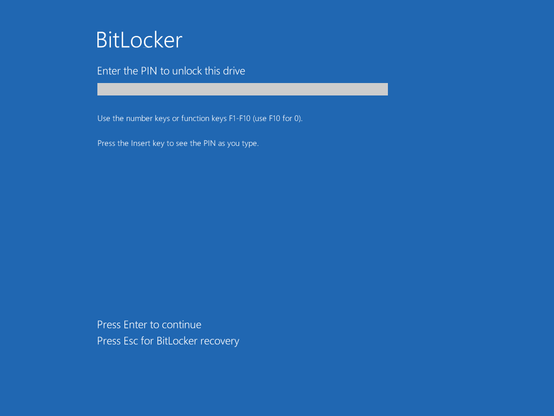
- YellowKey is a Windows login bypass for an attacker with physical access. Use case: Your roomate wants to get into your roomate's poorly protected (potentially work-owned) laptop. Mitigation: Use Bitlocker with a PIN. (Note: The YellowKey author disagrees that PIN is a protection 🤔)
1) GreenPlasma
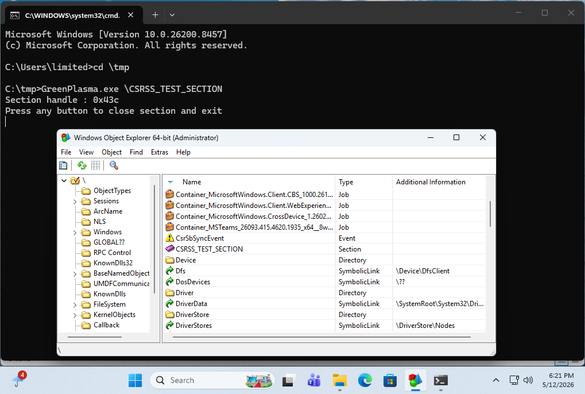
Here , an unprivileged user can create an arbitrary memory section in an object. While the first time I tried it it hung at the UAC prompt, but subsequent attempts worked to go from low-privileged to creating a \CSRSS_TEST_SECTION object.
It is worth noting that the PoC as it is does not have the bits that would turn it into a true LPE, as that is left as an exercise to the user.
2) YellowKey
This one is a bit hand-wavy to me, But I eventually was able to reproduce it. Via an attached USB drive. I could NOT reproduce it via putting the FsTx directory on the EFI partition. Potentially because the FsTx replay happened before my triggering of Recovery. I was able to reproduce with a USB drive attached.
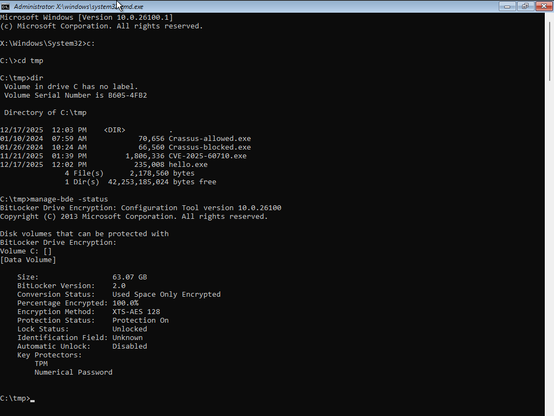
The target is a TPM-only bitlocker, which is known to be insecure. The use case is that, with physical access, you can access the filesystem with root privileges. Which even TPM-only bitlocker would prevent.
There is a thread on Twitter that claims to have reverse engineered the YellowKey Bitlocker bypass. And it talks about RecoverySimulation.ini and how it skips re-locking a bitlocker drive. The thing about this is:
1) This RecoverySimulation.ini stuff was talked about publicly last year
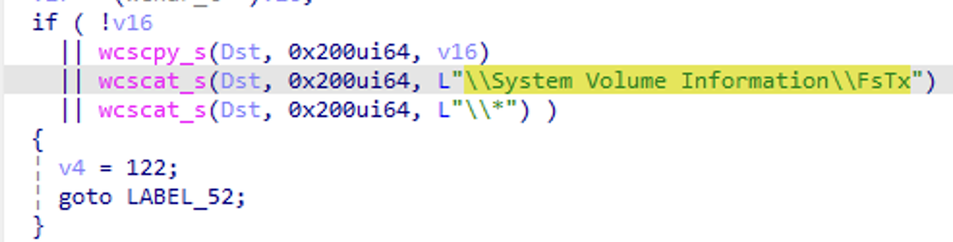
2) The actual bits in the YellowKey GitHub repo are the contents of an FsTx directory. Which appears to be be related to Transactional NTFS, which uses CLFS under the hood. (The files parse with python's dissect.clfs). Also note that by looking at Windows' fstx.dll, we can see code that explicitly looks for \System Volume Information\FsTx in the FsTxFindSessions() function.
Microsoft themselves have this to say about TxF 😂:
While TxF is a powerful set of APIs, there has been extremely limited developer interest in this API platform since Windows Vista primarily due to its complexity and various nuances which developers need to consider as part of application development. As a result, Microsoft is considering deprecating TxF APIs in a future version of Windows to focus development and maintenance efforts on other features and APIs which have more value to a larger majority of customers.
And if one looks at the contents of this FsTx directory in the GitHub repo, there are no strings related to RecoverySimulation.ini in it at all. Only of interest is perhaps:
\??\C:\Windows\win.ini
and
\??\X:\Windows\System32\winpeshl.ini
Where X:\Windows\System32\winpeshl.ini is what controls what WinRE does when it fires up.
But anyway, yes it works.
But what's intriguing to me is: Why can the presence a \System Volume Information\FsTx directory on one volume affect the contents of ANOTHER VOLUME when it's replayed? 🤔
In a normal WinRE session, you have a X:\Windows\System32 directory that has a winpeshl.ini file in it:
[LaunchApp]
AppPath=X:\sources\recovery\recenv.exe
However, with the YellowKey exploit, it looks like Transactional NTFS bits on a USB Drive are able to delete the winpeshl.ini file on ANOTHER DRIVE (X:). And we get a cmd.exe prompt, with bitlocker unlocked instead of the expected Windows Recovery environment. While the TPM-only Bitlocker bypass is indeed interesting, I think the buried lede here is that a \System Volume Information\FsTx directory on one volume has the ability to modify the contents of another volume when it is replayed. To me, this in and of itself sounds like a vulnerability.

 Dave Winter
 Viss
Viss
 BrianKrebs
 Michael T Babcock
 Will Dormann
 Boris Mann
 Brian Clark
 [aj]
[aj]