11 Followers
1 Following
428 Posts

----------------

🛠️ Tool
===================

Opening. Clawpatch is an automated code-review tool that treats a repository as a set of semantic features rather than a bag of files. The workflow maps features (routes, commands, packages, tests), sends bounded-context review requests to a local Codex provider, and persists findings and patch attempts under .clawpatch/ for audit and resumption.

Key features.
• Semantic mapping. Features include entrypoints, owned files, nearby tests and trust boundaries so the reviewer sees bounded context rather than unrelated files.
• Structured findings. Each finding stores category (bug, security, performance, docs-gap, test-gap, maintainability), severity (critical/high/medium/low), confidence, evidence (code snippets, file paths), and recommendations.
• Automated patch loop. An explicit fix→validate loop is available via clawpatch fix and clawpatch revalidate, and validation command outputs are recorded with the patch attempt.
• Safety controls. Clean-worktree checks, no implicit commits, and a persistent audit trail in .clawpatch/ keep changes under user control.

Technical implementation.

Clawpatch auto-detects project types (Node.js, TypeScript, Next.js, Python frameworks, Go, Rust, Swift). The default provider shells out to the local Codex CLI and enforces strict JSON schemas for provider responses. State files include config.json, project.json, and findings/ metadata so runs can be resumed and reports generated in Markdown or JSON.

Use cases.
• Focused reviews of risky features (routes, commands, config parsers) where context matters.
• CI gating for feature-level checks with persisted findings for triage.
• Assisted remediation where teams accept explicit patches and want recorded validation.

Installation & quick commands.

clawpatch init — initialize project and create .clawpatch/
clawpatch map — build semantic feature map
clawpatch review --limit 10 — run reviews in batches
clawpatch fix --finding <id> — apply a chosen fix

Limitations.

Clawpatch relies on a local Codex CLI provider by default, so review quality depends on provider capabilities and prompts. The source does not include independent validation of fix correctness across diverse codebases. Expect false positives/negatives typical of automated reviewers and verify patches manually before merging.

🔹 clawpatch #codex #code_review #static_analysis #tool

🔗 Source: https://clawpatch.ai/#overview

Clawpatch — Automated Code Review That Lands Fixes

Automated code review that lands fixes. Maps codebases into semantic features, reviews for bugs and quality, and records explicit fixes.

Clawpatch

----------------

🎥 Video
===================

Opening: The announcement describes a free webinar titled “Digital Forensics: Basic Linux Analysis After Data Exfiltration — Hackers Arise” scheduled for February 13, 2026. The core narrative emphasizes that intrusions often present as an adversary already resident in an environment rather than beginning with an obvious malware drop.

Technical Details: The event framing indicates a focus on post-exfiltration Linux analysis. Topics implied by the title and tagline include identification of forensic artifacts left after data exfiltration, methods to examine Linux hosts for traces of adversary activity, and investigator-centric techniques for reconstructing actions when initial compromise is not observable. The announcement explicitly centers on the concept that adversaries can be present before any exploit or payload execution.

Analysis: Framing investigations around the “adversary-inside” perspective shifts attention to persistence mechanisms, lateral movement artifacts, evidence of data staging and egress, and gaps in audit/visibility that enable prolonged dwell time. While the announcement does not list IoCs or specific tools, it signals an emphasis on host-level evidence collection and reasoning about timelines and artifact correlation on Linux systems.

Detection: Although the source does not provide detection signatures, the webinar’s scope suggests discussion of detection opportunities such as anomalous outbound connections, unusual file access patterns, unexpected scheduled jobs or services, and forensic indicators in system logs and memory snapshots.

Implications for IR practitioners: The stated narrative reinforces the need to treat post-exfiltration analysis as a distinct investigative discipline with its own priorities—establishing a timeline, locating exfiltration vectors, and validating whether data staging or covert channels were used.

Limitations: The announcement is a webinar summary and does not publish technical IoCs, ATT&CK IDs, or tooling details. Attendees should expect conceptual framing and case-oriented walkthroughs rather than a repository of signatures.

References: Event title and date as published by the organizers: “Digital Forensics: Basic Linux Analysis After Data Exfiltration — Hackers Arise”, Feb 13, 2026.

🔹 digitalforensics #linux #incidentresponse #dataexfiltration #forensics

🔗 Source: https://hackers-arise.com/digital-forensics-basic-linux-analysis-after-data-exfiltration/

----------------

🛠️ Tool
===================

Opening — Purpose and scope

Sniffnet is an open-source desktop application designed to let users monitor Internet traffic on their machines through a graphical interface. The project emphasizes usability, cross-platform availability, multilingual support and a set of UI-focused features such as an overview page, an Inspect view for connection details, notifications and a thumbnail mode for compact visualization.

Key Features
• User-facing traffic overview: a consolidated dashboard presenting active connections and bandwidth usage.
• Inspect page: interactive view for investigating individual connections and associated metadata.
• Notifications: configurable alerts for new connections or notable traffic events.
• Visual modes: thumbnail mode and customizable themes for different display preferences.
• Localization and sponsorship: translations into many languages and community/organizational sponsors supporting development.

Technical implementation (conceptual)

Sniffnet combines a native desktop UI with system-level traffic observation. Conceptually, the application collects network telemetry from the host OS, aggregates per-connection and per-application metrics, and presents them in a responsive GUI. Integrations referenced in project materials include third-party services for enrichment and sponsorship acknowledgements. The repo structure and screenshots indicate modular UI pages (Overview, Inspect, Notifications) and theming capabilities.

Use cases
• Rapidly visualizing which applications are generating outbound traffic on a workstation.
• Investigating unexpected or high-volume connections via the Inspect page.
• Receiving desktop notifications for new or suspicious connection events.
• Demonstrating network behavior in privacy-awareness or troubleshooting workflows.

Limitations and considerations
• Platform-level capture capabilities depend on the host OS networking APIs and permissions; behavior may vary across platforms.
• The project is presented as user-oriented rather than enterprise-grade packet capture/forensic tooling; depth of protocol analysis is not highlighted.
• External enrichment services and sponsorships are noted, and privacy implications of any telemetry or third-party lookups should be considered based on deployment choices.

Final note

Sniffnet fills a niche for accessible, GUI-driven network visibility on the desktop, with a clear emphasis on user experience and localization. #tool #sniffnet #network_monitoring #open_source

🔗 Source: https://github.com/GyulyVGC/sniffnet

GitHub - GyulyVGC/sniffnet: Comfortably monitor your Internet traffic 🕵️‍♂️

Comfortably monitor your Internet traffic 🕵️‍♂️. Contribute to GyulyVGC/sniffnet development by creating an account on GitHub.

GitHub

----------------

🛠️ Tool
===================

Opening: CLAUDE.md is a concise, prescriptive guideline aimed at improving the behavior of Claude Code and coding agents. The document adapts Andrej Karpathy’s observations on LLM coding pitfalls into four operational principles: Think Before Coding, Simplicity First, Surgical Changes, and Goal-Driven Execution.

Key Features:
• Think Before Coding: Requires explicit statement of assumptions, multiple interpretations when ambiguous, and active pushback when a proposed solution is needlessly complex.
• Simplicity First: Emphasizes the minimal code necessary, forbids speculative flexibility, and discourages abstractions for single-use scenarios.
• Surgical Changes: Mandates touching only lines directly related to the request, preserving adjacent code, comments, and style; only remove artifacts introduced by the change.
• Goal-Driven Execution: Transforms vague tasks into verifiable success criteria and promotes tests-first loops so the agent can iterate autonomously.

Technical Implementation (conceptual):
• The guideline is delivered as a single CLAUDE.md file intended to be included in Claude Code agent contexts or repositories such as Multica.
• The document prescribes behavioral constraints rather than implementation specifics: it defines prompts and verification steps (tests, checks) but avoids tooling or setup instructions.

Use Cases:
• Embedding as a behavior policy for coding agents operating over existing codebases to reduce collateral edits.
• Serving as a review checklist for agent-generated pull requests and patches.
• Integrating into agent skill libraries (e.g., in Multica) to standardize expectations across multiple agents.

Limitations:
• The guidance is normative and relies on the agent or human reviewers to enforce the rules; it does not provide automated enforcement mechanisms.
• The file assumes availability of tests or verification steps; projects without test harnesses will need complementary processes to realize the Goal-Driven Execution principle.

🔹 tool #LLM #agents

🔗 Source: https://github.com/forrestchang/andrej-karpathy-skills

GitHub - forrestchang/andrej-karpathy-skills: A single CLAUDE.md file to improve Claude Code behavior, derived from Andrej Karpathy's observations on LLM coding pitfalls.

A single CLAUDE.md file to improve Claude Code behavior, derived from Andrej Karpathy's observations on LLM coding pitfalls. - forrestchang/andrej-karpathy-skills

GitHub

----------------

🛠️ Tool
===================

Opening: openclaw-ops is an operational skill and script collection designed to manage local or self-hosted OpenClaw gateways. The package focuses on continuous monitoring, automated repair workflows, update/change detection, session-level analysis, and pre-installation security auditing of third-party skills. The bundle was tested against OpenClaw 2026.4.11 and documents a minimum supported baseline of v2026.2.12 due to prior critical fixes including CVE-2026-25253.

Key Features:
• Includes a dedicated skill /openclaw-ops to triage gateway configuration and runtime components: gateway, auth, exec approvals, cron jobs, channels, sessions, and installation state.
• Provides single-purpose scripts such as heal.sh (one-shot auto-fix), post-update.sh (post-update orchestrator), and watchdog.sh (periodic liveness restarter with escalation).
• Offers session tooling: session-monitor.sh for behavioral checks over JSONL session logs, session-search.sh for full-text search with structured, redacted output, and session-resume.sh to compact a session into a markdown resume with failure context.
• Supplies operational checks: check-update.sh for version-change detection and explainers, health-check.sh for declarative URL/process checks, and security-scan.sh to score configuration and credential exposure (0–100).

Technical Implementation:
• Scripts rely on standard runtime tools (Python3, curl, openssl, ripgrep) and read runtime metadata from ~/.openclaw/openclaw.json, with the option to override the gateway port via the OPENCLAW_GATEWAY_PORT environment variable.
• The post-update orchestrator sequences update detection, healing, workspace reconciliation (VPS-aware), security scan, and a sentinel trigger via a policy-guard state file (policy-guard.trigger).
• macOS-specific integration is provided for always-on supervision via a LaunchAgent installer wrapper (watchdog-install.sh), while non-macOS environments are expected to use scheduling alternatives.

Use Cases:
• Continuous operations for small self-hosted deployments invoking automated healing and watchdog restarts.
• Pre-installation vetting of third-party skills via skill-audit.sh to reduce risky dependencies.
• Incident summarization through daily-digest.sh and a shared incident-manager.sh helper for lifecycle flows.

Limitations:
• The watchdog installer is macOS-only; cross-platform uptime requires external schedulers.
• Several scripts depend on external binaries (e.g., rg, openssl, curl) and assume local file-system state in ~/.openclaw.
• No bundled remote orchestration; intended for local/self-hosted operators rather than managed SaaS.

🔹 tool #OpenClaw #security #ops #CVE-2026-25253

🔗 Source: https://github.com/cathrynlavery/openclaw-ops

GitHub - cathrynlavery/openclaw-ops: OpenClaw operations skill with health checks, repair scripts, watchdogs, update triage, and security scans.

OpenClaw operations skill with health checks, repair scripts, watchdogs, update triage, and security scans. - cathrynlavery/openclaw-ops

GitHub

----------------

🎯 AI
===================

Opening: An autonomous vulnerability-hunting workflow was built around Claude Code and the Model Context Protocol (MCP) to expose local research tooling as callable services. The deployment runs eight MCP Python processes across five VMs, aggregating over 300 tools used for reverse engineering, fuzzing, crash triage, exploit development and reporting.

Key Features:
• Tool orchestration: MCP endpoints wrap RE tools such as Ghidra, radare2 and Frida, allowing the model to invoke decompilation, dynamic instrumentation and static analysis as typed function calls.
• Fuzzing at scale: Multiple fuzzing domains are managed via dedicated MCPs and an Infra MCP that provisions and scales Proxmox VMs for campaigns.
• Persistent debugging: Debugger MCPs maintain long-lived WinDbg/GDB sessions across calls to preserve context between analyses.
• RAG integration: A RAG MCP provides semantic search across campaign artifacts, crash triage notes and past findings to inform ongoing campaigns.
• ROI telemetry: A complementary component, TokenBurn, tracks Claude Max usage and hardware cost against discovered findings.

Technical Implementation:
• Architecture: A central Claude Code instance interacts with separate Python MCP servers registered in a single .mcp.json manifest. Each MCP exposes typed function signatures so the model can request, for example, kernel driver listings or Ghidra decompilation via named tool calls.
• Data flow: Tool outputs are normalized into structured artifacts consumed by the RAG indexer and stored per-campaign for reuse. Crash triage results and diffs are fed back into campaigns to prioritize fuzz targets.

Use Cases:
• Automated attack-surface enumeration and patch diffing across binaries.
• Orchestrated fuzzing campaigns with automated triage and PoC scaffolding.
• Assisted exploit development using model-driven shellcode generation and emulation aids.

Limitations:
• Operational cost tied to Claude Max compute and persistent VM footprint.
• Reliance on historical campaign data for RAG effectiveness; novel code paths may require manual intervention.
• Security and trust considerations when exposing powerful tooling via model-accessible endpoints.

Conclusion: This workflow demonstrates how MCP-style function exposure and RAG indexing can reduce manual orchestration overhead in vulnerability research, while highlighting operational cost and data-dependence trade-offs.

🔹 MCP #ClaudeCode #RAG #fuzzing #tool

🔗 Source: https://blog.zsec.uk/bullyingllms/

Autonomous Vulnerability Hunting with MCP

Alt title: Bullying LLMs into submission to find 0days at scale

ZephrSec - Adventures In Information Security

----------------

🛠️ Tool: Missing README in GitHub Repository
===================

The repository Antonlovesdnb/bc96210121b9222373436f8d8f21e3ec returns a single, explicit indicator: "README not found - fetching original page." The available metadata from the source input is limited to the repository identifier and that error/notice string. No README content, descriptive documentation, or additional file listings were provided in the input.

Observed facts
• Repository identifier: Antonlovesdnb/bc96210121b9222373436f8d8f21e3ec
• Status message: "README not found - fetching original page"
• No README content returned in the provided input

Implications based on the observed input
• The only verifiable item from the supplied data is absence of README content and the presence of the repository name/ID. There are no further artifacts, file lists, code snippets, or metadata included in the source to analyze.

Technical gaps in the source
• No file tree or manifest data was included in the input.
• No commit history, contributor list, release tags, or binary/artifact references were supplied.
• No indicators (hashes, URLs beyond the repo name, file names) are present to perform follow-up correlation.

What the input reports (not inferred)
• The input explicitly reports a missing README for the named repository and a fetch attempt message. No other statements or technical details were provided by the source.

Summary

The supplied content documents a repository-level observation: a GitHub repository (Antonlovesdnb/bc96210121b9222373436f8d8f21e3ec) where the README file could not be retrieved and the listing shows "README not found - fetching original page." Beyond that single status message and the repository identifier, the input contains no further concrete artifacts or technical details for analysis.

🔹 github #repository #tool #readme #metadata

🔗 Source: https://gist.github.com/Antonlovesdnb/bc96210121b9222373436f8d8f21e3ec

Splunk Health Check

Splunk Health Check. GitHub Gist: instantly share code, notes, and snippets.

Gist

----------------

🔹 🔒 Incident Response & Digital Forensics

Overview

SOC Analyst Hub — Tier 1 centralizes Tier 1 operational content into five core components: step-by-step checklists (playbooks), decision flows for alert assessment and escalation, structured hunting hypotheses with data sources and pivot points, a guided learning path, and progress tracking. The package is aimed at standardizing triage and early-stage investigation activities.

Components
• Playbooks: Five incident-specific playbooks formatted as ordered checklists for common incident types to ensure repeatable Tier 1 responses and evidence capture.
• Decision flows: Tree-based workflows for assessing, classifying, and escalating alerts; designed for logging findings at each node to maintain auditability.
• Hunting hypotheses: Structured hypotheses with suggested data sources, representative queries, and pivot points enabling reproducible threat hunting at Tier 1.
• Learning path: Sequential modules estimated to take ~4 weeks when completed in order; tracks topics and completion percentage for analyst development.
• Progress metrics: Counters for steps and topics completed to measure adoption and training progress.

Use cases
• Standardizing Tier 1 triage across shifts and analysts.
• Accelerating hypothesis-driven hunts using predefined data sources and pivot strategies.
• Providing a measurable onboarding and training path for new Tier 1 hires.

How it works (conceptual)

The hub prescribes checklist-driven activities for immediate evidence collection, pairs decision trees with logging requirements to preserve analyst choices, and maps hunting hypotheses to SIEM/EDR/log sources and pivot fields so that queries and investigations are repeatable and auditable. The learning path sequences modules to build skills progressively without assuming prior coverage.

Limitations
• No platform-specific automation or integrations are described; implementation assumes existing SIEM/EDR and logging pipelines.
• Progress indicators show percentages and counts but no remediation workflows are embedded.

Hashtags

🔹 SOC #IncidentResponse #ThreatHunting #SIEM #EDR

🔗 Source: https://cross-samuel1.github.io/soc-analyst-hub/

SOC Analyst Hub — Tier 1

----------------

🔍 Threat Intelligence
===================

Overview

IBM X-Force observed Hive0163 deploying a PowerShell backdoor called Slopoly during a ransomware intrusion in early 2026. Researchers characterize Slopoly as AI-assisted or likely LLM-generated based on its structure and extensive commented code. The actor used Slopoly to maintain persistent access for over a week while deploying additional tooling and final ransomware payloads.

Technical findings
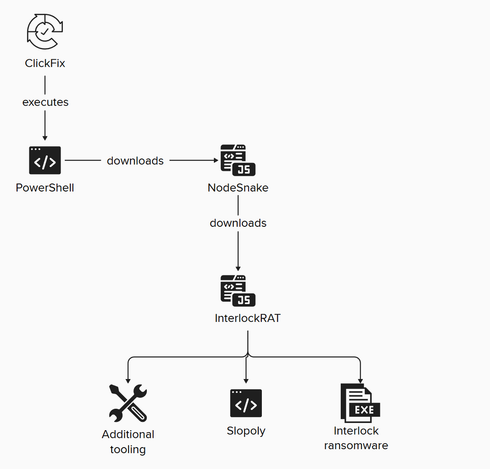
• Slopoly: A PowerShell-based C2 client that collects system data, sends heartbeat beacons to a remote server, executes commands via cmd.exe, and establishes persistence through a scheduled task. The code comments and structure strongly suggest AI assistance in development.
• NodeSnake: Identified as the first-stage component in a larger C2 framework used by Hive0163; observed across multiple languages and platforms (PowerShell, PHP, C/C++, Java, JavaScript) and used to download follow-on payloads.
• Windows Interlock ransomware: A 64-bit PE deployed via the JunkFiction loader, supporting arguments for directory/file targeting, self-deletion, scheduled task execution, file release, and external session key storage. Encryption uses per-file AES-GCM with RSA-protected session keys and leaves FIRST_READ_ME.txt as the ransom note. The ransomware leverages the Restart Manager API to stop processes and uses an embedded DLL invoked via rundll32.exe for self-deletion.
• Ancillary tools: Observed use of AzCopy and Advanced IP Scanner to expand access and perform lateral movement.

Observed intrusion chain
• 🎣 Initial Access: ClickFix malvertising or broker-assisted access (TA569, TAG-124) that led to a malicious PowerShell command execution.
• 📦 Download: NodeSnake and additional payloads fetched to the compromised host.
• ⚙️ Execution: PowerShell script execution of NodeSnake and loaders such as JunkFiction.
• 🛡️ Persistence: Deployment of Slopoly as a scheduled task providing ongoing C2 heartbeats and remote command execution.
• 🦠 Ransomware Deployment: Final payloads including InterlockRAT capabilities and Windows Interlock ransomware encryption routines.

Conclusions reported

IBM X-Force frames this activity as an example of how advanced LLMs lower the bar for malware development and enable rapid creation of operational tools. The report highlights acceleration of adversarial AI use and anticipates more agentic or AI-integrated malware in future campaigns.

🔹 Slopoly #Hive0163 #InterlockRAT #NodeSnake #WindowsInterlock

🔗 Source: https://securityaffairs.com/189378/malware/ai-assisted-slopoly-malware-powers-hive0163s-ransomware-campaigns.html

AI-assisted Slopoly malware powers Hive0163’s ransomware campaigns

The Hive0163 group used AI-assisted malware called Slopoly to maintain persistent access in ransomware attacks.

Security Affairs

----------------

🔒 AI Pentesting Roadmap — LLM Security and Offensive Testing
===================

Overview

This roadmap provides a structured learning path for practitioners aiming to assess and attack AI/ML systems, with a focus on LLMs and related pipelines. It organizes topics into progressive phases: foundations in ML and APIs, core AI security concepts, prompt injection and LLM-specific attacks, hands-on labs, advanced exploitation techniques, and real-world research/bug bounty work.

Phased Structure

Phase 1 (Foundations) covers machine learning fundamentals and LLM internals, including model architectures and tokenization concepts. Phase 2 (AI/ML Security Concepts) anchors the curriculum on standards and frameworks such as OWASP LLM Top 10, MITRE ATLAS, and NIST AI risk guidance. Phase 3 focuses on prompt injection and LLM adversarial vectors, describing attack surfaces like context manipulation, instruction-following bypasses, and RAG pipeline poisoning. Phase 4 emphasizes hands-on practice through CTFs, sandboxed labs, and safe testing methodologies. Phase 5 explores advanced exploitation: model poisoning, data poisoning, backdoor techniques, and chaining vulnerabilities across API/authentication layers. Phase 6 targets real-world research, disclosure workflows, and bug bounty engagement.

Technical Coverage

The roadmap lists practical tooling and repositories for experiment design and testing concepts without prescribing deployment steps. It calls out necessary foundations—Python programming, HTTP/API mechanics, and web security basics (XSS, SSRF, SQLi) to support end-to-end attack scenarios against AI systems. Notable conceptual risks include RAG poisoning, adversarial ML perturbations, prompt injection, and leakage through augmented memory or external tool integrations.

Limitations & Considerations

The guide is educational and emphasizes conceptual descriptions of capabilities and use cases rather than operational recipes. It highlights standards and references rather than prescriptive mitigations. Practical exploration should respect ethical boundaries and responsible disclosure norms.

🔹 OWASP #MITRE_ATLAS #RAG #prompt_injection #adversarialML

🔗 Source: https://github.com/anmolksachan/AI-ML-Free-Resources-for-Security-and-Prompt-Injection

GitHub - anmolksachan/AI-ML-Free-Resources-for-Security-and-Prompt-Injection: AI/ML Pentesting Roadmap for Beginners

AI/ML Pentesting Roadmap for Beginners. Contribute to anmolksachan/AI-ML-Free-Resources-for-Security-and-Prompt-Injection development by creating an account on GitHub.

GitHub