I was trying to type a #Peso symbol on my #Linux system, and much to my surprise, the #ComposeKey combination of <Compose><=><Shift-P> produces a Russian Ruble symbol, not a Peso symbol.

One Reddit user suggests using <Compose><-><Shift-P>, but this is totally backwards.

The Ruble symbol looks like a Latin Capital P with a single added stroke, the Peso symbol has two extra strokes.

The Ruble should be <Compose><-><Shift-P>, the Peso should be <Compose><=><Shift-P>.
https://www.reddit.com/r/linuxmint/comments/17yp9t3/what_do_we_know_about_the_compose_key_for_special/

I would submit to you that the population of the world which uses and refers to Pesos (or Piso) is significantly larger than the population of the world which uses and refers to Rubles.

Mexico = 132,887,567
Philippines = 117,609,383
Colombia = 53,893,310
Argentina = 45,986,968
Chile = 19,945,850
Uruguay = 3,383,037

Russia = 143,273,700
Belarus = 8,950,793

And yet, Linux appears to have no default Compose Key mapping for the Peso, and the one you would intuitively think it should be gives you a Ruble, instead, while the one you think would give you a Ruble gives you nothing, at all.

Accordingly, I will be modifying my Compose Key tables. Peso > Ruble!

If I can figure out who is responsible for maintaining this software, I will submit a feature change request.

OK, I have modified my
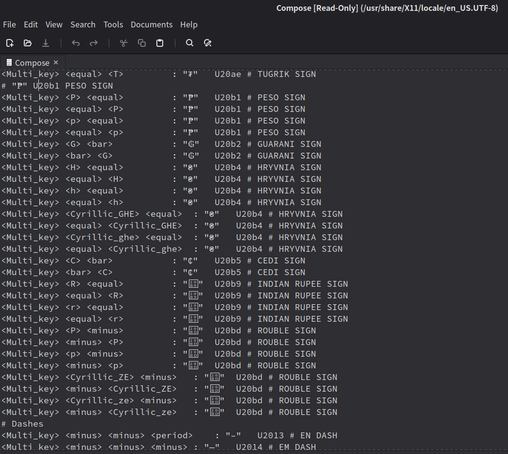
"/usr/share/X11/locale/en_US.UTF-8/Compose" file to fix the problem with the Peso and Ruble signs I described. After logging out and in, it works here in Waterfox, as long as I am in my en_US keyboard layout.

Not sure what to do about Mozc for when I am typing in Japanese, though.

As you can see in the screenshot, the file has a commented out line that shows that at least someone has thought about adding a section for Peso, at some point, but it was never done?

Hundreds of millions of people around the world use the #Peso symbol for their #currency. Why is this not implemented by default?

#Linux #X11 #XWindow #ComposeKey #typography #FOSS

Even weirder is that absolutely none of the fonts that came installed on my #Linux system even have a glyph for Ruble β‚½, and yet it displays properly on Mastodon when I type it.

AND, I'm trying to install fonts on this system by copying them over from my NAS, and Nemo (the Cinnamon file manager) is throwing a fit, "Cannot retrieve attribute standard::type"

@gcvsa

If you haven't found them already, look up Nerd Fonts. They have most of the symbols and you can easily download them from Github.

@gcvsa this website uses/loads the Roboto webfont which has the ruble among it's currency symbols

β€”β€”
https://fonts.google.com/specimen/Roboto/glyphs

Roboto - Google Fonts

Roboto has a dual nature. It has a mechanical skeleton and the forms are largely geometric. At the same time, the font features friendly and open curves. While

Google Fonts
@DLC Thank you! I was fooling around with the "Inspect" menu, trying to see if my browser would tell me what fonts it was actually using to render the page, but I gave up after a few minutes.

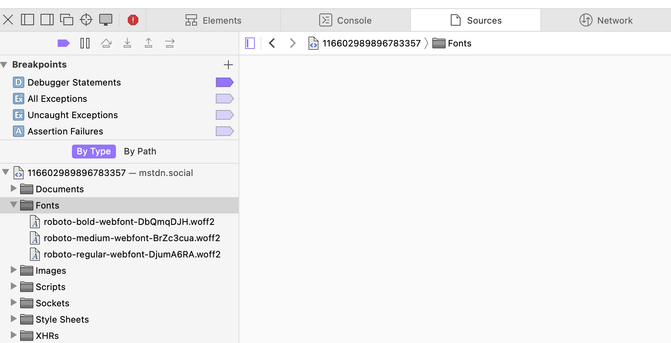
@gcvsa in my browser (Orion) it's

Context menu "Inspect element"
β†’ "sources" tab
β†’ open "fonts" folder (left column)

@gcvsa Many of us use $ for the currency symbol anyway, probably why. This is the first time I've seen that symbol.

@adriano Apparently, it's only used in the Philippines, and Latin America now uses the dollar sign for peso, which is so weird to me, and I'm just learning this today. I just assumed that the β‚± symbol came from Spain, which of course now uses € Euros.

https://en.wikipedia.org/wiki/Philippine_peso_sign

Philippine peso sign - Wikipedia

@gcvsa I just remembered: I watched this video a few days ago, and it kind of explains the comings and goings. https://www.youtube.com/watch?v=5Bf4ll1vuWw
What does the $ actually stand for?

YouTube
@adriano That was truly enjoyable. I think YouTube actually had been suggesting it to me, but I just hadn't watched it yet, until you mentioned it.