THIS IS A POST IN PRAISE OF SNAPSHOTS.

My PeerTube upgrade was a horror show: lost server connection during the upgrade and then PeerTube was automatically removed from my YunoHost server... the routine backup by YunoHost of PeerTube didn't restore... in short: bad, very bad outcome.

I hyperventilated for a few minutes and then... hit "Restore" on the VPS snapshot I had captured before the maintenance operation and... everything went back to normal.

Heart still beating a little fast but I am in AWE of the powers of SNAPSHOTS, ouf.

#sysadmin #MySoCalledSudoLife

@elena I keep the media in a separate volume, so the restore will go faster πŸ™‚

@elena

Β«So what's your cardio routine?Β»

Β«Unchecked upgrades on my Yunohost VPSΒ»

@elena 😱 thank goodness the snapshot worked!

Do you perform the upgrade from the command line? If so, you might like to have a look at a terminal multiplexer like tmux (https://github.com/tmux/tmux/wiki and should be available as a package in all Linux distros).

You just SSH to your VPS as normal, but then start tmux. If you lose connection, your terminal session continues to run on the VPS uninterrupted, and you can reconnect again as if nothing happened.

Home

tmux source code. Contribute to tmux/tmux development by creating an account on GitHub.

GitHub
@teapot_ben yeah next time I attempt a PeerTube app upgrade it will be from Terminal, ouf πŸ˜…β€‹

@elena hopefully you will (eventually) be able to look back at this as a valuable lesson in becoming an even better sysadmin.

I think every sysadmin you meet will be able to recount numerous horror stories of their own, either close misses or total disasters. Unfortunately it is an important part of the learning process, but never a pleasant experience at the time.

@teapot_ben for real!

and very appropriate as I've been writing a blog post about YunoHost maintenance. More experience to draw from I suppose πŸ˜…β€‹

@elena in real life, you’re supposed to test your backups by regularly restoring them on a spare zone to ensure any recover goes well πŸ˜‡

PS: Never seen it applied in any company I worked for.

Glad you had success with your snapshot though! πŸ˜‰πŸ‘

@joel thanks Joel, I know, I know πŸ˜…β€‹
@elena PPS: I generally don’t do it either and rely on an awfull amount of luck 😬

@elena Snapshots are amazing like that! Glad to hear that everything recovered nicely.

I second @teapot_ben’ tmux recommendation. I’m currently migrating a university’s learning management system to a new host & I’m doing it all via the command line in tmux.

Now, I’m not saying that I accidentally just hit Cmd-Q & closed the terminal in the middle of a database restore but if I *had*: no problem - I could just SSH back in, type β€œtmux attach” & be back where I left off - restore still running!

@drfyzziks @teapot_ben newbie question: I see in the YunoHost documentation that you can upgrade apps in terminal.

Can I simply run the command:

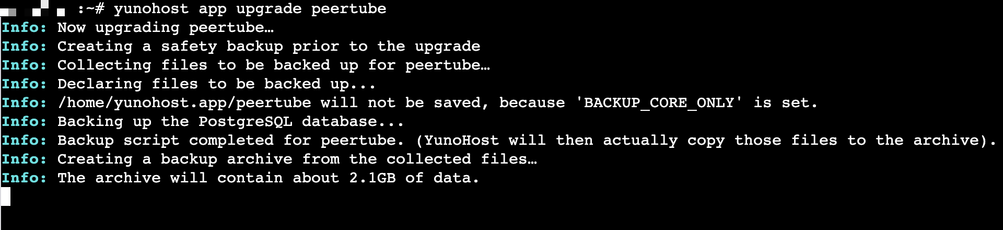
yunohost app upgrade peertube

in CLI or could I run into the same problem (server disconnect)? like is that what you mean when you say I should install tmux?

@elena @drfyzziks I'm not an expert in yunohost stuff, but if a server disconnect happened when using the web GUI to upgrade, then a similar problem could happen when you are using the CLI via SSH, with potentially bad results. The same is true when doing any remote sysadmin via SSH, not just yunohost upgrades.

I would definitely recommend installing tmux on the VPS, and starting a tmux session before doing any critical work.

@elena @teapot_ben Also not familiar with yunohost in particular, but that does appear to be what their documentation is suggesting.

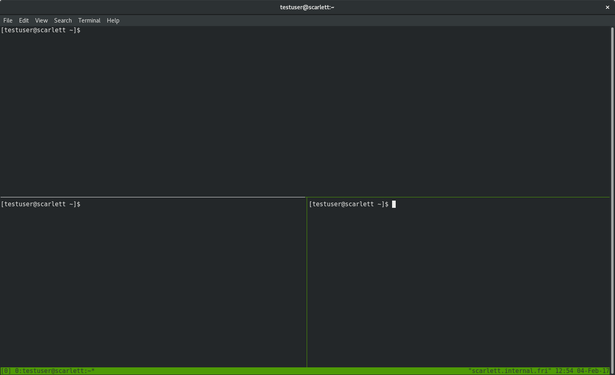
The tmux part is separate - think of tmux like a window manager or β€œGUI” for the terminal. You can do things like have multiple command prompts or programs running at the same time, in the same terminal. Here’s a screenshot:

@elena @teapot_ben But the game-changing part is that once you start programs running inside a tmux session, you can literally *disconnect* from the server. Those programs (like an upgrade) will continue to run. When you reconnect to the server, you just type β€œtmux attach” and you’re where you left off.

tmux saves you from accidental disconnections in the middle of upgrades.

Here’s a tutorial: https://fedoramagazine.org/use-tmux-more-powerful-terminal/

The only question is whether Yunohost has tmux installed already or not.

Use tmux for a more powerful terminal - Fedora Magazine

Some Fedora users spend most or all their time at a command line terminal. The terminal gives you access to your whole system, as well as thousands of powerful utilities. However, it only shows you one command line session at a time by default. Even with a large terminal window, the entire window only shows […]

Fedora Magazine

@elena @teapot_ben Practical example: I’m running a database restore in a terminal that takes hours to complete. My laptop battery is low & I forgot my charger.

1. SSH to server.
2. Start a tmux session by typing β€˜tmux’
3. Begin database restore on the command line.
4. Type β€œCTRL-b d” to disconnect from tmux
5. Log out of server, shut down laptop.
<time passes>
6. SSH back into server
7. Type β€œtmux attach” to reconnect to my tmux session.
8. Confirm that database has finished restoring.

@drfyzziks @teapot_ben thank you for all the great advice!

I've just installed tmux on my second VPS which hosts far fewer apps and all non-critical. I also have a second PeerTube there.

I will attempt the PeerTube upgrade in Terminal, inside tmux (since an upgrade is available) and report back...

@drfyzziks @teapot_ben I hope you're proud of me!!! It was sooooo easy to install tmux and launch the yunohost x peertube upgrade
@elena couldn't be prouder! Excellent sysadmin skills πŸ†πŸ… @drfyzziks

@teapot_ben thank you Ben! πŸ₯Ή

tmux is super beginner friendly, I'm glad I followed your advice and took the plunge

@drfyzziks

@elena glad I thought to mention it! It is a brilliant little tool for sysadmins.

For basic usage, it's really no different to using the command line as you would normally do. Just be aware that it can change the behaviour of copying and pasting a little.

As @drfyzziks mentioned, Ctrl+b d will detach your session but leave it running on the server.
"tmux attach" will get you back to it later.

Later you can investigate the other features such as multiple windows, split panes etc.

@teapot_ben @drfyzziks thanks!

as a certified normie, I don't think I will ever do split panes but I love how easy it is to upgrade YunoHost apps from Terminal... and using tmux definitely gives me peace of mind because I routinely get messages of losing connection to the server. CLI it is for me from now on πŸ˜Šβ€‹

@elena I think you may have to relinquish that certificate soon the way your skills are developing πŸ˜‚ Definitely not a normie any more, and I mean that in a good way.

Could you honestly imagine yourself doing any of this just a year ago, and now proclaiming that you love the command line?

You have the most important skill of a sysadmin - the desire to always learn more and improve your knowledge.
@drfyzziks

@teapot_ben @drfyzziks aw thank you Ben!

I still feel like a normie at heart because all I do is copy and paste commands... I truly know NOTHING.

But this is so much fun.

I'm also super grateful for all the advice and encouragement of people like you. tmux is sooo cool, I am incorporating instructions about YunoHost app upgrades using CLI and tmux in my guide... publishing it later this week.

So hopefully more normies can learn about it and use it β˜ΊοΈβ€‹

@elena Good for you! I would really have appreciated snapshots after my own PeerTube server upgrade.
I still haven't fixed it btw. But I'll switch to btrfs and snapshots before any maintenance operation.

@zerkman wanna know something funny?

I remembered to take a snapshot just because I'm currently writing a YunoHost guide about maintenance operations for my blog...

Half the time I forget to grab snapshots, but this time I thought: I wrote to do this as advice, I need to follow what I preach.

Sure enough, it was a VERY GOOD CALL (huge sigh of relief)

P.S.: BEST OF LUCK restoring your PeerTube server πŸ€β€‹

@elena I discovered the power of btrfs snapshots AFTER I set up my home server on Raspberry Pi OS πŸ˜…

Now I have a good reason to migrate, and hopefully not break everything in the process (but I'll make a backup at least)

On my other machines (desktop and laptop PCs) I set up rolling daily snapshots using btrbk. So at minimum I always have less than 24 hour-old snapshots.

And thanks for your support :)

@elena Had a few of my own upgrades go sideways in the past. Snapshots are wonderful.

I recently discovered tmux, too. Very useful for remote upgrades, especially when a console isn't available. If you haven't tried it, give it a look!

@elena snapshots are the asbestos underpants of the sysadmin community
@dch oh no! I wasn't aware of their bad reputation. they save the day for a newbie like me πŸ˜¬β€‹

@elena not bad at all β€” asbestos underpants are great to have! You can survive any fire with them. But totally your last erm .. layer .. of defense.

I use these extensively with zfs - boot environments give coverage to the bootable OS, and datasets give me granularity for specific file systems.

@elena yeah, snapshots are a sysadmins best friend