THIS IS A POST IN PRAISE OF SNAPSHOTS.

My PeerTube upgrade was a horror show: lost server connection during the upgrade and then PeerTube was automatically removed from my YunoHost server... the routine backup by YunoHost of PeerTube didn't restore... in short: bad, very bad outcome.

I hyperventilated for a few minutes and then... hit "Restore" on the VPS snapshot I had captured before the maintenance operation and... everything went back to normal.

Heart still beating a little fast but I am in AWE of the powers of SNAPSHOTS, ouf.

#sysadmin #MySoCalledSudoLife

@elena Snapshots are amazing like that! Glad to hear that everything recovered nicely.

I second @teapot_ben’ tmux recommendation. I’m currently migrating a university’s learning management system to a new host & I’m doing it all via the command line in tmux.

Now, I’m not saying that I accidentally just hit Cmd-Q & closed the terminal in the middle of a database restore but if I *had*: no problem - I could just SSH back in, type “tmux attach” & be back where I left off - restore still running!

@drfyzziks @teapot_ben newbie question: I see in the YunoHost documentation that you can upgrade apps in terminal.

Can I simply run the command:

yunohost app upgrade peertube

in CLI or could I run into the same problem (server disconnect)? like is that what you mean when you say I should install tmux?

@elena @teapot_ben Also not familiar with yunohost in particular, but that does appear to be what their documentation is suggesting.

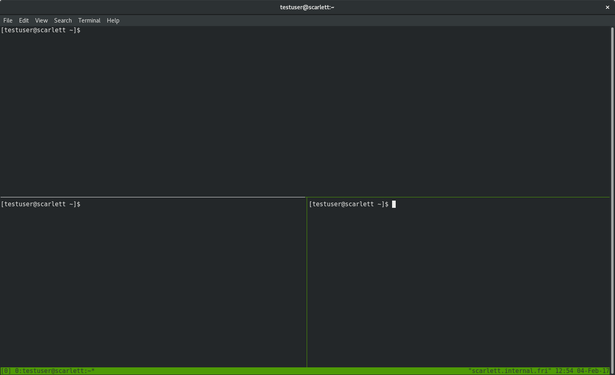
The tmux part is separate - think of tmux like a window manager or “GUI” for the terminal. You can do things like have multiple command prompts or programs running at the same time, in the same terminal. Here’s a screenshot:

@elena @teapot_ben But the game-changing part is that once you start programs running inside a tmux session, you can literally *disconnect* from the server. Those programs (like an upgrade) will continue to run. When you reconnect to the server, you just type “tmux attach” and you’re where you left off.

tmux saves you from accidental disconnections in the middle of upgrades.

Here’s a tutorial: https://fedoramagazine.org/use-tmux-more-powerful-terminal/

The only question is whether Yunohost has tmux installed already or not.

Use tmux for a more powerful terminal - Fedora Magazine

Some Fedora users spend most or all their time at a command line terminal. The terminal gives you access to your whole system, as well as thousands of powerful utilities. However, it only shows you one command line session at a time by default. Even with a large terminal window, the entire window only shows […]

Fedora Magazine