THIS IS A POST IN PRAISE OF SNAPSHOTS.

My PeerTube upgrade was a horror show: lost server connection during the upgrade and then PeerTube was automatically removed from my YunoHost server... the routine backup by YunoHost of PeerTube didn't restore... in short: bad, very bad outcome.

I hyperventilated for a few minutes and then... hit "Restore" on the VPS snapshot I had captured before the maintenance operation and... everything went back to normal.

Heart still beating a little fast but I am in AWE of the powers of SNAPSHOTS, ouf.

#sysadmin #MySoCalledSudoLife

@elena Snapshots are amazing like that! Glad to hear that everything recovered nicely.

I second @teapot_ben’ tmux recommendation. I’m currently migrating a university’s learning management system to a new host & I’m doing it all via the command line in tmux.

Now, I’m not saying that I accidentally just hit Cmd-Q & closed the terminal in the middle of a database restore but if I *had*: no problem - I could just SSH back in, type “tmux attach” & be back where I left off - restore still running!

@drfyzziks @teapot_ben newbie question: I see in the YunoHost documentation that you can upgrade apps in terminal.

Can I simply run the command:

yunohost app upgrade peertube

in CLI or could I run into the same problem (server disconnect)? like is that what you mean when you say I should install tmux?

@elena @teapot_ben Also not familiar with yunohost in particular, but that does appear to be what their documentation is suggesting.

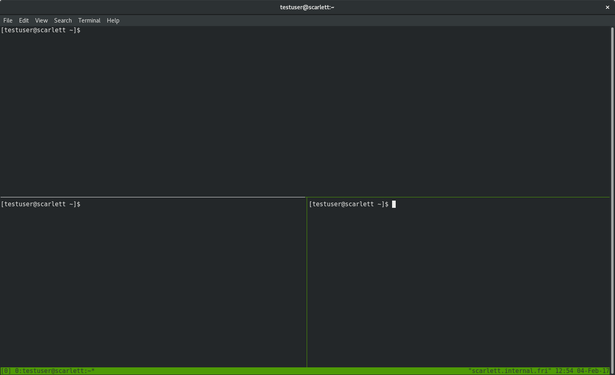
The tmux part is separate - think of tmux like a window manager or “GUI” for the terminal. You can do things like have multiple command prompts or programs running at the same time, in the same terminal. Here’s a screenshot:

@elena @teapot_ben Practical example: I’m running a database restore in a terminal that takes hours to complete. My laptop battery is low & I forgot my charger.

1. SSH to server.
2. Start a tmux session by typing ‘tmux’
3. Begin database restore on the command line.
4. Type “CTRL-b d” to disconnect from tmux
5. Log out of server, shut down laptop.
<time passes>
6. SSH back into server
7. Type “tmux attach” to reconnect to my tmux session.
8. Confirm that database has finished restoring.

@drfyzziks OMG! Sounds like magic 🤩 @teapot_ben