THIS IS A POST IN PRAISE OF SNAPSHOTS.

My PeerTube upgrade was a horror show: lost server connection during the upgrade and then PeerTube was automatically removed from my YunoHost server... the routine backup by YunoHost of PeerTube didn't restore... in short: bad, very bad outcome.

I hyperventilated for a few minutes and then... hit "Restore" on the VPS snapshot I had captured before the maintenance operation and... everything went back to normal.

Heart still beating a little fast but I am in AWE of the powers of SNAPSHOTS, ouf.

#sysadmin #MySoCalledSudoLife

@elena Snapshots are amazing like that! Glad to hear that everything recovered nicely.

I second @teapot_ben’ tmux recommendation. I’m currently migrating a university’s learning management system to a new host & I’m doing it all via the command line in tmux.

Now, I’m not saying that I accidentally just hit Cmd-Q & closed the terminal in the middle of a database restore but if I *had*: no problem - I could just SSH back in, type “tmux attach” & be back where I left off - restore still running!

@drfyzziks @teapot_ben newbie question: I see in the YunoHost documentation that you can upgrade apps in terminal.

Can I simply run the command:

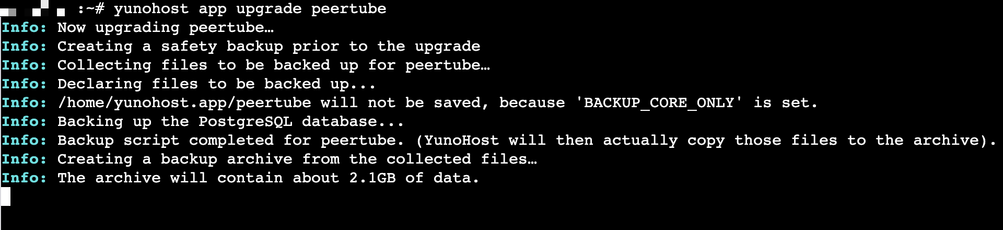
yunohost app upgrade peertube

in CLI or could I run into the same problem (server disconnect)? like is that what you mean when you say I should install tmux?

@elena @teapot_ben Also not familiar with yunohost in particular, but that does appear to be what their documentation is suggesting.

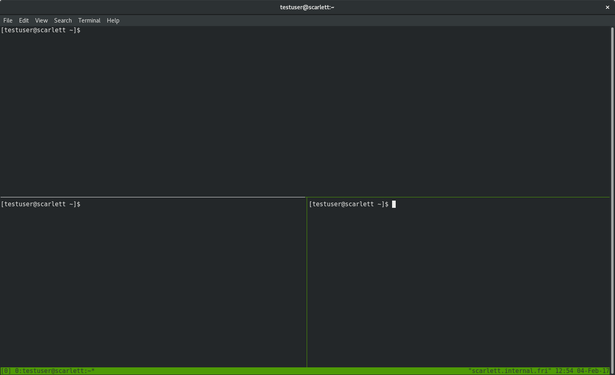
The tmux part is separate - think of tmux like a window manager or “GUI” for the terminal. You can do things like have multiple command prompts or programs running at the same time, in the same terminal. Here’s a screenshot:

@elena @teapot_ben Practical example: I’m running a database restore in a terminal that takes hours to complete. My laptop battery is low & I forgot my charger.

1. SSH to server.
2. Start a tmux session by typing ‘tmux’
3. Begin database restore on the command line.
4. Type “CTRL-b d” to disconnect from tmux
5. Log out of server, shut down laptop.
<time passes>
6. SSH back into server
7. Type “tmux attach” to reconnect to my tmux session.
8. Confirm that database has finished restoring.

@drfyzziks @teapot_ben I hope you're proud of me!!! It was sooooo easy to install tmux and launch the yunohost x peertube upgrade
@elena couldn't be prouder! Excellent sysadmin skills 🏆🏅 @drfyzziks

@teapot_ben thank you Ben! 🥹

tmux is super beginner friendly, I'm glad I followed your advice and took the plunge

@drfyzziks

@elena glad I thought to mention it! It is a brilliant little tool for sysadmins.

For basic usage, it's really no different to using the command line as you would normally do. Just be aware that it can change the behaviour of copying and pasting a little.

As @drfyzziks mentioned, Ctrl+b d will detach your session but leave it running on the server.
"tmux attach" will get you back to it later.

Later you can investigate the other features such as multiple windows, split panes etc.

@teapot_ben @drfyzziks thanks!

as a certified normie, I don't think I will ever do split panes but I love how easy it is to upgrade YunoHost apps from Terminal... and using tmux definitely gives me peace of mind because I routinely get messages of losing connection to the server. CLI it is for me from now on 😊​

@elena I think you may have to relinquish that certificate soon the way your skills are developing 😂 Definitely not a normie any more, and I mean that in a good way.

Could you honestly imagine yourself doing any of this just a year ago, and now proclaiming that you love the command line?

You have the most important skill of a sysadmin - the desire to always learn more and improve your knowledge.
@drfyzziks

@teapot_ben @drfyzziks aw thank you Ben!

I still feel like a normie at heart because all I do is copy and paste commands... I truly know NOTHING.

But this is so much fun.

I'm also super grateful for all the advice and encouragement of people like you. tmux is sooo cool, I am incorporating instructions about YunoHost app upgrades using CLI and tmux in my guide... publishing it later this week.

So hopefully more normies can learn about it and use it ☺️​