 Alice Averlong🏳️⚧️
anyone tried opening the magic file "con" from MS DOS Edit?
I was hoping for an editor but it turns out instead it happily opens it but then hangs forever
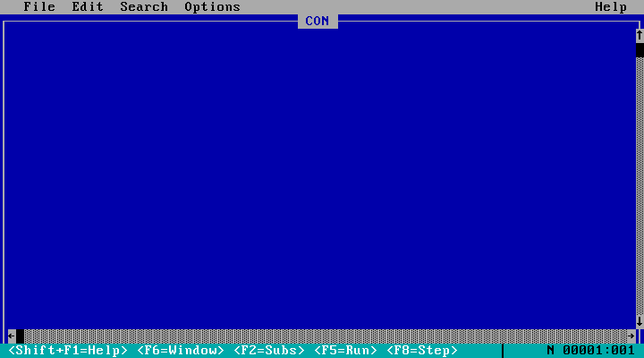
anyone tried opening the magic file "con" from MS DOS Edit?
I was hoping for an editor but it turns out instead it happily opens it but then hangs forever
weird punnet square of results:
EDIT hangs if you open "CON", but errors if you try "C:\CON\CON"
Win95 errors if you try to open "CON", but crashes if you try "C:\CON\CON"
what about C:\CON\NON\CON
@sabik it can't exist, you can't create a folder named "CON".
like, to this day. I just tried on windows 11, it told me no
@sabik @foone you don't even have to go that far; creating files having mounted the drive under linux is enough
most of the windows file name limitations are enforced at the Win32 API layer, not NTFS (or even FAT). which means some casual quoting in a linux shell can turn into trying to remember the \\?\ UNC path magic to deal with them under Windows.
...god, I wonder if WSL1 can also do it, since it's a kernel personality
@sabik @foone Yeah there we go. SystemRescueCD + WinXP VM, just needed to slip an era later.
Nothing crashes when I try to open it in Notepad, it just throws an "Access denied" MsgBox.
And trying to delete it shows the layer confusion (remember when people used standard MsgBox, so Ctrl-C worked?):
"Cannot delete CON: Cannot find the specified file.
Make sure you specify the correct path and file name."
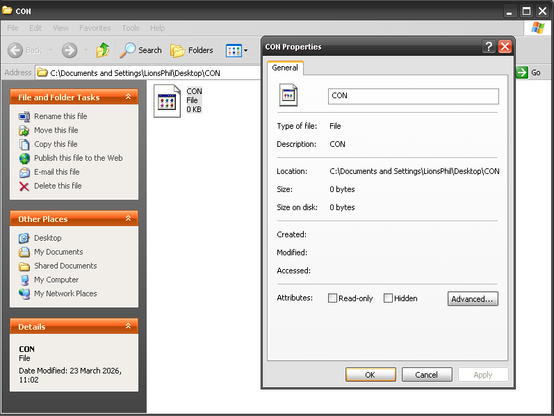
@foone @sabik alright I tried it myself
Notepad++ can’t open the resulting file, but interestingly, Microsoft’s own Notepad CAN?!?
PowerShell and cmd think none of this exists, of course (they can see it if you do a dir, but if you actually try to cd into it, it can’t find it)
Windows Explorer at least nowadays was able to delete it. I know I’ve done some horrendous WSL-enabled abuse of illegal filenames in the past, and could only destroy the evidence using WSL itself. (I had a file named “C:\” on my filesystem. I just tried it now, and it looks like Microsoft avoids this specific problem by re-encoding those characters to different Unicode codepoints - C is what it’s represented as in Win32 programs, so it’s just shoving the : and \ characters up into the U+F0xx private use space.)
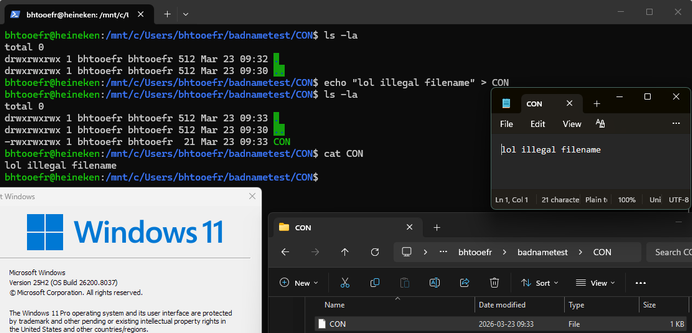
@foone @sabik the names are reserved by the Win32 API, but NTFS doesn't care, so it's possible to create the files by using \\?\ to specify the file I/O namespace, sending the filename directly to the filesystem.
This then causes grief for users because they can't delete the file or do anything with it. (Cygwin used to be the recommended way to fix this, but WSL works too. I think you can also use \\?\ in Terminal but who wants to learn Win32 namespaces just to delete a file)
@foone @sabik as others have pointed out, you can use the DOS device path syntax (\\?\C:\...\con) to create forbidden filenames. you can also just directly create them in powershell (not “Windows PowerShell”, but rather the open-source one that I think is officially called “PowerShell Core” but just calls itself “PowerShell”). it gets even wackier in Windows PowerShell though: as someone else pointed out, you can’t directly cd into it or anything, but you can cd \\?\C:\con, after which your working directory is Microsoft.PowerShell.Core\FileSystem::\\?\c:\con and anything that implicitly operates on the current directory doesn’t work anymore:
PS Microsoft.PowerShell.Core\FileSystem::\\?\c:\con> dir
dir : Cannot find path '\\?\c:\con' because it does not exist.
At line:1 char:1
+ dir
+ ~~~
    + CategoryInfo          : ObjectNotFound: (\\?\c:\con:String) [Get-ChildItem], ItemNotFoundException
    + FullyQualifiedErrorId : PathNotFound,Microsoft.PowerShell.Commands.GetChildItemCommand
Wasn't there also once a bug in Win7 or 8 that caused it to hang in kernelspace and bluescreen with these once?
@foone No, I mean something way more recent. Cause that together with early days Minecrafrt modding (where you had to unzip the jar file and then at some version there was a file named "AUX" in it)
where when I learned about these special filenames for the first time. And I didn't play minecraft on anything less recent than win7, so...
@agowa338 oh that's not a bug, that's an intentional design decision. windows reserves a bunch of filenames and it's a pain
the bug where this crashed the machine hasn't been there since windows 95, that's a separate issue
No there was a similar crash bug in Win7. Then they must have reintroduced it at some point.
And the AUX one the bug was then with minecraft as it would silently drop that file when unzipping and then the unzipped jar wouldn't properly execute anymore.
I just wanted to add that piece to nail down the timeframe of when I a similar bug.
I made a list of the reserved names, as a git repo, so that windows users can not check it out
> Windows recognizes the 8-bit ISO/IEC 8859-1 superscript digits ¹, ², and ³ as digits and treats them as valid parts of COM# and LPT# device names, making them reserved in every directory. For example, echo test > COM¹ fails to create a file.
Source: https://learn.microsoft.com/en-us/windows/win32/fileio/naming-a-file
I can tell you, Minecraft modding had that issue for quite a while. You can see the files inside the Zip. But when you extract it either shows an error of not being able to copy that file (for some of them) or if e.g. you have a COM1 port and the file was named COM1 it just sends it out the COM1 port and doesn't show any error. So you're missing that file without knowing it.
Oh and some 3rd party archive managers just always drop them silently.
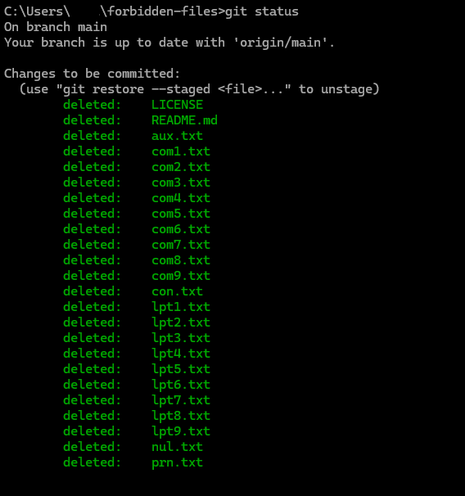
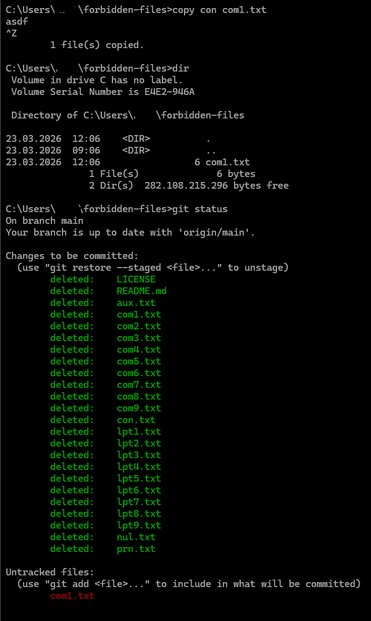
this was fun times in windows 95 as well, sending your friends files like con and lpt1
this is kind of interesting. don't use this for evil
https://community.spiceworks.com/t/they-say-you-cant-name-it-con-but-yes-you-can/791710

It’s “common knowledge” that there are reserved names in Windows, such as CON, PRN, COM1, or LPT3, and that you can’t name a file with those names. And it’s true that a command prompt and Windows Explorer won’t allow you to name a file that, and if by some happenstance a file is named with a reserved name (i.e., you created it on a Mac or Linux system and then connected the drive to Windows), you won’t be able to open or delete it. But there is a way. You can name a file CON. Or PRN. Or LPT1....
@gloriouscow @foone That's overly complicated, just prepend the full path with \\?\ (eg. \\?\c:\users\aux).
Also, Windows 11 now lets you create files like con.txt without doing anything special (older versions ignored the extension).
 gloriouscow
 Ra (Freyja) (it/its)𒀭𒈹𒍠𒊩
 Rue Mohr
 sabik
sabik LP🔸Light up the night
 bhtooefr
 curtmack
 Maia
Maia Neko May
 Klaus Frank
 Z̈oé
Z̈oé
 F4GRX Sébastien

 Wouter Verhelst
 cliffordheath
 avatastic
 Jernej Simončič �
 goedelchen
 Sn0wlink
 Chip
Chip FozzTexx
 ehurtley
 William D. Jones
 mirth
mirth