 Christian Selig
Discovery: If you have Hue lights and want a single Hue dimmer switch button to *toggle* lights on/off, this is really slow in Apple Home (you need to run an actual Shortcut). In Home Assistant there's just a toggle command that is literally 10x faster. 2.5 seconds -> ~200ms 🥳
(Maybe I'm weird, but having a separate button for "on" and "off" seems like the opposite of smart versus having a single button just be a toggle)
 Jonathan
@christianselig must be a Hue thing. My IKEA smart bulbs are one button toggle on/off without shortcuts.
@JTostitos In Apple Home? You can do this in Hue too if you want to use a bunch of vendor specific apps, I'm talking about doing everything in Apple Home
@christianselig i think I understand what you mean now. You want a physical switch to do both. The IKEA physical button switch has two separate buttons but it routes through their hub.
@JTostitos yeah exactly! It’s even more perplexing that as you showed tapping it does the desired functionality already
 Michael Cook
@christianselig I just use scenes in Apple Home for sets of lights, and Lutron add-on dimmer switch (no wiring!) that I’ve got set in Hue to toggle to off or last state for sets of lights (effectively on/off).
 Stephen Robles
@christianselig if you make a shortcut there’s a built in toggle action now
@stephenrobles how do you pair the shortcut to the dimmer button though?
 Owen 🇦🇺
@christianselig @stephenrobles If the dimmer button is an accessory in the Apple Home, then perhaps a Home Automation that runs the toggle shortcuts action?
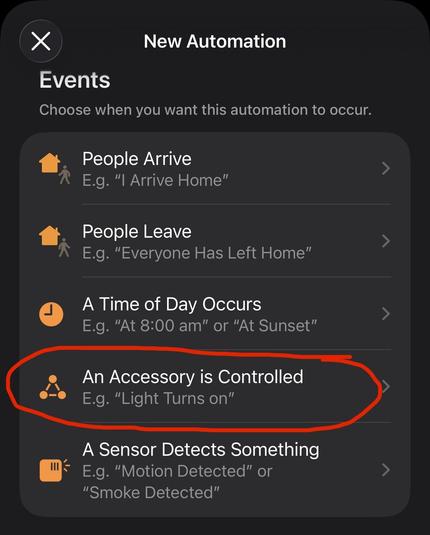
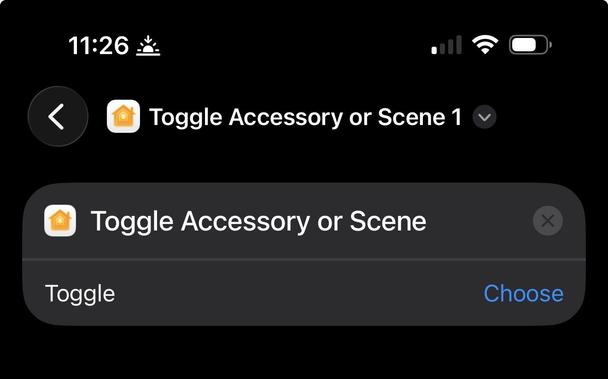
@stephenrobles Sorry I’m still not getting it. Are you setting this up in the Shortcuts app or the Home app?
@christianselig Shortcuts app. That toggle action is not available in the home app unfortunately. So if you’re trying to setup an automation with toggling a device, the if statement you made is the way to do it
 jonas lindgren
@christianselig @stephenrobles Wondering this as well. That action is only visible in the Shortcuts app and not in the Home app. I’m having to do the same if statements for my wall switches in Apple Home
 Aaron Pearce
@christianselig because the product team for Home doesn’t use it would be my bet… 😂
 DHa
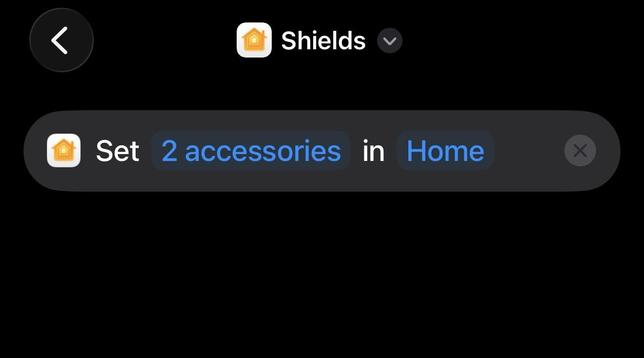
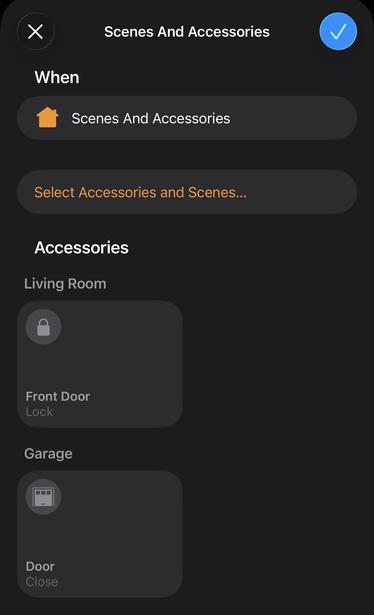
DHa@christianselig Is it not possible to do something like this? I have a shortcut that sets the state on specific accessories. One version turns them on, and another turns them off.
 Jackson
@christianselig The 2x2 and 2x4 Home widgets are okay too. But are more space than a single homescreen con.
@Jackson to be clear I’m just trying to program a real life button in Apple Home haha
 Alex
Alex@christianselig @Jackson i think i found your problem: you’re trying to use Apple Home. It’s such a ridiculously poor app, I really cannot understand how they could make it so hard to set up and make work as you’d want. I know Home Assistant has a very steep learning curve, but it’s so so much better!
 Jaime Creixems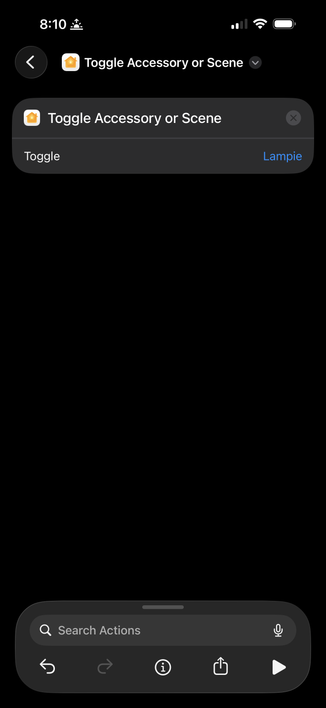
@webjac that’s in the shortcuts app, you can’t assign that to an action in the actual Apple Home app
@christianselig that’s actually true. From the Home app what I do is 2 automations, one to turn in, one to turn off. Sucks 🙁
 Andrew Faden
@christianselig
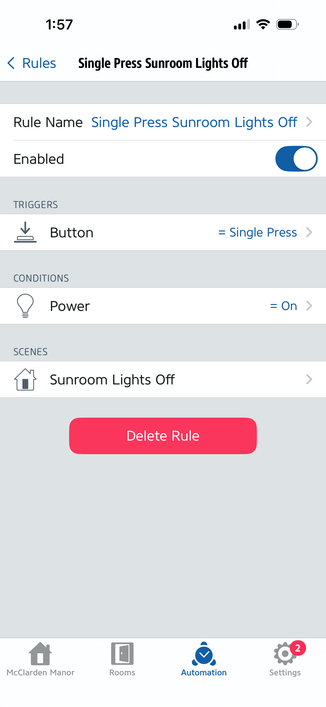
Another approach is to set up 2 Home Automations to conditionally turn on/off the device on button presses. Here's how it looks in the Eve app (which is just acting as a more advanced interface for HomeKit). It's even uglier than having a single shortcut, but button presses almost instantly toggle my light.
Another approach is to set up 2 Home Automations to conditionally turn on/off the device on button presses. Here's how it looks in the Eve app (which is just acting as a more advanced interface for HomeKit). It's even uglier than having a single shortcut, but button presses almost instantly toggle my light.
@christianselig HomeKit is janky in so many ways:
- There's a subtle difference between personal shortcuts (which run on your phone, and can't be triggered by home device state changes and won't work when it's offline) vs shortcuts that run on your home hub (but which have very limited library of actions) vs home automations (fast and simple "when x, if y, then z" logic that runs on your home hub).
- There's a subtle difference between personal shortcuts (which run on your phone, and can't be triggered by home device state changes and won't work when it's offline) vs shortcuts that run on your home hub (but which have very limited library of actions) vs home automations (fast and simple "when x, if y, then z" logic that runs on your home hub).
@christianselig - Can't edit the condition (y) of a home automation in the Home app, you need to use a 3rd party app like Eve, even though it's actually part of HomeKit backend system. You can actually do all sorts of complex conditions, like "if temp is <70" or "if battery level <30" or "if smart outlet is currently in use"
@christianselig - Can't apply the "toggle" action from within a home automation or a shortcut that runs on your home hub, only on personal shortcuts. So you need to create two separate automations to turn on and off.
@faden yeah my main thing though is I don’t want to install a bunch of vendor specific apps for every accessory I just want to do everything through one app (Apple Home)
@christianselig I don’t even have any Eve accessories, I’m just using it as an advanced HomeKit app. That rule is using an Aqara button to toggle a Nanoleaf bulb, and runs on my HomeKit hub. It even shows up in Home, you just can’t edit the condition there. https://youtu.be/Ft07PRk6jtk?t=138
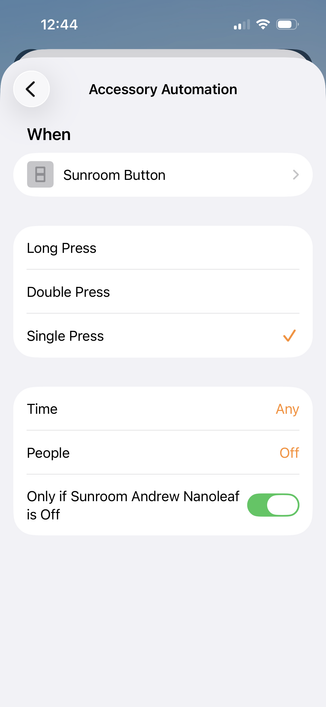
@christianselig I think the Eve app is using the Homekit API to set up an HMEventTrigger (aka Automation) with a “predicate”. It's all possible in HomeKit, Apple has just dumbed down the Home app too much. https://developer.apple.com/documentation/homekit/hmeventtrigger
There are other HomeKit 3rd party apps that can edit conditions too, like Controller for HomeKit https://homedevices.app/creating-complex-homekit-automations-step-by-step/#Conditions . But the Eve app is free and works well for me.

@faden That's pretty clever but makes me scratch my head about Apple Home even more then. I think I'll just stick to Home Assistant where everything is at least in one app
 Mieszko Ślusarczyk
@christianselig why not do it in Home Assistant did you have it?
@spitfire I had some leftover ones in Apple Home that I never migrated over, you really shouldn’t need HA just to toggle a light properly via a button haha
@christianselig Apple Home is probably never going to be a good platform for automations
@christianselig probably a good idea to migrate them into same Zigbee network to avoid interference https://www.zigbee2mqtt.io/advanced/zigbee/02_improve_network_range_and_stability.html#interference-from-other-2-4-ghz-devices
 Philipp
@christianselig you said you have HA, right? I have all of my smart home devices linked to HA and do all automation there. It’s my backend. Then I use the HomeKit bridge to bridge my devices into HomeKit for my front end Siri use. But all automations happen only in Home Assistant
@eierund yeah I do this now (see parent post) but had some leftover Apple Home ones
@christianselig copy that. And you don’t want to bring those into HA?
 ꜰᴀʙɪᴏ
ꜰᴀʙɪᴏ 
@christianselig and for do disable after xxx minutes. from normal command in home it doesn’t works always. but if you create shortcuts inside home… well… magically you can see “disable” works always.
 Jesse Atkinson
@christianselig they’ve abandoned Home app as far as I can tell.
 dmd
dmd@christianselig The latest model has a toggle power button… https://www.philips-hue.com/en-us/p/hue-dimmer-switch-latest-model/046677562779
(I refuse to use it. Old ones were better.)

@dmd Yeah that's the one I have, but it doesn't toggle if you use Apple Home, you can only assign it to either on or off
 hooliews
@christianselig I use that one and have no problem with it toggling on/off. However, I have it set up just in the Hue app. The light is in Apple Home.
@hooliews Yeah I don't have the Hue app installed (I don't want a bunch of vendor specific apps for my home, I just one one place)
 Keir
Keir@christianselig I get this but also you can have the on button cycle through scenes as well so a separate off button is useful in those scenarios 😄
@keir Oh totally I just want *options* lol
@christianselig options are never a bad thing!
 Chancerubbage
I run into a toggle quite frequently on my iPhone. In this case, you cannot tell the state of the toggle nor any evidence of what it did. I’m not sure what sort of feedback I find to verify the act was done. I reckon I do verify ‘button pushed’
But it is disconcerting each time, and not the way the interaction used to happen.
@christianselig Eve smart light switches are one button for both
@stephenrobles Unless I'm misunderstanding you I mean natively through Apple Home, no vendor apps installed. I assume Eve supports that through their app? I don't see any way in the Home app to just purely toggle but would love to be wrong
@christianselig wait maybe I don’t know what you mean. You’re wanting to toggle lights off in the home app, a physical switch, or an automation?
 rouxdoo √
It looks like you've been struggling today with the conundrum of smart bulbs and smart switches working together (correct me if I'm wrong).
The obvious answer is to use a shelly relay behind your switch in "detached mode" which sends commands to the bulbs through your favorite home automation platform while continuously powering the bulbs so they are awake to receive the commands.
@christianselig Also, have you tried Home+? It has options that aren’t exposed in the Home app but still work after being created in Home+.
