 Christian Selig
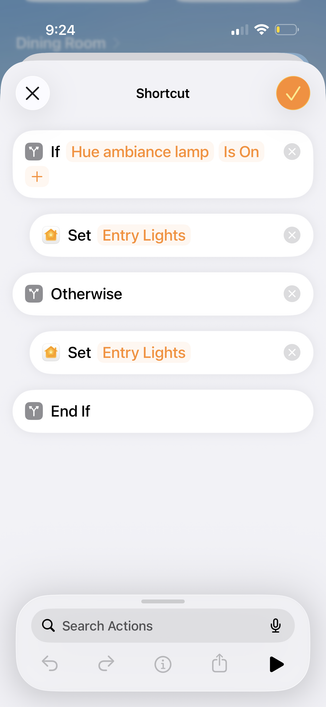
Discovery: If you have Hue lights and want a single Hue dimmer switch button to *toggle* lights on/off, this is really slow in Apple Home (you need to run an actual Shortcut). In Home Assistant there's just a toggle command that is literally 10x faster. 2.5 seconds -> ~200ms 🥳
(Maybe I'm weird, but having a separate button for "on" and "off" seems like the opposite of smart versus having a single button just be a toggle)
 Andrew Faden
@christianselig
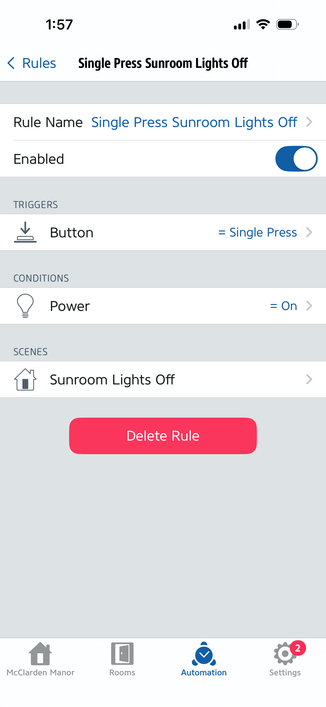
Another approach is to set up 2 Home Automations to conditionally turn on/off the device on button presses. Here's how it looks in the Eve app (which is just acting as a more advanced interface for HomeKit). It's even uglier than having a single shortcut, but button presses almost instantly toggle my light.
Another approach is to set up 2 Home Automations to conditionally turn on/off the device on button presses. Here's how it looks in the Eve app (which is just acting as a more advanced interface for HomeKit). It's even uglier than having a single shortcut, but button presses almost instantly toggle my light.
@christianselig HomeKit is janky in so many ways:
- There's a subtle difference between personal shortcuts (which run on your phone, and can't be triggered by home device state changes and won't work when it's offline) vs shortcuts that run on your home hub (but which have very limited library of actions) vs home automations (fast and simple "when x, if y, then z" logic that runs on your home hub).
- There's a subtle difference between personal shortcuts (which run on your phone, and can't be triggered by home device state changes and won't work when it's offline) vs shortcuts that run on your home hub (but which have very limited library of actions) vs home automations (fast and simple "when x, if y, then z" logic that runs on your home hub).
@christianselig - Can't edit the condition (y) of a home automation in the Home app, you need to use a 3rd party app like Eve, even though it's actually part of HomeKit backend system. You can actually do all sorts of complex conditions, like "if temp is <70" or "if battery level <30" or "if smart outlet is currently in use"
@christianselig - Can't apply the "toggle" action from within a home automation or a shortcut that runs on your home hub, only on personal shortcuts. So you need to create two separate automations to turn on and off.