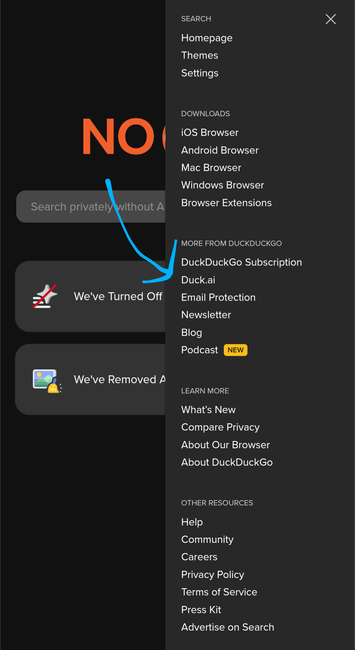

You prob know this already, but if you duck-search, you can go to a slightly different entry point at https://noai.duckduckgo.com to do web searches without AI slop dumping on you.

I see they've dressed up the landing page there! Now more obviously non-AI. I mean, it's a selling feature, so yeah, go to town guys.

(if you still google things, consider the duck search! it's worked well for me for years, and the non-ai version is a nice step forward).

#InternetSearch #degoogle #websearch

@ottaross I have the NO AI version set up as my preferred search engine
@darwinwoodka Same - it's a good idea.

@ottaross Your post reminded me I've been wanting to do that. Thanks!

@darwinwoodka

@darwinwoodka @ottaross

I can do that in DDG's own browser, but it's a PITA.

Tor offers it right in their dropdown menu with other search engines (yay).

What other browsers let you select NoAI DDG as your default search engine?

@callisto @darwinwoodka @ottaross You can add a custom search engine and then select it as default in Firefox (and forks thereof). Pretty painless.

@skylark13 @callisto @darwinwoodka @ottaross yup, confirmed. Enter the following URL as a search engine;

https://noai.duckduckgo.com/search?q=%s

@harald @skylark13 @darwinwoodka @ottaross

Thanks - but hmmmmm - I'm transitioning away from Firefox but still have a lot bookmarked there, but when I try, I get "! That URL doesn't look right. Please check it and try again" and it won't let me click "Add Engine"?

@callisto @harald @darwinwoodka @ottaross

You need to go to Settings - Search. Then at the bottom you have "search shortcuts", there you can click "Add" to add a new one. Name it "NoAI DDG" or whatever and paste

https://noai.duckduckgo.com/%s

In the URL field. (Right-click copy that since Mastodon sometimes hides the https part) Then you can go to the top where it says "Default search engine" and select the new one you just created.

It's a bit different in the mobile version but similar enough.

@skylark13 @harald @darwinwoodka @ottaross Ah, thank you. It was just the absent https:// that was tripping me up.
@skylark13 @callisto @harald @darwinwoodka @ottaross Thanks! I thought this was what I tried before but apparently not quite. Worked for me in Fennec for Android (a Firefox fork).

@soaproot @callisto @harald @darwinwoodka @ottaross

Also if you want the search suggestions to work with noai.duckduckgo.com too, this user found what you need to put in the Search suggestion API field:

https://mastodon.social/@NickAnEngineer/115907242831363914

@callisto Vivaldi and Firefox both let you set default search sites.

I kind of liked how FF used it, better than how Vivaldi does, but I'm getting used to it.

@darwinwoodka @ottaross

@solitha @darwinwoodka @ottaross NoAI DuckDuckGo is not one of Firefox's built-in options, but it can be added manually (instructions upthread - be sure to include https:// in the URL when you enter it)
@callisto @darwinwoodka @ottaross
But DuckDuckGo's "own browser" is actually Chrome, right? Just like all the other "our own browser"s, like Ecosia browser. Or ist it an actual alternative browser suitable for people who don't want to use Google Apps like Chrome?
@darwinwoodka how did you do that?

@bntn

under "settings" "AI features" "disable duckai"

@darwinwoodka never mind, I see some helpful instructions in the thread.
@darwinwoodka @ottaross i'm using tor as my main browser, and on tor, i use duckduckgo with no ai, and i would recommend it to everyone by default :)
@darwinwoodka @ottaross Thanks to the original post, now I do as well! 😁

@ottaross

This is great, but why isn't 'No AI' the default?

@rgulick Exactly - it should be an opt-in, not the negative-option thing.
@ottaross oh cool! I should make this my default search provider in Firefox

@astrovore You might also consider the #Waterfox version of Firefox. They're staying true to the Firefox experience, but removing all the AI junk FF is adopting.

I was reticent at first, but I've been using it now for a couple of months without any complaints.

@ottaross i added this to my browser's default search engine list
@ottaross Kind of pointless branding when the top 15 search results are all LLM generated websites anyways. The quality on DDG has fallen off hard in the past two years and unfortunately it seems Google is way ahead in terms of surfacing real information

@nepi Certainly developers working search have a tough hill to climb to develop algorithms to reliably detect AI slop sites, and down-grade them.

But DDG being poor in their search results and Google being way ahead? Not seeing that at all.

@ottaross Maybe it depends on what you’re searching, and this is all anecdotal of course. But I can’t count how many times over the past year I’ve typed something into DDG basically knowing what I’m looking for (checking my knowledge) and been met with a wall of obvious slop from generically named websites. Google will also surface things like Reddit or forums where, especially if you have a problem, people are actually discussing that problem and a solution to it. No such luck on DDG.

@ottaross

You can also subscribe to #Kagi and dodge surveillance capitalism altogether.

@ottaross I switched my default search engine in Firefox from regular DDG no noai as "Better DuckDuckGo"

@linuxandyarn @ottaross I don't see a way to do this in Safari - but Vivaldi has a way to pick all sorts of search engines.

I gave up on Firefox when they couldn't say they wouldn't sell user info…

@ottaross
Depending on what you need, you may also like:
https://lite.duckduckgo.com
or
https://html.duckduckgo.com
DuckDuckGo

@manu nice - those sound interesting to check out too.
@ottaross I didn't know about this no-AI landing page, but I've used DDG for years. I'll have to change my links to point toward this instead, because I always opt out of the "search assist" and other tools.

@ottaross On the other hand, they recently renamed their branded Android browser app from "DuckDuckGo Browser" to something like "Duck.ai Free Chatbot", so it's pretty clear where their heart is. Sad; I still prefer DDG to the alternatives, but I recognize this trajectory.

EDIT: ah, as of today it's called "DuckDuckGo, Duck.ai (optional)", so they must still be iterating.

@cort Yeah, as much as I like them for a web search engine, I'd never entertain installing their browser, phone app, nor plug-in. I wouldn't trust a search engine company that far. I'm fine with a website.
@ottaross I like the search engines @Qwant and @ecosia (they're based on Bing, but privacy focused and developing their own index in collaboration)
@ottaross Never heard of this, thanks 🙏

@ottaross #DuckDuckgo is owned by a privately owned US-company, thereby not subject to GDPR-privacy standards.

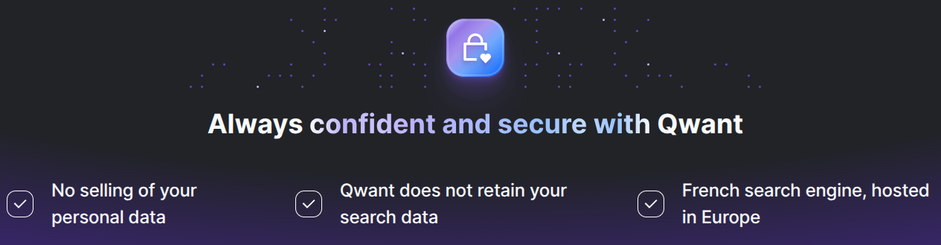
It's much better now to switch to the European qwant.com, without AI with this direct link: https://www.qwant.com/?&llm=0

#DigitalRights #democracy #USImperialism #qwant #deGoogle #TechForGood #EU
PS: here a list of EU-software alternatives, with my own experiences: https://mastodon.social/@TheStefan/114259071639384095

@ottaross in the DDG app, you can modify the settings to prevent AI-assisted search results.
AI should be a choice. Here’s where you stand.

Voting has closed. See the final results of the public vote on AI.

@HugeGameArtGD @ottaross ha ha ha! Currently at 97% NO!!!
@ottaross wow i don't know about this feature, thanks 
@ottaross I'd like to have a search engine exclusively _for_ AI generated images. I'd like to see who's using prompts I wrote.

@ottaross

Yes it was an open secret before but now that they realize people actually prefer it they are now promoting it. I expect if it is not already it will become the default version.

@the5thColumnist would make sense. It's a key differentiator.

@ottaross

Well strangely, or not, no obvious deference to the non AI version (if you go to preferences you can turn the AI stuff off) or the poll on the main DDG page .

@ottaross I set my DDG preferences to be no AI so I'm pretty sure that's what I get in the OG version.
@ottaross NO Duck AI browser. Thank you.

@ottaross
I personally prefer Kagi, and it also has many anti-ai features like AI image detection and SlopStop:

https://help.kagi.com/kagi/features/slopstop.html

While I don't use any AI, I applaud Kagi for what they're doing. You can go Full AI if you want, and No AI if you don't. The whole spectrum and then some.

SlopStop | Kagi's Docs

Kagi Search Help

@ottaross
Yeah! Thank you!

I am TIRED of telling their default page that I NEVER want to see "AI" results!