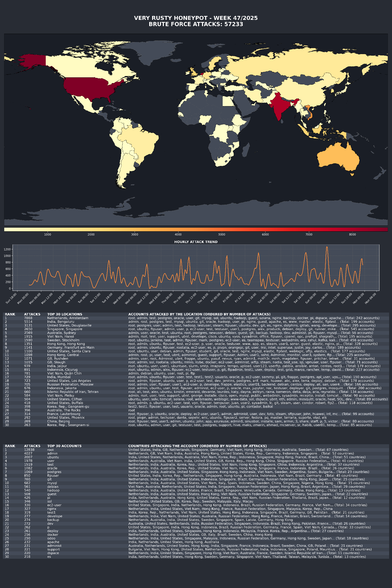

SSH brute force login attempts 🤣 It is time to hide your ssh port behind a vpn? I say, disable password based login and only use the 2FA protected ssh keys based login and ensure TCP/port 22 is rate limited.

I've more tips for you. Read: OpenSSH Server Best Security Practices https://www.cyberciti.biz/tips/linux-unix-bsd-openssh-server-best-practices.html if you want to protect yourself from such attacks.


@nixCraft does ssh switch to another port for sessions? i love the idea of rate limiting 22 but don't want to slow my scp transfers etc.

@jon_wnc @nixCraft You can always just rate limit the SYN packets using iptables/nftables, which defeats the main (retry) attack surface from a single IP due to sshd's slow fail approach.

Something like this would work: https://serverfault.com/questions/340256/should-i-rate-limit-packets-with-iptables

Should I rate-limit packets with iptables?

I'm using iptables on Ubuntu Server. It's a web server on a VPS. I'd like to know if I should rate-limit packets. If so, what should I rate-limit? And should I do so globally or per IP address?

Server Fault
@nixCraft Putting ssh on 1022, with fail2ban AND a honeypot on 22 (which insta-bans an IP for an hour) helps, but only a bit.
@krono @nixCraft I use sslh on port 443 😁
@gunstick @nixCraft nice… I see people probing my ssh ports as HTTP servers anyways, so looking forward to more of that xD
Years ago, a student put a Raspberry Pi with default account and password to public IP address with very little filtering. It took 23 seconds after bootup before someone logged in unauthorized via ssh. And that IP most likely had some other system before that, so it was just random IP scanning.
Of course, when I've done similar things as lab demo, it has not worked.
@nixCraft
@nixCraft I put my ssh on port 443 with nginx doing the protocol multiplexing.
@mlen @nixCraft oh, that works? I use sslh to do the multiplexing. What is the config in nginx to do that?

@gunstick @nixCraft I don't have the config at hand, but this old post captures it well: https://web.archive.org/web/20210617212600/https://www.nginx.com/blog/running-non-ssl-protocols-over-ssl-port-nginx-1-15-2/

The only difference is that I map "" to ssh and default to web.

Run Non-SSL Protocols on the Same Port as SSL in NGINX 1.15.2

The $ssl_preread_protocol variable introduced in NGINX 1.15.2 allows you to distinguish between SSL/TLS and other protocols when forwarding traffic using a TCP proxy. This is useful if you want to avoid firewall restrictions by running (for example) SSL/TLS and SSH services on the same port.

NGINX
@nixCraft no attack surface - no problem (wireguard or tailscale)
@nixCraft <shrug> I just force 2fa via TOTP for password based auth on all my servers that are connected to the internet. This has been my standard config for many years at this point and I've never had a problem. I also turn off root logins and kill all user accounts that are not mine.
@nixCraft Port 22? You don't move that?)

@nixCraft Root login => Immediate Fail2Ban lock (and user, test*, and anything that isn't a valid uesrname).

Login timeout always good.

Attach timeout (good unless MOSH, *shrug*).

Keys, not passwords, damnit.

It takes surprisingly little to secure SSH.

@nixCraft disable root logins, disable password logins. gpnna brute force a 4096 bit rsa private key while guessing the username? 🙄 well ok, throw in a 24 hour fail2ban.
@nixCraft Don't use port 22. Use port knocking.
@nixCraft 2FA and sshguard! However, I also keep a second, more permanent block list for ipfw (based on more aggressive ssh and http(s) exploit attempts).
@nixCraft or use the port 23 for ssh, for more fun!
@nixCraft Using "I've" like this is technically allowed but I hate it.

@nixCraft

Install an iris just a few nanometers away from the #ssh login attempt event horizon. Authorized login attempts must send an encrypted code over radio before the iris is opened.

Be aware that Sokar can try to burn your iris away so make sure to have a watchdog process dial out before Sokar can dial in again and keep the connection open for as long as possible so the iris can cool down.

Make sure there are no unattended and unburied SSH processes listening elsewhere and you'll be fine. No SSH keys needed unless you're dealing with "less primitive" peoples that can just walk through.

@nixCraft what utility gives that output?
@nixCraft
Have you checked the ip addresses and who is behind it?
@haui @nixCraft
I’m running a single server with a bare setup (22, no fail2ban) as a honeypot—just for fun.
Last week looked like this: the hourly rate sometimes peaked above 1000. I wouldn’t trust the resolved location info, these are almost certainly botnets controlled from elsewhere.
@nixCraft run on a nonstandard port solves 99.9% of this.

Many years ago, I used to get those brute force attempts regularly.

I moved SSH to a non-standard port and they disappeared.

Security through obscurity may not be truly secure, but it does actually work.

@nixCraft

@nixCraft
What do you think of using fail2ban instead?
@nixCraft really good tips. I would bump up number 10, at least for visibility. Fail2ban opened my eyes…
@nixCraft They can try all they want; they only have a couple of tries before the firewall locks them out. It's not like they can shell into root anyway.