Something in my house is sucking a *lot* of energy and I would like to find it and make it stop doing that. Anyone have specific recommendations for multi-circuit power-usage-tracking devices? (I have 13 240V and 18 120V circuits across three panels, suggesting I will probably need three such devices; the most populated panel has 10 120V and 2 240V.)

Other requirements: ideally #homeassistant compatible, not internet based (currently have devices on zwave and non-internet-facing wifi, adding zigbee soon for unrelated reasons), works with normal US split phase power. Assume I am a reasonably competent electrician and am comfortable putting a current transformer around a wire.

#homeautomation

oh wait what

just realized PSE bills every *two* months, which means we're only using More Than I'd Like, not Holy Shit Something Is Very Wrong Here amounts (2280 KWh over two months, not 2280 KWh per month)

I can still get into electricity usage optimization but at least it's only half as bad as I thought

@emily lol I thought my 350 kWh per month was a lot (it is for the small apartment given my server rack, but we do have gas hot water and stove)

I bought ModBus compatible DIN rail current meters and a modbus/RS422 to Ethernet adapter with PoE. That way there’s one shielded Ethernet lead coming out the back of my DB and it’s cheaply expandable, and not dependent on wifi in there.
I have one meter for the whole board, and one per aircon circuit, but I’d add more if I had more space.

I looked at this project https://github.com/CircuitSetup/Expandable-6-Channel-ESP32-Energy-Meter but didn’t have room to encapsulate it neatly in my board and run all the CTs the way it was wired.
For you it sounds pretty good, being nice and expandable.

GitHub - CircuitSetup/Expandable-6-Channel-ESP32-Energy-Meter: Hardware & Software documentation for the CircuitSetup Expandable 6 Channel ESP32 Energy Meter. Works with ESPHome and Home Assistant.

Hardware & Software documentation for the CircuitSetup Expandable 6 Channel ESP32 Energy Meter. Works with ESPHome and Home Assistant. - CircuitSetup/Expandable-6-Channel-ESP32-Energy-Meter

GitHub
@s0 @emily I have a Shelly EM and a selection of their inline power monitors around the house, but that sounds neater. Where did you get them?

@emily these are the modbus DIN rail meters I used:

Built in CT for smaller circuits: https://www.aliexpress.com/item/1005005657459435.html

External CT, better quality: https://www.aliexpress.com/item/4000107698147.html

DIN-Schienen-Energieverbrauch Multifunktions-Wattstundenzähler 100 A RS485 MODBUS RTU 230 V SDM120 V A PF Hz - AliExpress 1420

Smarter Shopping, Better Living! Aliexpress.com

aliexpress.
@s0 huh, I saw this before but somehow missed the "expandable" part and ignored it because only 6 channels

and yeah, this is a full size house + workshop with electric everything, no gas, so I expect >350, but... <2000
@emily thats weirdly close to our ~1,200kWh/month
@solemnwarning is that why i keep getting electric bills for "Daniel Collins"
@emily They started doing that to me too a while ago. I was so angry from the scare they gave me.

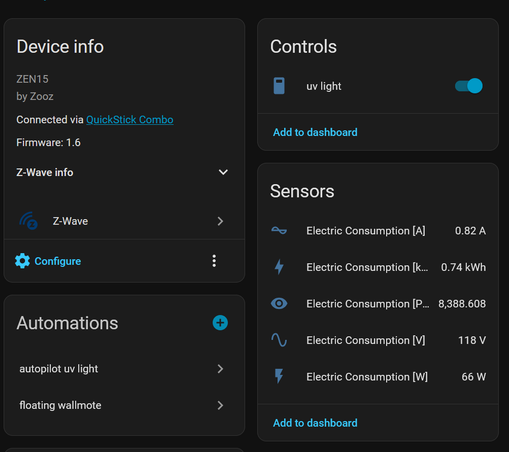
@emily Im very pleased with these, I have like five - https://www.getzooz.com/zooz-zen15-power-switch/

they measure stuff! its great! this one is currently powering a uv light for some halloween decorations:

@emily i know this is just one at a time, but ive been using these things kinda like smart kill-a-watts

@emily sadly theres not a whole lot between the one-shot 15A outlets, and this sort of thing: https://www.span.io/panel

but the this one: https://www.amazon.com/Aeotec-Security-controller-electricity-consumption/dp/B00MBIRF5W might get you part of the way there?

SPAN® Panel | Lower your energy bill

SPAN Panel is a re-invention of the 100 yr old home electrical panel adding a layer of intelligence and control to your home.

@emily the alternative is to do something like a powerwall or some other whole-house solution, and then watch the numbers while you turn stuff on and off to see when it spikes
@emily
I'm using an emporia Vue 2 flashed with esphome. You can use one clamp around one of the 120v legs of your 240v circuits of it's balanced load. If not you jead one for each leg. They have the Vue 3 now with improved plugs which makes for better for wire management in the panel. I've had mine for ove a year without issues. Found some interesting things with it, and been able to automate with some of the info
@emily I use #MEROSS and #AQARA smart outlets for this purpose, but only on the 120v lines. #HomeAssistant has a built-in energy tracking and management capability with a ready-made dashboard. The picture shows an example of graphs for a portion of my house. I still need to get to the 240v equipment monitoring.
@emily I’m pleased with my Emporia Vue. Uses current transformers you install in the panel. 16 channels on the one I have.
@emily I've been quite happy with my Emporia monitor; it has its own app (which is actually half-decent) and wifi and talk-to-their-servers shit but it goes into Home Assistant quite readily and with a bit of faff you can ESPHome it and cut out the Emporia servers entirely (caveat, haven't done this myself but reasonably sure it is possible). CTs are quite chonk, the mains doubly so. Refreshes VERY quickly, often fast enough to catch spikes when motors turn on. Dunno if it's gonna work with your number of circuits but hey, it's a data point.
@ifixcoinops I've gotten several recommendations for them, went ahead and ebay'd a Vue 3 to esphome and install in one panel, and will get a couple more if it works out.
@emily good luck tracking down the culprit! How much leccydrinking we talking here anyway? Is it like a Sudden Lots? Got me curious now
Post by emily, blinkenlight witch, @[email protected]

oh wait what just realized PSE bills every *two* months, which means we're only using More Than I'd Like, not Holy Shit Something Is Very Wrong Here amounts (2280 KWh over two months, not 2280 KWh per month) I can still get into electricity usage optimization but at least it's only half ...

fedi.uni.horse

@emily
Question for clarity. Is it a lot of power (very high rate of usage) or a lot of energy (large bill each month?). If its high power there are likely only 5-6 devices in your house it could be. Electric oven, dryer, HVAC, some big motor, EV charger etc. And it'd be on a beefy high amp circuit.

If its a lot of monthly energy then it could be something more moderate but that runs almost continuously... A computer sucking down 500W but 24hrs a day, a space heater with a broken thermostat...

@dlakelan Energy. Edited for clarity, thanks.

I do not have the data yet to say whether it's high power or just continuous moderate power.
@emily
Where I am in California the power company uses smart meters and you can download power usage data every 15 minute period for many weeks. You could find out if you have a high baseline load or a bunch of intermittent usage that way. Do you have something similar?
@dlakelan I have hour-level data that's delayed by a day or so. Not fast enough to do real-time experiments, but I did stare at it for a bit and it looks reasonably continuous at that level.
@emily
Thats pretty low pass filtered, but it should tell you like what's the lowest and highest rates of consumption. If the usage never drops very low then probably you have some constant usage devices. If it does drop fairly low but also rises high then maybe AC, heating, or cooking etc. Can you plot a week worth of the data? Or compare a hot day to a cold day.

@emily I highly recommend https://www.egauge.net/

Handles a mix of 120/240V circuits (30 120V or 15 240V or a mix of those; you can even set up logic for a single CT on a 240V load if you don't mind a loss of accuracy). Integrated data logger and webserver, no cloud nonsense required. Data output via Modbus TCP/RTU, CSV, and I think the JSON API is available now too. Second-granular data for the most recent ten minutes; minute-granular for a year after that, 15-min for 30yr after that.

You can even import data from Modbus TCP/RTU devices, or from one meter into another meter.

I have one on my house and one on my garage/apartment. You can see the data here if you'd like: https://celestial-bastion.egaug.es/

I also have a bunch of environmental sensors and other measurements (THD, L1-L2 voltage imbalance, line frequency) but you have to click the dropdown in the top left corner of the graph to see that data.

Full disclosure, I also worked for them from about 2013 to 2022.

Energy Metering Systems | eGauge

eGauge home and commercial energy meters connect electricity usage and solar production to the internet for users to monitor in real time. Certified high accuracy (ANSI C12.20 0.5 percent).

@notthatdelta oh this is nice. probably not cost effective considering I need three of them, but I'm glad someone made it.

@emily Yeah they are quite expensive, but the price/feature ratio is unmatched. There's even some limited oscilliscope functionality in there!

If all three of your panels are on the same service, you can get a voltage reference from one panel and extend CT leads to the other two panels. And it's totally possible to bundle loads in a single CT if you're running up against the port cap (assuming you don't mind "mixing" two loads together in your readings).

@emily I should clarify that they don't have cloud functionality (all data is stored on the meter), but the company offers a proxy service so you can access your meter remotely without port forwarding. If you use that service they do collect firmware version and a few other details, but you can opt out of that entirely by just disabling the proxy connection in the meter UI.

They pretty much require an NTP server (unless the design has changed, they lose date/time on extended power outages) so either point it at an internal server or allow it outbound access to an external server.

I also don't know where they're at with HA compatibility, sorry. Forgot that was one of the criteria!

@notthatdelta honestly, if shit just follows documented standards I am happy to bodge together a whatever-to-mqtt bridge if I need to
@emily Not sure you need the full automation approach - but sounds fun. I've just taken a basic power meter and plugged it inline with a device while it's on and you can usually work it out quickly. Money is on your fridge FWIW :)
@dplattsf listen, if I can find excuses to graph things I will always graph things
@emily You already answered the power vs energy question in another reply, so this will be of slightly less use, but borrowing a thermal camera might still be illuminating.
I discovered that satellite TV receivers use a LOT of power that way. I always knew it was warm, but I was unaware of the scale until it was glowing so brightly in the images.

@emily I can highly recommend the Brultech GEM, I've got it running fully locally and covering 32 circuits and the 2 main phases. It's helped me figure out some power issues and track my usage pretty accurately (within 5% of the bill without calibration)

https://www.brultech.com/greeneye/

GreenEye Monitor (Residential)

The GreenEye Monitor (GEM) is a multi-channel energy consumption monitor. NOTE: For single or split phase services only. The versatility of the GEM makes it ideal for a variety of applications: The…

Brultech Research Inc.

@emily If everything else fails, you can always use an ESP32 (or multiple) with a bunch of CT clamps, no? Also, Shelly has the Shelly EM which does exactly that.

Or just one or two clamps (not sure how many live wires come in on NA installs), reading off the input wires, and temporarily shutting of each breaker to see where the biggest constant draws come from.

That being said, biggest vampire power drains are usually things like old HVAC equipment in need of cleaning or maintenance, laser printers, AV equipment, game consoles, lights in places you seldom go left on, and also malfunctioning freezers and fridges (especially if their seals are old).

Hope you find the culprit(s). I'd be interested to know the solution you come up with, and what the culprits are, BTW, this kind of investigation always interests me.

Good luck!

@emily you dont need all that smart stuff for all your groups. If you have just one central meter that has realtime current usage. Just disable one by one your groups and write down the differences.

Next to that you might have a big aquarium, sauna, 60 inch television, heater, old airco,and so on.
What is your average kWh usage per month? What is your usage in watts during any moment when you go to bed?

@emily
I'm waiting for these to go into production:

https://noblecarbon.io/

@emily this happened to me, and I found out that you can listen to your meters broadcast of usage with a $40 device.I used this + HA to figure out what it was by systematically turning off sections of breakers till I found out I left my heat tape on all summer 🤦https://www.rtl-sdr.com/reading-electric-meters-with-rtl-sdr-and-homeassistant/
Reading Electric Meters with RTL-SDR and HomeAssistant

Over on his blog Jeff Sandberg has posted a writeup detailing how he combined RTL-SDR, rtl_amr, and HomeAssistant to decode wireless data from his Itron power meter, and create useful graphs showing his US home's power usage. In the post, Jeff explains how he uses an RTL-SDR Blog V4, HomeAssistant, EMQX, and rtl_amr to receive and plot the data. The RTL-SDR and rtl_amr software receives and decodes the wireless Itron electricity meter data packets, and then EQTT passes the data to HomeAssistant for logging and plotting. Jeff also notes how he used NodeRed to correctly automate the summer and winter

rtl-sdr.com

@emily I installed this one about 6 months ago and it’s been working well.

Smart Home Energy Monitor with 16... https://www.amazon.com/dp/B0D6VZQBPF?ref=ppx_pop_mob_ap_share

Amazon.com: Smart Home Energy Monitor with 16 50A Circuit Level Sensors, Measure Power Usage in Real-Time, History with App (16 50A Circuit Level Sensors) - Compatible with Home Assistant : Industrial & Scientific

Amazon.com: Smart Home Energy Monitor with 16 50A Circuit Level Sensors, Measure Power Usage in Real-Time, History with App (16 50A Circuit Level Sensors) - Compatible with Home Assistant : Industrial & Scientific

@emily I liked the quality and the fact that there is no cloud integration of the Brultech monitor: https://www.brultech.com/greeneye/

There are two different ways to integrate it with home assistant (mqtt and a custom integration)

GreenEye Monitor (Residential)

The GreenEye Monitor (GEM) is a multi-channel energy consumption monitor. NOTE: For single or split phase services only. The versatility of the GEM makes it ideal for a variety of applications: The…

Brultech Research Inc.

@emily Forgotten printer that’s out of paper in the attic?

(It’s a cool story but I can’t find it again at the moment.)